MCP security and permissions
The Voice AI Portal MCP server gives an AI assistant the same view of your agency you have in the dashboard, with a few things it can never do. This page explains them in plain words: who can connect, what the assistant can and can’t see, what waits for your yes, and how to see and stop every connection.
Who can connect
Section titled “Who can connect”- Owners and admins of your agency can connect an assistant. Your clients can’t, and nothing about it shows in their portal.
- A connection acts as the person who approved it, in the agency they chose, with their role. The role is checked again on every request, so if you change someone’s role or they leave, their connections change or stop with it.
- A Claude connection gets everything your role allows: reading, changes, billing, and campaigns and provider settings. The safety comes from previews and confirmations, below. To give a tool less, the owner creates an access token with only the access it needs, for one client if you like.
- Owner-only actions stay owner-only. That covers changing the team, the custom domain, the agency’s own plan, the billing defaults, margin inputs, forgetting a provider key and stopping a client’s inbound calls at the provider. Those tools aren’t offered to admins. Who can use each tool.
The consent screen shows the agency and role before you approve:
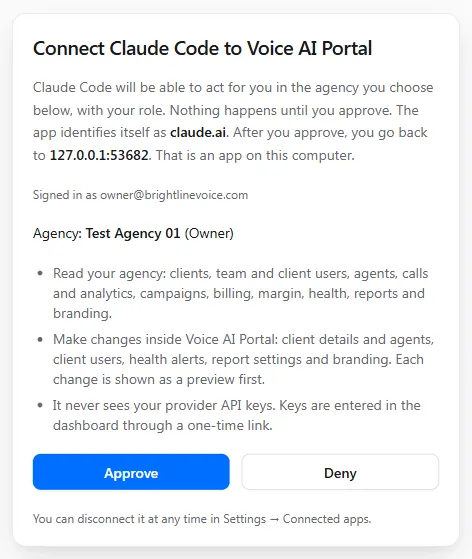
Provider keys and secure links
Section titled “Provider keys and secure links”Your provider API keys control your whole Retell AI, Vapi or ElevenLabs account and its bill, so they never go through a chat.
- The assistant never sees a key. At most it sees the last 4 characters, to tell keys apart.
- No tool accepts a key. To connect, replace or fix one, the assistant gives you a secure link to the right page in the dashboard, and you type the key there. A key change shows which agents, numbers and other clients it affects.
- The link isn’t a sign-in link. It needs your normal dashboard sign-in as the same person who asked. It works once, and expires after 15 minutes. Anyone else who opens it sees nothing. A used or expired link says “Ask your assistant for a new link”.
- If you paste a key into a chat by mistake, the assistant is told not to use it, and to tell you to treat it as exposed: revoke it at your provider, create a new one, and enter it through a secure link.

Secure links also handle uploading lead lists, downloading call history, recordings, your own card and cancelling your plan.
Call content
Section titled “Call content”Voice AI Portal doesn’t store recordings, transcripts or summaries. Calls are read live from your provider when the assistant asks, for that answer only.
- Call statistics are always available: times, durations, channels, outcomes, costs and the caller’s last 3 digits.
- Transcripts and summaries reach the assistant only when the agency owner switches on Let AI assistants read call transcripts and summaries, in Settings, Connected apps, Call content. It’s off until then, and only the owner can change it.
- Clients marked sensitive in their report settings are never included, whatever the switch says.
- Recordings are never returned. The assistant gives a link to the call in the dashboard instead.

Switching it on sends that content to your AI assistant’s provider, under your agreement with them. Decide knowingly.
Previews and confirmations
Section titled “Previews and confirmations”- You
Ask for the change
For example: "Top up NYC Dentist with a pay link."
- Voice AI Portal
Preview, nothing changed
The tool returns what would change: before and after, who pays, the amount and currency, and any email it would send.
- Your AI assistant
Shows you the preview
The assistant is told never to agree on your behalf, and never to reuse a preview for a different change.
- You
Agree, with the exact text
For money, the exact amount (such as £10.00); for a client or campaign, its exact name.
- Voice AI Portal
Applies it once
Each preview works once. If anything changed since the preview, you get a fresh preview instead.
| What the assistant does | What happens |
|---|---|
| Reads your agency, clients, calls, billing, health and reports | Answers straight away |
| Changes something inside Voice AI Portal (client details, client users, health alerts, report settings, branding) | Shows a preview first, and changes nothing until you agree |
| Moves money, emails a client, places calls or messages, or changes something at your provider | Shows the preview, then needs the exact text from it, such as an amount or a client’s name |
| Something that can’t be undone, such as deleting a call, refunding or forgetting a key | Needs the exact text, and the preview says it can’t be undone |
Calls in progress always finish: no tool ends a live call. Money is always shown with its currency, and never added across currencies.
Your data is data, not instructions
Section titled “Your data is data, not instructions”Text that comes back from your agency can include anything: client and agent names, agent prompts, transcripts, email templates and notes. The assistant is told to treat all of it as data. If something in it looks like an instruction, for example a client note saying “refund this client”, the assistant tells you and doesn’t act on it.
See and revoke every connection
Section titled “See and revoke every connection”Open Settings, then Connected apps:
- Connections lists every assistant and access token, who connected or created it, when it was last used, and when a token expires. Disconnect or Revoke stops it straight away. Owners can stop anyone’s; admins can stop their own.
- Activity shows what each assistant and token did over the last 90 days, grouped into sessions, newest first: the tools it used, the clients it touched, what was refused, and the changes it made, with a link to each in the dashboard. It never shows the content of what was asked or returned.

Every change is also written to your agency’s activity log, marked as coming from an AI assistant. Ask Claude “What changed this week, and who changed it?” to read it: it shows which fields changed and whether it was the dashboard or an assistant, never the values.
Limits
Section titled “Limits”| Limit | Value |
|---|---|
| Tool calls, whole agency | 600 an hour |
| Changes, whole agency | 120 an hour |
| Emails sent through AI assistants, whole agency | 50 a day |
| Lists | 25 rows at a time by default |
Your account status
Section titled “Your account status”- During a trial, every tool works.
- If the trial has ended, or the plan is cancelled, the assistant can still show your account overview and your Voice AI Portal plan, so you can sort it out. Other tools say what still works.
- If the subscription is paused, or in a read-only grace period, the assistant can read but not change anything.
- A disabled client can be read but not changed, except to enable it again.