What a results email shows
A results email tells your client what their AI handled in a week or month: how many calls it answered, how many came after they closed, and how much staff time that saved. Every figure comes from the client’s own calls, and the email explains how it was counted. This page shows what your client reads, so you can answer their questions.
To send one, see Set up client results emails.
What does the client get?
Section titled “What does the client get?”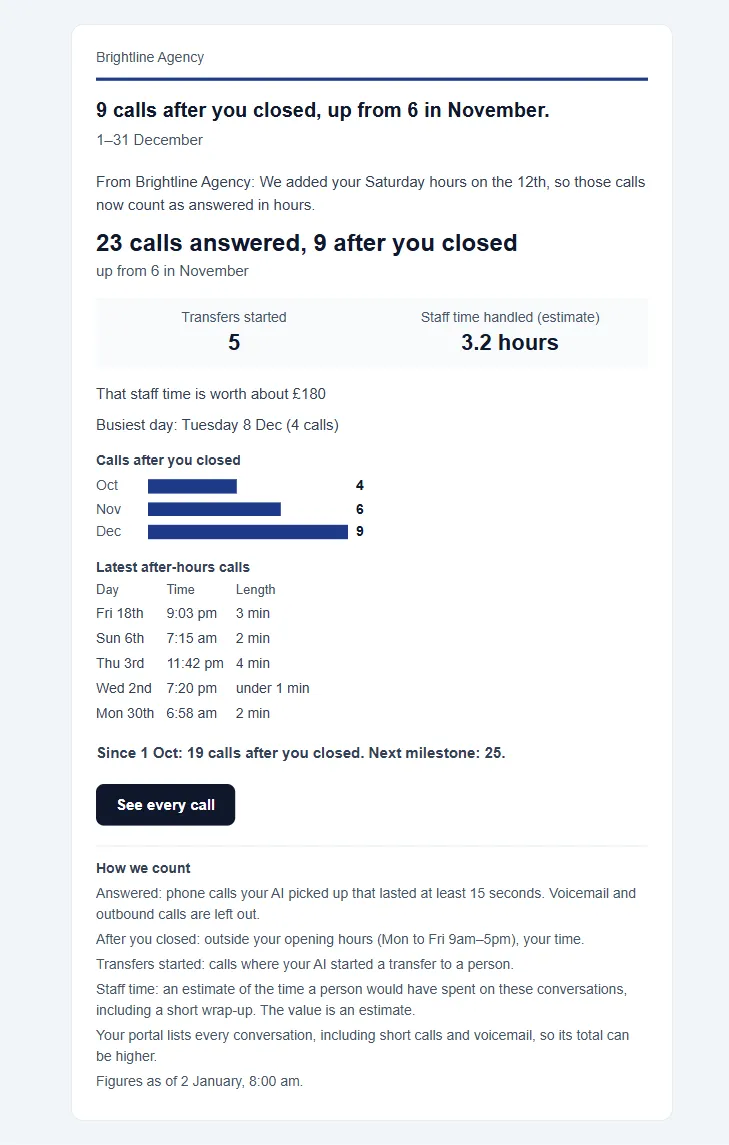
A full report runs in this order:
- Your logo or agency name, with a thin line in your colour
- A one-line heading, and the period it covers
- Your note, if you added one
- The headline figure, with a comparison against the last period
- Tiles, for example Transfers started and Staff time handled (estimate)
- Short lines, for example what the staff time is worth and the busiest day
- Monthly bars, once a client has 3 complete months
- A list of the latest calls
- A running total and the next milestone
- A See every call button, or a reply line for email-only recipients
- How we count, and your footer with an unsubscribe link
Only what applies appears. A line with nothing to show is left out.
What does the headline say?
Section titled “What does the headline say?”The headline depends on how you set up the client’s Hours and coverage.
| Client setup | Headline |
|---|---|
| Hours set, some calls after hours | 23 calls answered, 9 after you closed |
| Hours set, none after hours | 23 calls answered |
| No hours set | 23 calls answered |
| Open all hours | 23 calls answered |
| After hours only | 9 calls answered after you closed |
| Overflow | 23 overflow calls answered |
The heading above it gives the main point, such as a change from last month or the client’s best month so far. A report only calls a month the best when it is the highest of every month on record.
How is each figure counted?
Section titled “How is each figure counted?”| Figure | How it is counted |
|---|---|
| Calls answered | Inbound phone calls your AI picked up that lasted at least 15 seconds. Outbound calls are left out, and so is voicemail on Retell AI and Vapi |
| After you closed, After hours | Calls outside the client’s opening hours, in the client’s time. With no hours set, before 9am or from 7pm. Bank holidays aren’t counted: the hours are the normal week |
| Transfers started | Calls where the AI started a transfer to a person. The report doesn’t say whether the transfer connected |
| Staff time handled (estimate) | An estimate of the time a person would have spent on these conversations, including a short wrap-up. See Staff time handled |
| Hours of calls handled | Talk time on answered calls. It takes the place of staff time when staff time isn’t shown |
| That staff time is worth about | Staff time at the client’s confirmed rates. It is an estimate |
| Chats handled | Conversations the AI handled by text |
| Busiest day | The day with the most answered calls, when it had 2 or more |
Your client’s portal lists every conversation, including short calls and voicemail, so its total can be higher than the email’s. The email says so in How we count. A monthly statement from client billing covers the billing period and counts billed usage, so its totals can differ too.
When does a figure not appear?
Section titled “When does a figure not appear?”Figures only appear when they are safe to show.
| Figure | Appears when |
|---|---|
| Comparison with last period | The last period had 5 or more answered calls, the call history is complete, and the client wasn’t paused |
| Staff time | Show estimated staff-time value is on for the client, with 20 or more qualifying conversations |
| Money value | Rates are confirmed, and the value is at least 50 in the client’s currency |
| Monthly bars | Monthly reports, once a client has 3 complete months |
| Running total | The client has 2 or more months of figures |
| List of calls | List individual calls is on. It shows day, time and length, up to 10 calls, and never who called or what was said |
What changes in a quiet period?
Section titled “What changes in a quiet period?”| Period | What happens |
|---|---|
| 5 or more answered calls | A full report |
| 1 to 4 answered calls | A shorter report, with no comparison, tiles or bars |
| No answered calls, some chats | A report led by chats handled |
| No answered calls, no chats | Nothing goes to the client, and you get a note |
Which provider shows what?
Section titled “Which provider shows what?”The main figures hold on all three providers. Two rows depend on what the provider reports.
| Row | Retell AI | Vapi | ElevenLabs |
|---|---|---|---|
| Calls answered, after hours, talk time, staff time | Yes | Yes | Yes |
| Transfers started | Yes | Not shown | Not shown |
| Chats handled | Not shown | Yes | Yes |
On ElevenLabs, How we count doesn’t mention voicemail.
Where can my client see past reports?
Section titled “Where can my client see past reports?”Once a client has had a report, Reports appears in their portal menu. It lists their latest 24 reports, newest first, and you see the same page.
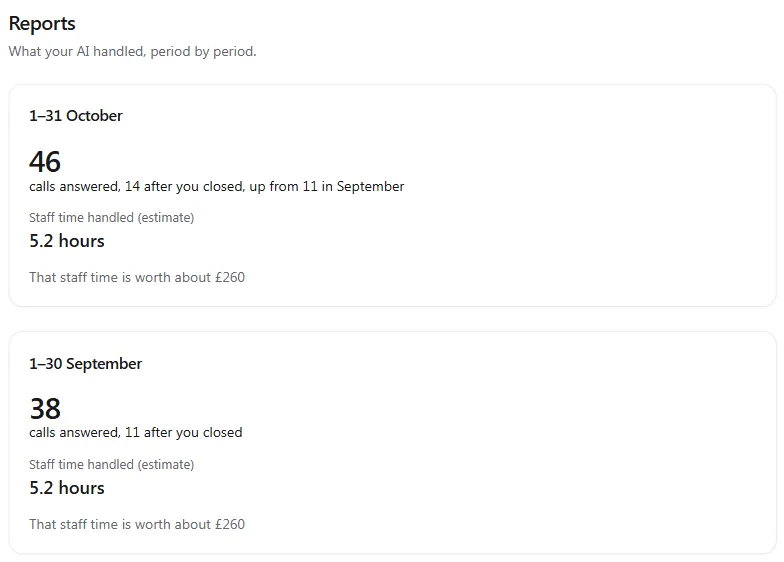
Past reports use the figures stored when each report went, so a sent report doesn’t change. Forwarded reports, first-win emails and test emails aren’t listed.
What does a report never say?
Section titled “What does a report never say?”A results email only states what the call data supports:
- no bookings, leads, callbacks or new customers
- nothing about what a caller wanted or what a call achieved
- no sentiment scores or provider success ratings
- no caller names, phone numbers, transcripts, recordings or summaries
- no provider costs
- no comparison with other clients, only with the client’s own past
The email stays a service message, so it carries no offers. If the portal can’t read a client’s calls, the report is held back rather than sent as a quiet month.
Where do the figures come from?
Section titled “Where do the figures come from?”Results emails use stored call statistics: IDs, times, durations, categories and cost for each call, kept for 13 months. The same statistics are used for client billing, usage, client health checks and margin. Call content is never stored. The list of calls is built from those statistics when the email goes, and isn’t kept with the report. See every call opens the portal, where recordings and transcripts are read live from the provider. Read more in the privacy policy.
Troubleshooting
Section titled “Troubleshooting”| Your client asks | Why | What to do |
|---|---|---|
| “Why doesn’t it say after you closed?” | No hours are set, or no calls came after hours | Set Hours and coverage |
| “The portal shows more calls” | The portal lists every conversation, and the email counts answered calls of 15 seconds or more | Point them to How we count |
| “The times look wrong” | The client’s time zone may be wrong | Check Region in Client settings |
| “Where’s the money figure?” | Rates aren’t confirmed, or the figure is under the minimum | See When does a figure not appear? |
| “There’s no comparison this month” | The last period was too small, or the client was paused | Nothing. It returns with enough history |
| “There are no bars” | The client has fewer than 3 complete months, or the report is weekly | Nothing. They appear in time |
Does a report change after it is sent?
Section titled “Does a report change after it is sent?”No. A report keeps the figures it went out with, in the email and on the client’s Reports page.
Why doesn’t the report show bookings?
Section titled “Why doesn’t the report show bookings?”None of the three voice providers report bookings, so a results email doesn’t claim them. It sticks to answered calls, hours and staff time, which every provider supports.
Are the figures live?
Section titled “Are the figures live?”Reports use stored call statistics that sync every few minutes, and the portal waits until they are complete before it sends.
Can I change the wording?
Section titled “Can I change the wording?”You can edit the heading and intro in the template under Email Hub, and add a note to any report. The figures, How we count and the footer stay as they are, so a client can always check how a number was worked out.