Offer your clients a free trial
With client billing, your agency can give its own clients a free trial: a prospective client uses your voice and chat agents before paying you. You decide every term of the trial: how long it lasts, the minutes and chats it includes, whether a card is needed, and what happens when it ends. The portal counts usage against the trial, reminds the client before it ends in your name, and then either stops the service or moves the client onto the paid plan you picked.
What you decide
Section titled “What you decide”| Term | Your choice | Where you set it |
|---|---|---|
| Length | Any number of days from 1 to 90. Most agencies use 7 or 14. | A default under Client billing, Settings, Free trials; each trial in Plans; and for one client when you start its trial |
| Minutes | The minutes the trial includes | The trial in Plans |
| Chats | The chat conversations or messages the trial includes, or 0 for none, and the channels that count | The trial in Plans |
| When it ends | Stop: calls and chats stop until the client picks a plan. Or Move to a paid plan: the plan you choose starts when the trial ends | The trial, and again for one client when you start it |
| Card up front | Ask for a card through your Stripe account before the trial starts (trials of 3 days or more) | Require a card, on the trial or when you start it |
| Limits for your agency | How many trials can run at once, and a warning before a repeat trial for the same billing contact | Client billing, Settings, Free trials |
| During the trial | Extend it, end it early, move the client onto a plan, or add minutes and chats | The client’s Billing page |
You can create several trials, for example a 7-day trial with 30 minutes for small businesses and a 14-day trial with 120 minutes and 200 chats for busier ones, and choose the right one for each client.
How does a client free trial work?
Section titled “How does a client free trial work?”- You
Start the trial
Choose the trial, its length and what happens after it
- Voice AI Portal
Trial runs
Minutes and chats are used from the trial allowance
- Voice AI Portal
Reminders go out
7, 3 and 1 days before the end
- Voice AI Portal
Trial ends
Service stops, or the paid plan starts
- Length: 1 to 90 days. Most agencies use 7 or 14 days. A trial ends at midnight in the client’s time zone at the end of its last day.
- Allowance: the minutes and chats in the trial. When either runs out, new calls or new chats stop until the trial ends or you add more.
- When it ends: either Stop (calls and chats stop until a plan is chosen) or Move to a paid plan (the client’s paid plan starts at the moment the trial ends).
- One trial per client. A client that has had a trial or a plan can’t start another. If a new client shares a billing contact email with one that had a trial, you see a warning first.
Before you begin
Section titled “Before you begin”- Client billing switched on for your agency. See Set up client billing.
- A priced monthly plan in the same currency for the client to move to, if the trial moves to one. See Create client plans.
- For trials that take a card: your Stripe account connected (see Connect Stripe), and a billing contact with an email for the client, who accepts the terms and gets the reminders.
Create a free trial
Section titled “Create a free trial”- Go to Client billing, then Plans, and select Free trial.
- Give it a name and a Length (days).
- Set the Minutes in the trial and the chat messages or chat conversations in the trial (0 if chats aren’t included).
- Under When the trial ends, choose Then: Stop: calls and chats stop until a plan is chosen or Move to a paid plan, and pick the Paid plan after the trial.
- Turn on Require a card if the client should add a card before the trial starts. A trial that takes a card lasts at least 3 days and moves to the paid plan when it ends, unless the client cancels.
- Select Create free trial.
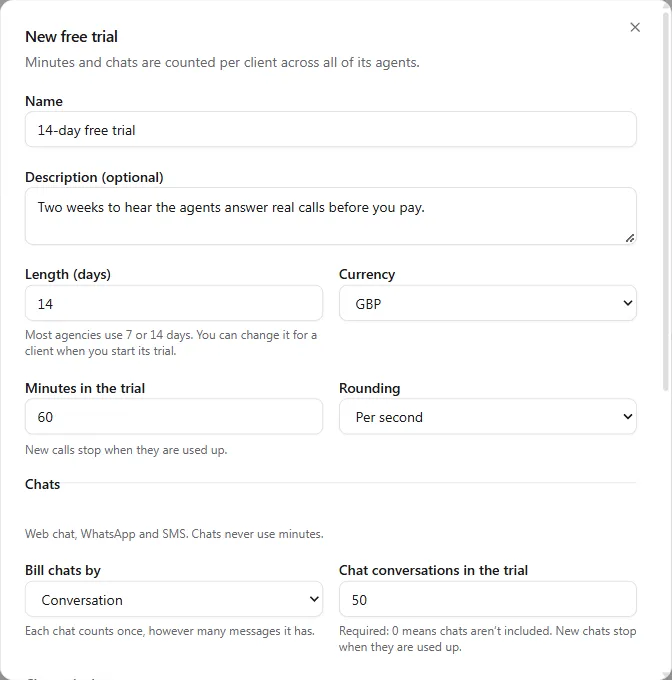
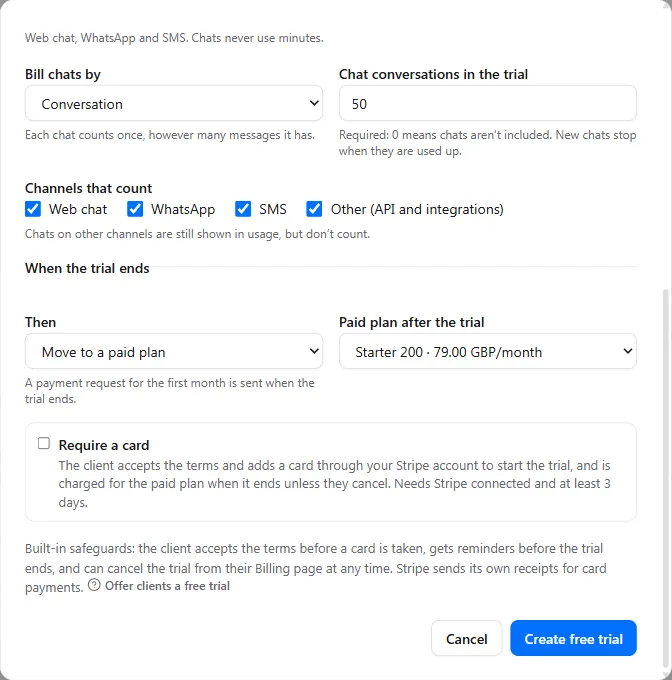
Trial plans have no price, overflow, rollover or extra-chat price, and they are never offered to clients who change their own plan. Under Client billing, then Settings, then Free trials, the owner sets the Default length (days) (14 unless changed), When a trial ends for new trials, an optional limit on Trials running at once, and Warn about repeat trials.
Start a trial for a client
Section titled “Start a trial for a client”- Open the client’s Billing page and select Start free trial. It shows for a client that has never had a plan or a trial, even while its billing is off: the trial switches billing on.
- Choose the Trial. You can change its length, what happens at the end, and whether it takes a card, for this client only. The dialog shows the end date and what stops when the trial ends.
- For a trial without a card that moves to a paid plan, tick that the client agreed to it. A payment request for the first month is sent when the trial ends.
- Select Start trial, or Offer trial for a trial that takes a card.
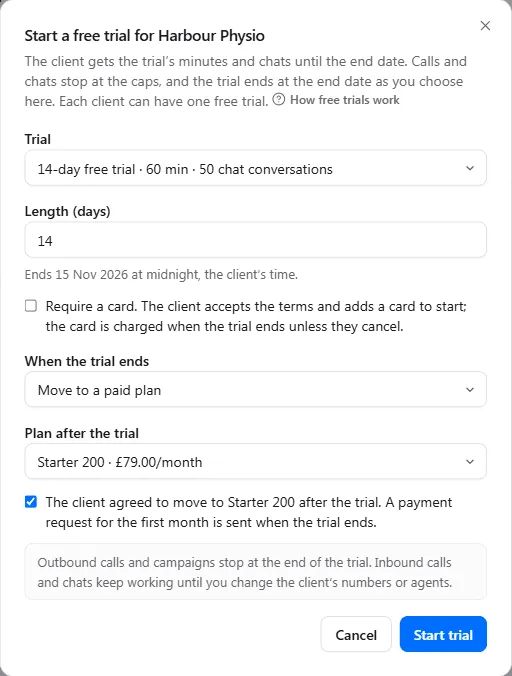
A trial without a card starts straight away, and the client’s billing contacts get an email with its terms. A trial that takes a card waits for the client: select Copy link on the client’s Billing page and send it, or the billing contact opens their own Billing page. They read the terms, tick I agree to these terms, select Add card and start trial and add a card through your Stripe account, and the trial starts. Withdraw offer cancels an offer the client hasn’t accepted.
A trial puts the client on Track and enforce with Stop outbound calls, Stop inbound calls and Stop text channels too on, and puts back the client’s own options when the trial is over. While it runs, Track only and switching those options off aren’t available.
During the trial
Section titled “During the trial”The client’s Billing page and banner show the days left, the end date, what’s left of the trial’s minutes and chats, and what happens next, for example Free trial · 9 days left · ends 12 Nov with “Then Pro.” On the client’s Billing page you can:
- Extend the trial to a later Last day of the trial. Minutes and chats you added during the trial move with it.
- End now, which applies what you chose for the end straight away. What’s left of the trial is removed.
- Choose plan, to move the client onto a paid plan before the trial ends. The plan starts today, and the trial’s unused minutes and chats don’t carry over.
Packs and auto top-up aren’t offered during a trial. To give the client more, use Add minutes, or Add chat messages (or Add chat conversations): they end with the trial, and extending the trial moves them too.
Clients can select Cancel trial on their Billing page at any time, whatever your plan change settings, and Keep my trial before it ends. A client who cancels a card trial isn’t charged. Switching the client’s billing off, or disabling the client, also ends its trial.
What stops when the trial’s limits are reached or it ends?
Section titled “What stops when the trial’s limits are reached or it ends?”When the trial’s minutes run out, new calls stop until the trial ends or you add minutes, and the banner reads Free trial minutes used up. When its chats run out, new chats stop the same way. When a trial ends with Stop, calls and chats stop until a plan is chosen, and the banner reads Free trial ended · Choose plan (the client sees Your free trial has ended, with Choose a plan when they can change their own plan).
| When it stops | |
|---|---|
| Outbound calls and campaigns from the portal | Straight away. Campaigns pause by themselves and carry on once the client has a plan or minutes. |
| WhatsApp messages and calls sent from the portal | Straight away. |
| Inbound calls and chats | Once our team has turned on provider changes for the client. Where they aren’t on yet, the start dialog says so: inbound calls and chats keep working until you change the client’s numbers or agents. |
| Calls in progress | Always finish. |
What a caller or chat user experiences when a call or chat is refused depends on the provider: on Vapi, callers hear your blocked message; on Retell AI and ElevenLabs, the call ends before the agent answers. See What callers hear when calls are blocked.
Usage past the trial’s allowance, such as a call that was already running when it ran out, is never billed to the client.
When the trial moves to a paid plan
Section titled “When the trial moves to a paid plan”The plan starts at the moment the trial ends. A client paying by card is charged by Stripe then. If the charge fails or the bank asks the client to confirm it, the client gets an email and a Confirm your payment banner with Confirm or update card, and your usual grace period applies. A client paying manually gets a payment request for the first month.
Which trial emails go out?
Section titled “Which trial emails go out?”| Client | Your team | |
|---|---|---|
| Trial started, with its terms | Yes | |
| Trial ending reminders, 7, 3 and 1 days before the end (each for trials longer than that) | Yes | At 3 days |
| Client cancelled its trial | Yes | |
| Trial minutes or chats running low, and used up | Yes | Yes |
| Trial ended | Yes | Yes |
| Trial moved to a paid plan | Yes | Yes |
| First payment after the trial needs attention | Yes | Yes |
Built-in safeguards
Section titled “Built-in safeguards”For trials that take a card, the client accepts the terms before the card is taken, the same terms appear on the checkout page, and the portal keeps a record of what they agreed to. The terms read, for example: “Free until 12 Nov. Then Pro, £99.00/month, charged to your card on 12 Nov unless you cancel before. You can cancel the trial at any time from your Billing page with” your agency name.
Troubleshooting
Section titled “Troubleshooting”| Problem | What to do |
|---|---|
| Start free trial doesn’t show | The client has had a plan or a trial before. Assign a plan instead. |
| The dialog says “Create a free trial in Client billing → Plans first” | Create a trial plan with Free trial on the Plans tab. |
| Require a card can’t be used | Connect your Stripe account, add a billing contact with an email, and make the trial at least 3 days long. |
| “You have” a number of “trials running, your limit.” | Raise or clear Trials running at once under Settings, Free trials, or wait for a trial to end. |
| Inbound calls kept going after the trial ended | Provider changes aren’t on for this client yet. See What callers hear when calls are blocked and contact us. |