Bill clients for WhatsApp messages
WhatsApp messages answered by your client’s ElevenLabs agent are billed to your client as chats, never as minutes. You choose whether a plan bills each WhatsApp conversation once or every message, how many are included each month and what extra ones cost. You can change any of it later, for one client or a whole plan. This page covers WhatsApp in particular; the same rules apply to web chat and SMS, as explained in Bill your clients for chats.
- You
Set the plan
Per conversation or per message, the allowance and the extra price.
- Voice AI Portal
Reads each WhatsApp chat
From the client’s ElevenLabs account, every minute.
- Voice AI Portal
Counts it
One conversation, or the messages with text.
- Voice AI Portal
Uses the allowance
Plan chats first, then chat packs, then extra chats.
- You
Bill at renewal
Extra chats on the next payment request or Stripe invoice.
Who charges what
Section titled “Who charges what”Three separate charges can touch a WhatsApp conversation. Only the first is set in Voice AI Portal.
| Charge | Who sets it | Who pays |
|---|---|---|
| Your price for chats | You, in a client plan | Your client pays you |
| WhatsApp fees | Meta | Billed by Meta to your client’s WhatsApp Business account |
| Agent usage | ElevenLabs | Billed by ElevenLabs to the ElevenLabs account the agent runs on |
Voice AI Portal adds no fee per WhatsApp message. To price your plan so it covers ElevenLabs and leaves a margin, see Sell voice, WhatsApp and web chat bundles.
How a WhatsApp chat is counted
Section titled “How a WhatsApp chat is counted”| On a plan billed | One WhatsApp chat counts as |
|---|---|
| Per conversation | 1 chat conversation, however many messages it has. It ends when the agent ends it, at the agent’s maximum duration, or after 15 minutes with no new message following the agent’s last reply. A customer who writes again after that starts a new conversation. |
| Per message, Customer and agent messages | Every message with text, from the customer and from the agent, including the agent’s first message. |
| Per message, Agent replies only | Only the agent’s messages with text, including its first one. |
For example, a WhatsApp chat where the customer sends 5 messages and the agent replies 5 times counts as 1 chat conversation, 10 chat messages, or 5 chat messages on Agent replies only.
A few rules worth knowing:
- Unanswered messages are free. A chat where the customer never writes, such as a WhatsApp campaign message nobody replies to, is not billed in either unit. When the contact replies, it is billed like any other WhatsApp chat.
- Only text counts. Images and files without text never count as messages.
- WhatsApp calls use minutes, like phone calls, not chats.
- Meta’s 24-hour window doesn’t apply to billing. It decides when a business can reply freely on WhatsApp; the portal counts each conversation once, however long it lasts.
- Late messages still count. The portal keeps reading an open chat until it ends, so messages that arrive later are counted. Messages after a renewal count in the new period.
Set up WhatsApp billing
Section titled “Set up WhatsApp billing”-
Open the plan
Go to Client billing, then Plans, and select Monthly plan, or Edit on a plan.
-
Choose how chats are billed
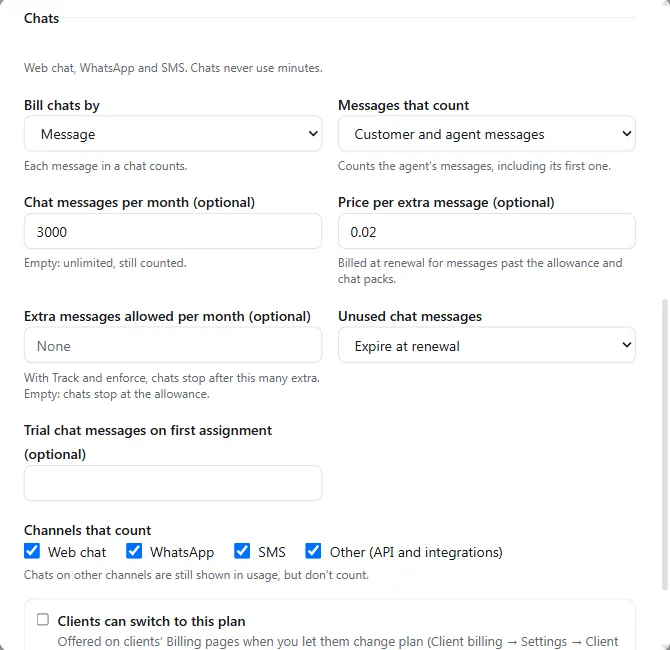
In the Chats section, set Bill chats by to Conversation or Message. For Message, choose Messages that count: Customer and agent messages or Agent replies only.
-
Set the allowance
Enter the chat conversations (or messages) per month, or leave it empty for unlimited chats that are still counted. Optionally enter a Price per extra conversation (or per message), billed at renewal, and what happens to unused chats.
-
Check WhatsApp counts
Under Channels that count, make sure WhatsApp is ticked. Untick a channel to stop billing it: its chats still show in usage.
-
Save and assign
Select Create plan or Save plan, then assign the plan from the client’s Billing page. See Create client plans.
For clients who need more, create a chat pack under Client billing, then Packs, Chats, and let clients request it, buy it by card or top up automatically. See Bill your clients for chats.
Change how WhatsApp messages are billed
Section titled “Change how WhatsApp messages are billed”| You want to | Do this | When it applies |
|---|---|---|
| Switch a plan between per conversation and per message | Edit the plan, change Bill chats by or Messages that count, then choose Apply at renewal or Apply now | At each client’s next renewal, or today with Apply now |
| Switch one client now | On the client’s Billing page, on Chats this period, select Switch to per-message billing now (or per-conversation) | Today, with the full allowance in the new unit for the rest of the period |
| Change the allowance | Edit Chat conversations per month (or messages) on the plan | At each client’s next renewal; straight away when the plan had unlimited chats |
| Change the price of extra chats | Edit Price per extra on the plan | With the way chats are billed: at renewal, or with Apply now |
| Stop billing WhatsApp, or start | Untick or tick WhatsApp under Channels that count | New chats, straight away |
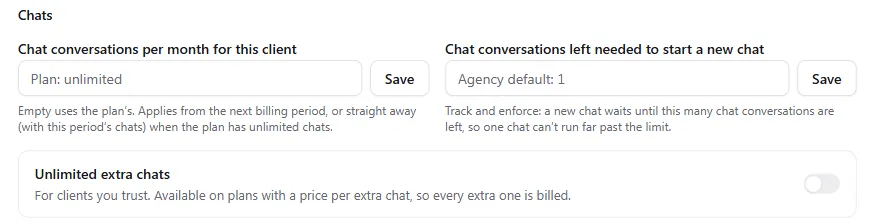
| Give one client its own allowance | Client settings, Client billing, Chats: Chat conversations per month for this client (or messages) | From the next billing period, or straight away when the plan has unlimited chats |
| Let a trusted client keep chatting past the allowance | Client settings, Client billing, Chats: Unlimited extra chats | Straight away; needs a plan with a price per extra chat |
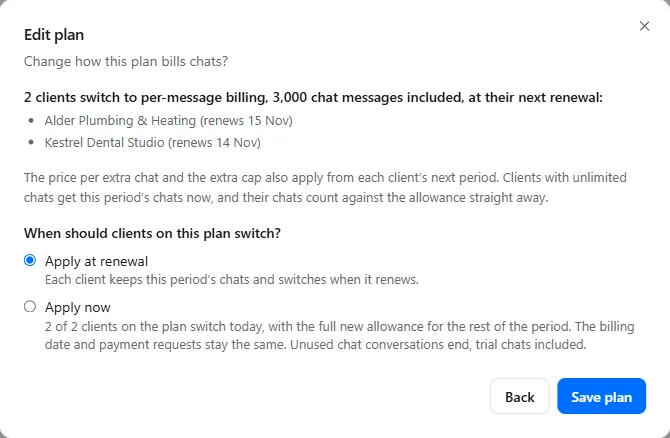
When you change how a plan bills chats, the portal lists the clients it affects before saving, and you choose Apply at renewal or Apply now. Every screen is in Change how chats are billed.
Until a change applies, every billing screen says what is true now and what comes next, for example “Billed per chat conversation until 25 Nov. From 25 Nov: billed per chat message, 500 included.” Your client sees the same line on its Billing page and in its emails.
What happens when WhatsApp chats run out
Section titled “What happens when WhatsApp chats run out”With Track only, WhatsApp keeps working and every chat is counted. With Track and enforce and Stop text channels too on, once no new chat may start:
- Inbound WhatsApp messages on the client’s linked numbers get no reply, until chats are added or the next period begins. This changes a setting in the client’s ElevenLabs account, which our team turns on for each client on request. See When minutes run out.
- WhatsApp messages and template campaigns sent from the portal are checked before each send and refused with “This client has used all its chats. Add chats from its Billing page, or new chats can start when its allowance resets.” A campaign shows Paused: chats used up and resumes by itself within a minute of chats being added.
- Calls and minutes are never affected by chats, and chats are never affected by minutes on a plan with a chat allowance.
You and the client’s billing contacts are emailed when the Chat warning share is reached (80% unless the owner changed it) and when all plan chats are used. For what a WhatsApp user sees when chats stop, see What callers hear when calls are blocked.
Troubleshooting
Section titled “Troubleshooting”| Problem | What to do |
|---|---|
| WhatsApp conversations use minutes, not chats | The number is answered by an agent that takes voice too. Answer WhatsApp with a chat-only agent (see the tip above), and make sure the plan has a chat allowance. |
| WhatsApp chats aren’t counted at all | Check WhatsApp is ticked under Channels that count on the client’s plan. |
| A WhatsApp template send says “This client has used all its chats.” | Add chats on the client’s Chats this period card, or let the client buy a chat pack. Sends can start again within a minute. |
| The switch to per-message billing is greyed out or refused | The client holds unused chat packs or added chats, or has a chat pack payment open: use them up, remove them or settle it first. With extra chats this period, it switches at its next renewal. |
| The client asks why a WhatsApp chat counted as many messages | On per-message plans every message with text counts. Consider Agent replies only, or per-conversation billing for that client’s plan. |