Change how chats are billed
Every client plan bills web chat, WhatsApp and SMS either per conversation or per message. You can switch at any time: for every client on a plan, or for one client; at each client’s next renewal, or today. Before anything changes, the portal shows you exactly which clients are affected and when, and it tells you and your clients what is billed now and what comes next.
- You
Edit the plan
Change Bill chats by, then Save plan.
- Voice AI Portal
Shows who is affected
Each client, its renewal date and what changes for it.
- You
Choose when
Apply at renewal, or Apply now.
- Voice AI Portal
Switches each client
With the full new allowance, and the same billing date.
- Voice AI Portal
Tells everyone
Billing screens and emails to you and the client.
The three ways to switch
Section titled “The three ways to switch”| You want to | Use | When it applies |
|---|---|---|
| Switch every client on a plan | Edit the plan’s Chats section | At each client’s next renewal, or today with Apply now |
| Switch one client today, after you changed its plan | Switch to per-message billing now (or per-conversation) on the client’s Billing page | Today |
| Bill one client differently from the rest | Move the client to another plan with Change plan | Today for an upgrade, at renewal otherwise |
Not sure which unit to choose? Per conversation is the simplest to explain (“300 chats a month”); per message follows your cost when chats vary in length. See Per conversation or per message.
Before you switch
Section titled “Before you switch”| Check | Why it matters |
|---|---|
| Unused chat packs or added chats | They only count in the unit they were bought or added in. While any client on the plan holds some, or has a chat pack payment open or in progress, the plan can’t change unit. Use them up, remove them, settle the payment, or create a new plan and move clients to it. |
| Extra chats this period | They are billed at renewal at this period’s price, so that client switches at renewal, not today. |
| Chat auto top-up | It turns off for a client whose unit changes: its pack holds chats in the old unit. The client can turn it on again with a pack in the new unit. |
| A custom allowance | A client’s own allowance keeps its number and is read in the new unit, for example 500 conversations becomes 500 messages. Edit it if that number no longer fits. |
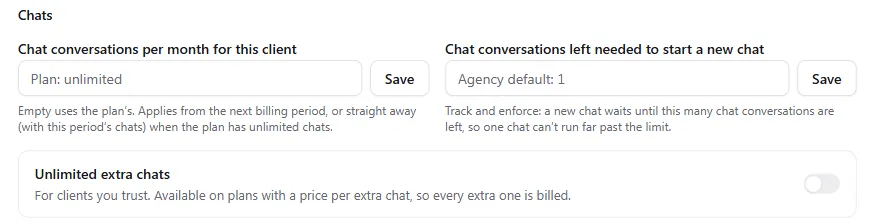
A client’s own allowance and chat options are in its Client settings, under Client billing, Chats.
Changing only Messages that count, between Customer and agent messages and Agent replies only, keeps the unit, so packs and added chats never hold it up.
Switch every client on a plan
Section titled “Switch every client on a plan”-
Edit the plan
Go to Client billing, then Plans, and select Edit on the plan.
-
Change how chats are billed
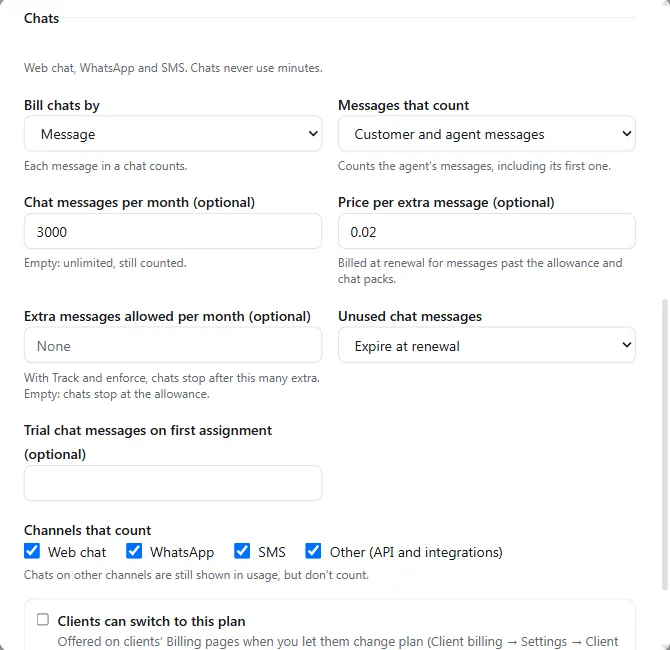
In the Chats section, change Bill chats by to Message or Conversation. For Message, choose Messages that count: Customer and agent messages or Agent replies only. Change the chats per month too if you want, for example 300 conversations to 3,000 messages. Select Save plan.
-
Check who is affected
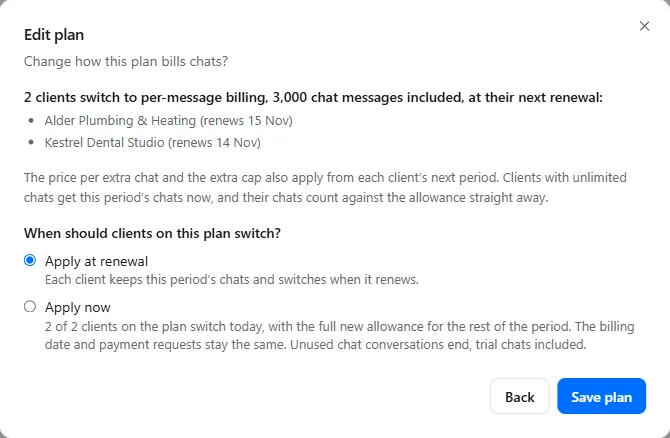
When clients are on the plan, or moving to it, the dialog becomes Change how this plan bills chats? and lists them, for example: “2 clients switch to per-message billing, 3,000 chat messages included, at their next renewal: Bright Dental (renews 25 Nov) · Oakwood Vets (renews 2 Dec) · chat auto top-up turns off”. A client with its own allowance shows “custom allowance 500 conversations → 500 messages” with Edit. It also says “The price per extra chat and the extra cap also apply from each client’s next period.”
-
Choose when clients switch
Under When should clients on this plan switch?:
- Apply at renewal (the default): “Each client keeps this period’s chats and switches when it renews.”
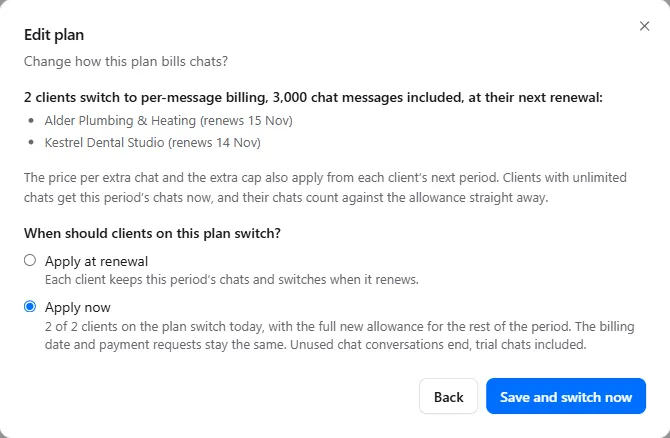
- Apply now: for example “2 of 2 clients on the plan switch today, with the full new allowance for the rest of the period. The billing date and payment requests stay the same. Unused chat conversations end, trial chats included.” Clients that can’t switch today are listed after Switch at renewal, with the reason.
-
Save
Select Save plan for Apply at renewal, or Save and switch now for Apply now. You see “2 clients switched now”.
A plan with no clients saves straight away. If a client on the plan holds chats in the old unit, the dialog says so, for example “Bright Dental has unused chat packs or added chats. Those chats only count in chat conversations, so this plan can’t change unit yet. Use them up, remove them or settle the request first, or create a new plan and move clients to it.”, and the plan can’t be saved with the new unit until that’s done.
Reasons a client switches at renewal instead of today with Apply now:
| The dialog says | Meaning |
|---|---|
| moves to this plan at renewal | The client is on another plan now and moves to this one at renewal, in the new unit. |
| billing is off | Client billing is off for this client. |
| has extra chats this period, billed at renewal | Its extra chats are billed at this period’s price first. |
Switch one client now
Section titled “Switch one client now”After you change a plan with Apply at renewal, each client on it shows the change as pending. To switch one of them today:
-
Open the client’s Billing page
Open the client and select Billing in the Agency only box. The Chats this period card reads, for example, “Billed per chat conversation until 25 Nov.”
-
Select the switch
Select Switch to per-message billing now, Switch to per-message billing (agent replies) now or Switch to per-conversation billing now, whichever matches the plan.
-
Confirm
The dialog Switch Bright Dental’s chat billing now? says what happens, for example “From today Bright Dental is billed per chat message. It gets 3,000 chat messages for the rest of this period. The billing date and payment requests stay the same.” It lists what else changes: unused chats in the old unit end (trial chats included), chat auto top-up turns off, a custom allowance is read in the new unit, chats still open keep their unit, and the client’s billing contacts and your team are emailed. Select Switch now. You see Chat billing switched.
When the button can’t be used, holding the pointer over it shows why:
| Reason | What to do |
|---|---|
| “Billing is off for this client.” | Switch client billing on for the client first. |
| “This period has ended and the renewal is about to run.” | Wait a minute: the renewal switches it. |
| “This client has unused chat packs or added chats. Settle or use them first.” | Let them be used, remove added chats on the card, or settle the open pack payment. |
| “This client has extra chats this period. They are billed at renewal, so the switch waits until then.” | Nothing: it switches at renewal. |
Only agency owners and admins see the switch. Clients never do.
Bill one client differently
Section titled “Bill one client differently”To change how just one client is billed, move it to a plan that bills chats the way you want: open the client, select Billing, then Change plan, and choose the plan. The dialog says what happens before you save, for example “Upgrade: starts today. Chats are billed per chat message from today.” or “Downgrade: from 25 Nov 2026, chats billed per chat message.” See Bill a client.
A client holding chats in its current unit can’t move to a plan that bills the other way: “This client has unused chat packs or added chats, and Growth 500 bills chats per message, so they would stop counting. Use them up, remove them or settle the request first, or choose a plan that bills chats the same way.”
What happens when a client switches
Section titled “What happens when a client switches”- The billing date and payment requests stay the same. Only how chats are counted changes.
- The full allowance in the new unit is given for the rest of the period with Apply now, or from the next period at renewal.
- Unused chats in the old unit end with Apply now, including trial chats.
- Chats that are still open keep their unit. They use up their old chats and then continue without extra charge.
- At renewal, a client holding chat packs or added chats keeps its current unit for another period, and switches at a later renewal once they are used up.
What you and your client see
Section titled “What you and your client see”Until a change applies, every billing screen says what is true now and what comes next:
- the client’s Billing page, on Chats this period: “Billed per chat conversation until 25 Nov. From 25 Nov: billed per chat message, 3,000 included.”;
- the client’s Client settings, under Client billing;
- the Clients list under Client billing, for example “→ chat messages from 25 Nov”;
- the Plans list, where Clients counts clients moving to a plan at renewal, for example “1 + 1 from 25 Nov”.
Your client sees the same lines on its own Billing page. Emails go to the client’s billing contacts and your team: the plan change email with a chats line, a renewal reminder 3 days before when the next period bills chats differently, and an email when a client is switched today.
Troubleshooting
Section titled “Troubleshooting”| Problem | What to do |
|---|---|
| The plan won’t save with the new unit | A client on the plan holds chat packs, added chats or an open chat pack payment. The dialog names it. Use them up, remove them or settle the payment, or create a new plan in the new unit and move clients to it at renewal. |
| Apply now is greyed out | No client on the plan can switch today. The reasons are listed after Switch at renewal. |
| The switch button doesn’t show on a client’s Billing page | It shows only while the client is billed differently from its plan, after you changed the plan with Apply at renewal. |
| A client’s allowance looks wrong after switching | Its custom allowance was read in the new unit. Change it in Client settings, Client billing, Chats. |
| Chat auto top-up stopped | It turns off when the unit changes. Set it up again with a pack in the new unit. See Bill your clients for chats. |