MCP quick start
This guide connects Claude.ai to your agency and gets you a first answer. It takes four steps, and you only do it once. Claude Desktop then uses the same connection. For Claude Code, see Connect Claude Code.
Before you start: you need the owner or admin role in Voice AI Portal, and a Claude account. Custom connectors work on every Claude plan, and Claude’s Free plan allows one (Claude’s help centre, November 2026).
-
Copy the address
https://app.voiceaiportal.com/api/mcp -
Add it to Claude as a custom connector
In Claude, open Customize, then Connectors. Select + Add, then Add custom connector. Name it
Voice AI Portal, paste the address and select Continue. Keep the sign-in settings Claude detects, and select Add.On a Claude Team or Enterprise plan, only your Claude organisation’s owner can add it, in Organization settings, Connectors. Everyone else then selects Connect on it in Customize, Connectors. All the Claude.ai details.
-
Sign in to Voice AI Portal and approve
Claude sends you to Voice AI Portal. Sign in with the code we email you, check the agency and your role on the screen, and select Approve.
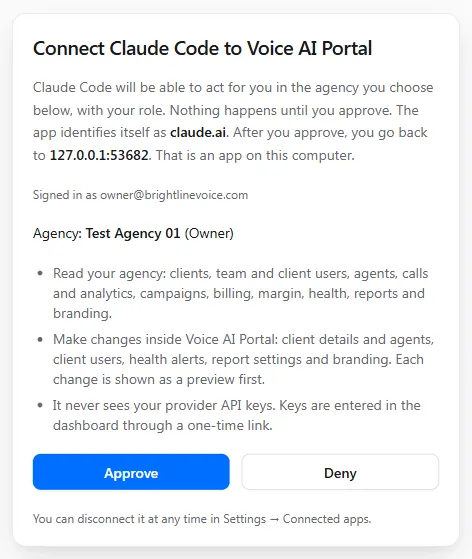
The screen names the assistant asking to connect and where you go back to afterwards (here, Claude Code on this computer; for Claude.ai, claude.ai). If you belong to more than one agency, pick the one to connect.
-
Ask your first question
Start a new chat, make sure the Voice AI Portal connector is switched on (the + button, then Connectors), and ask:
Give me my agency overview.Claude replies with your agency, your role, your plan, which features are on and what this connection may do. Then try Weekly client check from the prompts, or ask “Which clients need my attention this week?”.
Check it worked
Section titled “Check it worked”Open Settings, then Connected apps, in Voice AI Portal. The assistant is listed under Connections, with who connected it and when it was last used.
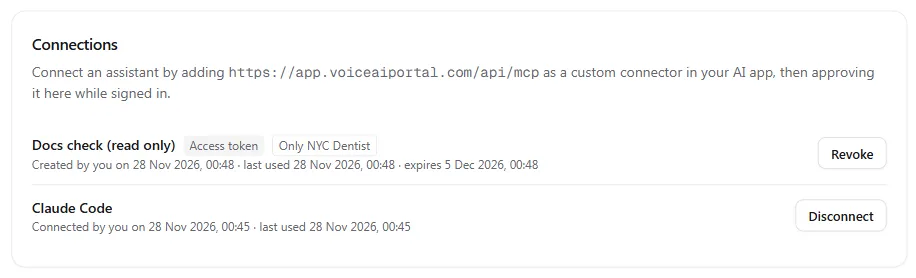
To stop it at any time, select Disconnect. It stops working straight away.
What to do next
Section titled “What to do next”- Decide about call content. Claude can’t read transcripts or summaries until the owner switches it on. Call content.
- Learn what it can do. MCP tool reference and Prompts and example requests.
- Set it up for automation. Access tokens and n8n.