Connect Claude Code
Claude Code connects to Voice AI Portal over HTTP and signs in with OAuth, so there’s no key to paste. Run one command, sign in once in your browser, and Claude Code can read and manage your agency from the terminal.
Add the server
Section titled “Add the server”-
Add it
Terminal window claude mcp add --transport http voice-ai-portal https://app.voiceaiportal.com/api/mcpKeep the name
voice-ai-portal: the prompts’ slash commands use it. The server is added for the current project by default. To use it in every project, add--scope user. -
Sign in
Start Claude Code, run
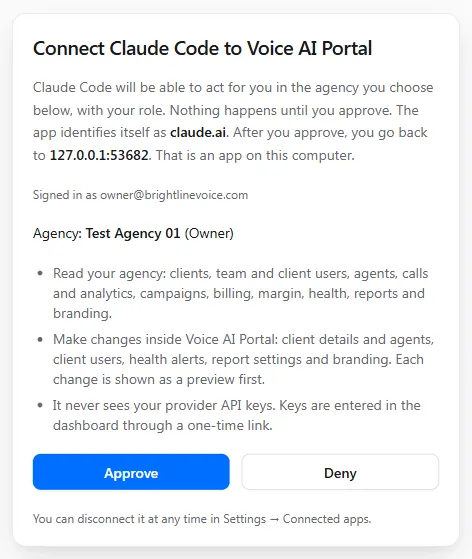
/mcp, choose voice-ai-portal and authenticate. Or, from your shell:Terminal window claude mcp login voice-ai-portalYour browser opens Voice AI Portal. Sign in with the code we email you, check the agency and role, and select Approve. The screen says Claude Code is asking, and that you go back to an app on this computer.
-
Try it
Give me my agency overview.
Use the prompts as slash commands
Section titled “Use the prompts as slash commands”The four ready-made prompts show up as slash commands:
| Command | What it does |
|---|---|
/ |
The clients that need your attention this week, what can wait, and what is going well |
/ |
A results review for one client, with a draft email for you to send |
/ |
Why a client’s agent isn’t working as it should, and the fix, step by step |
/ |
The clients at risk of leaving, the reasons, and one next step for each |
client_review and diagnose_client ask for the client’s name as it is in Voice AI Portal. None of the prompts changes anything. More about the prompts.
Use an access token instead
Section titled “Use an access token instead”For scripts and headless runs, the agency owner can create an access token and pass it as a header:
claude mcp add --transport http voice-ai-portal https://app.voiceaiportal.com/api/mcp \ --header "Authorization: Bearer vappat_your_token"With an Authorization header set, Claude Code uses the token and doesn’t sign in with OAuth. The token can do only what the owner chose when creating it, and stops working when it expires or is revoked.
Sign out or remove it
Section titled “Sign out or remove it”claude mcp logout voice-ai-portalclears the sign-in on your computer.claude mcp remove voice-ai-portalremoves the server.- To end the connection from Voice AI Portal’s side, open Settings, then Connected apps, and select Disconnect next to Claude Code.
See MCP troubleshooting if the sign-in doesn’t finish.