When a client owes you
Most clients pay on time. For the ones who don’t, Voice AI Portal follows the rules you set: it tells the client, gives it time, bills what is owed the way the client pays you, and only stops calls if you said it should. The moment the client pays, everything starts again on its own.
The short version
Section titled “The short version”- A client owes you when its credits go below zero, or a recurring charge isn’t paid.
- It gets 7 days of grace (your choice), with an email and reminders every 3 days.
- What it owes is billed as money the way it pays you: a payment request, a Stripe invoice or its saved card.
- If it still hasn’t paid when grace ends, it is suspended: new outbound calls, campaigns and chats stop, as your settings say. Inbound calls keep connecting and are counted, unless Stop inbound calls and chats at the provider is on for the client. Only clients on Track and enforce are ever suspended. Calls in progress always finish.
- After 30 days suspended, you decide what happens to its phone numbers. Nothing is released without your click.
- When it pays, everything that was stopped resumes within a minute.
- Voice AI Portal
Owing
Below zero, or a charge not paid
- Voice AI Portal
Grace starts
Email and amount owed request to the client
- Voice AI Portal
Reminders
Every few days, as you choose
- Voice AI Portal
Suspended
Track and enforce only, if still unpaid
- You
Number review
After 30 days suspended: keep or release
- Your client
Pays
Calls resume within a minute
How a client comes to owe you
Section titled “How a client comes to owe you”| How | Example |
|---|---|
| Calls and chats keep going at zero | You chose Keep going, client owes the rest on the Credits tab, or the client is on Track only |
| A recurring charge takes the balance below zero | A phone number fee is due and the balance is 2 credits short. It may go below zero up to your limit, one month of charges unless you change it. |
| A recurring charge can’t be taken at all | The charge is bigger than the balance plus your limit. It is Not taken and retried every 24 hours. |
| A money charge is overdue | A payment request or Stripe invoice for a charge is past its due date |
What the client sees and gets
Section titled “What the client sees and gets”-
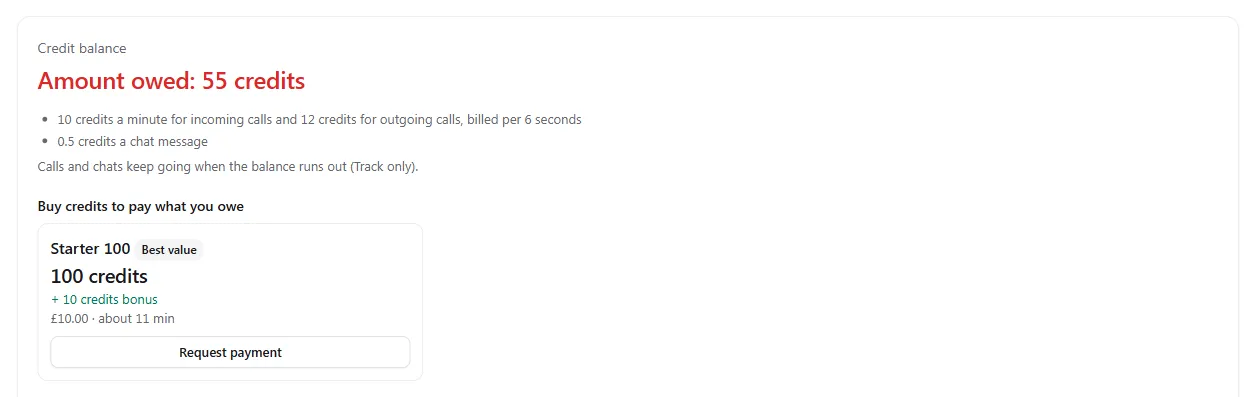
Its balance shows Amount owed in red, and its bundles read Buy credits to pay what you owe.
-
When grace starts, an email: you owe this amount, please pay by this date, with a Pay now button.
-
A reminder every few days, and one the day before grace ends.
-
An amount owed request for the money value of what it owes, sent the way it pays you. Paying it clears what is owed.

-
If it is suspended, an email and a banner on its pages: its service is paused because of an amount owed, and calls resume within a minute of paying.
Buying any bundle also pays what is owed first, unless you chose otherwise under A payment pays first.
What you see
Section titled “What you see”Needs attention. On Client billing, the Overview and Arrears tabs list everything that needs you: charges that failed, clients in grace or suspended, card charges declined, and numbers to review. Each links to the client. Select Done to clear one.

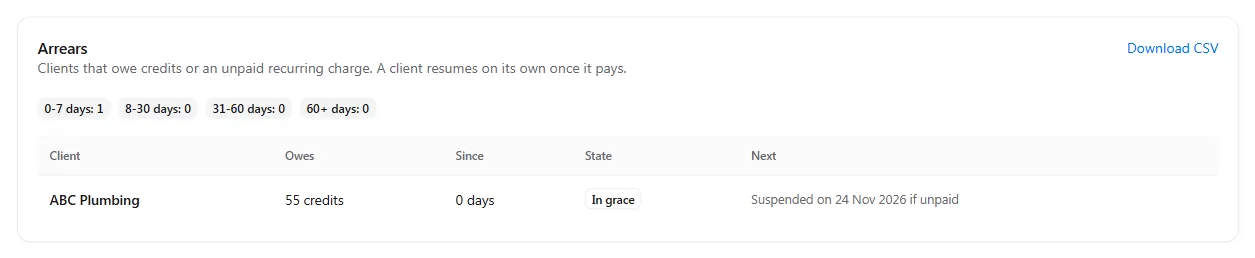
The Arrears tab. Every client that owes you, with what it owes in credits and money, for how many days, its state and what happens next. Counts at the top split them by age: 0 to 7, 8 to 30, 31 to 60 and over 60 days. Select Download CSV for your records.
| State | Means |
|---|---|
| Paid up | Nothing owed |
| Owing | Something is owed and grace hasn’t started yet |
| In grace | Grace has started; the Next column shows the date it ends |
| Suspended | Grace ended unpaid: new calls and chats are stopped as your settings say |
| Number review | Suspended long enough for you to decide about its numbers |
Your team also gets the same emails as the client (you choose which), and the daily summary lists arrears every day, on Mondays or not at all. To get these alerts in Slack or your own tools, see Billing alerts and emails.
The settings that decide it
Section titled “The settings that decide it”Set these once on the Credits tab, under More options. Any client can have its own on its Credit settings card, with Change for this client.
| Setting | Choices | Default |
|---|---|---|
| Charges may go below zero by (credits) | How far a recurring charge may take the balance below zero | One month of the client’s charges |
| Take what fits of a charge and owe the rest | On: take part of a charge now. Off: all or nothing. | Off |
| Grace before suspension (days) | Days between grace starting and suspension. With 0, a client is suspended as soon as a charge goes unpaid. | 7 |
| Suspension stops | Calls and chats, Calls only, Chats only, or Nothing (reminders only) | Calls and chats |
| Reminders every (days) | How often reminders go out in grace and while suspended | 3 |
| A payment pays first | What is owed, then the balance; or the balance, with the amount owed still billed | What is owed, then the balance |
| Money value of one credit | What an owed credit is billed at | What the client last paid per credit |
| Arrears in the daily summary | Every day, Mondays, Off | Every day |
How an amount owed is billed, for each way your client pays you:
| Client pays you | Choices | Default |
|---|---|---|
| By hand (bank transfer) | Send a payment request; or don’t bill it (I’ll handle it) | Send a payment request |
| By Stripe invoice | Send a Stripe invoice; send a payment request; or don’t bill it | Send a Stripe invoice |
| By card | Charge the saved card (with the client’s OK); send a payment request; or don’t bill it | Charge the saved card |
An amount owed is billed when grace starts, and every month for clients whose calls keep going at zero. A card is charged only for clients who agreed on their Billing page; otherwise they get a payment request.
Fixed for every agency: a charge not taken is retried every 24 hours, a client stays in grace until it pays or grace ends, and the number review starts after 30 days suspended.
Clear what is owed
Section titled “Clear what is owed”-
The client pays. It pays the amount owed request, buys a bundle, or its card is charged. Record a manual payment as usual with Mark paid. What it owes is cleared, and if it was suspended, calls and chats resume within a minute.
-
Or you write it off. On the client’s Credit balance card, choose Write off amount owed, enter the amount and a reason, and select Save. The amount owed request is voided once nothing is left owed. Only the agency owner can write off.
-
Or you waive a charge. On the client’s Recurring charges card, select Waive on the unpaid run. See Charge recurring fees and add-ons.
Phone numbers of a suspended client
Section titled “Phone numbers of a suspended client”After a client has been suspended for 30 days, its phone numbers wait for the agency owner’s decision on the Numbers tab, and the owner is emailed. Keep carries the number at your cost; Release ends the client’s charge so you can release the number at the provider. If the client pays first, its numbers stay as they are. See Bill clients for phone numbers.