Charge recurring fees and add-ons
Recurring charges bill a client for anything on top of its plan or usage: a phone number fee, monthly maintenance, a one-off setup fee, a yearly service charge. Voice AI Portal takes each charge on its schedule, retries it if the client can’t pay, and tells you when something needs your attention.
Who can do this: agency owners and admins.
Credits or money
Section titled “Credits or money”Each charge is billed one of two ways:
- In credits: taken from the client’s credit balance. For clients billed in credits or on a minutes plan with extras in credits.
- As money: billed in the client’s currency, for any client, including clients on a minutes plan.
| Money charges are billed by | What happens |
|---|---|
| Next invoice | The default. For a client Stripe bills by subscription, it is added as a line to the next renewal invoice. Otherwise it is billed when due: a Stripe invoice for clients on Stripe invoices, or a payment request for clients who pay by hand. |
| Its own payment request | A payment request on its own, with your bank details and payment page |
| Its own Stripe invoice | A Stripe invoice on its own, through your Stripe account |
| The client’s saved card (with its OK) | Charged to the client’s card, for clients who pay by card and agreed. See Card payments for charges. |
Add a charge for one client
Section titled “Add a charge for one client”- Open the client, then Billing, and find Recurring charges.
- Choose a Template if you made one, or fill in the fields by hand:
- Name, for example Phone number or Website maintenance. The client sees it.
- Charged in: credits or money.
- Amount.
- How often: Once, Monthly (the default), Yearly, Weekly or With each plan renewal.
- Billed by, for money charges.
- Select Add charge. The first charge is taken straight away, and the Next column shows when the next one is due.
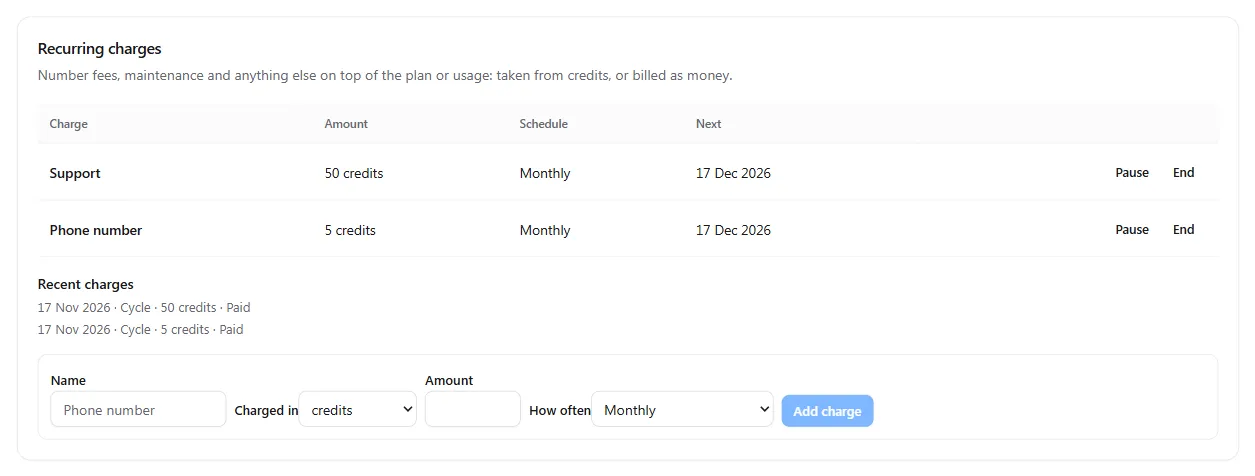
Recent charges lists the latest runs: Paid, Part paid, Not taken, Billed, Waived or Refunded, with the next retry date for any that failed.
Pause, resume, end or waive
Section titled “Pause, resume, end or waive”| Action | What happens |
|---|---|
| Pause | No charges are taken while paused |
| Resume | The charge starts again from today. Cycles missed while it was paused are not billed. |
| End | No more charges. The charge stays in the list as Ended. |
| Waive (on a run under Recent charges) | Forgives one charge that failed, was part paid or is billed and unpaid. The client no longer owes it, and an open payment request for it is voided. |
When the balance can’t cover a charge
Section titled “When the balance can’t cover a charge”For charges in credits:
- A charge may take the balance below zero, up to your limit: one month of the client’s recurring charges unless you set another under Charges may go below zero by on the Credits tab. What goes below zero becomes an amount owed.
- Beyond that limit, the charge is Not taken and tried again every 24 hours. With Take what fits of a charge and owe the rest on, the part that fits is taken now.
- When the client buys credits, anything owed is paid first, and a charge that was not taken is tried again at its next retry, within 24 hours.
- You and the client are emailed, and the charge shows under Needs attention on Client billing.
An unpaid charge marked Unpaid can suspend counts towards grace and suspension. See When a client owes you.
Templates for many clients
Section titled “Templates for many clients”If you sell the same add-on to many clients, make a template once on the Credits tab, under Recurring charges.
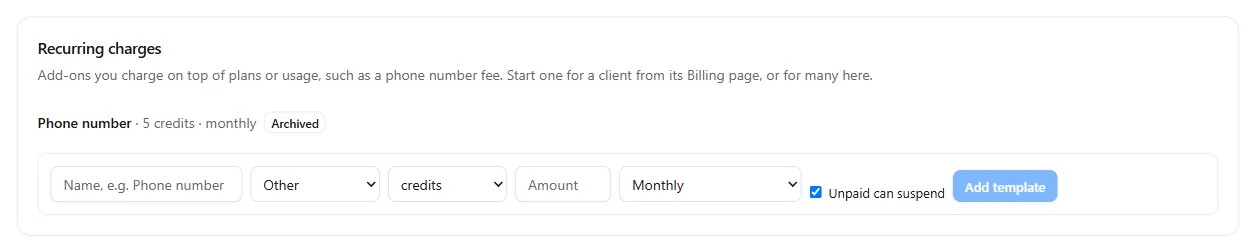
- Enter a name, choose a category (Phone number, Maintenance or Other), credits or money, the amount and how often.
- Leave Unpaid can suspend on if a client who doesn’t pay this charge should be suspended after grace. Turn it off for charges that should never stop a client’s calls.
- Select Add template.
- To start it for clients, select Start for clients, tick the clients and select Start for N clients.
Changing or archiving a template never changes a charge already running.
Card payments for charges
Section titled “Card payments for charges”Clients who pay you by card can agree to have their recurring charges, and any amount owed, taken from their saved card. Until they agree, these charges are sent as payment requests.
- The client agrees on its own Billing page, on the Card payments for charges card, with Save a card and agree. You can’t agree for the client.
- The card shows the exact terms: each charge, its amount and schedule, and any amount owed when it is billed.
- If you add or change a charge, the card shows Needs a new OK until the client agrees to the new terms.
- The client can Withdraw at any time. Charges then become payment requests again.
- Setup fee plus monthly care plan: a Once charge for the build and a Monthly maintenance charge, both in money, billed with Next invoice.
- Phone numbers at a margin: a Phone number template at your monthly price, started automatically when a number is assigned. See Bill clients for phone numbers.
- Yearly service charge: a Yearly money charge billed by its own Stripe invoice.
- Priority support: a Monthly charge in credits, with Unpaid can suspend off.
More in Ways to bill your clients.