Bill clients for phone numbers
Phone numbers are a real monthly cost for your agency. The Numbers tab finds every number in your provider accounts, shows which client uses it and what it costs you, and lets you charge each client for its numbers, so no number quietly eats into your margin.
Who can do this: agency owners and admins. Costs and margin are shown to people who can see margin. Release decisions are the agency owner’s.
Where: Client billing, then the Numbers tab.
How numbers are found
Section titled “How numbers are found”Every day, Voice AI Portal reads the numbers in each Retell AI, Vapi and ElevenLabs account your clients are connected with. Select Check now to read them straight away.
A number belongs to the client that selects it in its settings (Client settings, agents and numbers). If you move a number to another client there, the Numbers tab follows.
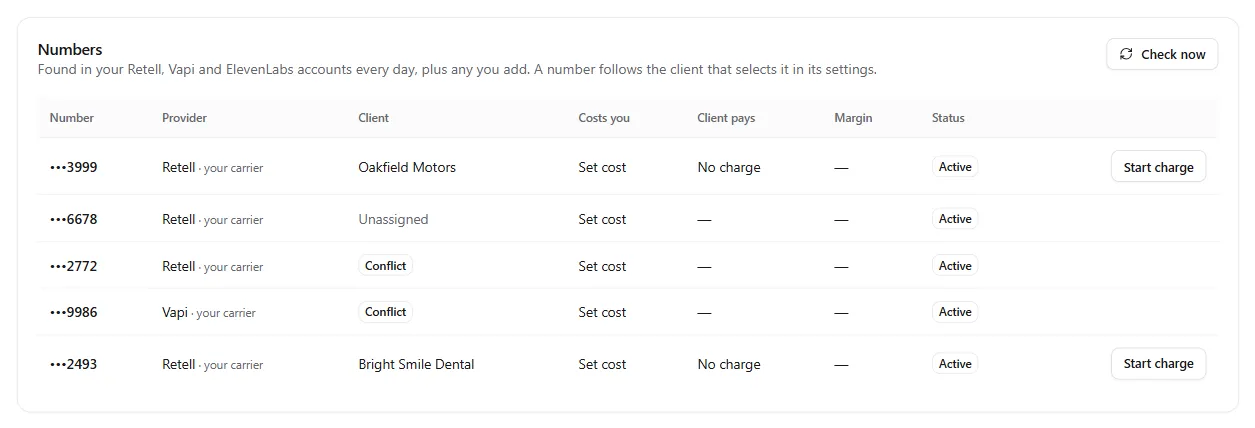
| Column | Shows |
|---|---|
| Number | The last four digits and the label from the provider |
| Provider | Retell AI, Vapi, ElevenLabs, or the carrier for numbers you added by hand |
| Client | The client that selects it, Unassigned, or Conflict |
| Costs you | What the number costs you a month. Select Set cost to enter it. |
| Client pays | The charge running for it, for example 5 credits a month, or No charge |
| Margin | What you keep each month, in red if the client pays less than it costs you |
| Status | Active, Waiting for your decision, Release approved, Released or Missing at provider |
Above the list, four totals show what numbers cost you a month, what you collected for them this month, how many are unassigned and what was not recovered.
Charge a client for its numbers
Section titled “Charge a client for its numbers”-
Set what a number costs your clients. On the What a number costs your clients card, choose:
- Charged in: credits or money.
- Amount and How often: Monthly, With each plan renewal, Yearly or Once.
- Setup fee: charged once when a number starts. Skipped when a number moves from one client to another.
- When a number leaves a client: Credit back unused days (the default), Nothing, or Charge the full cycle.
- Start the charge when a number is assigned: off unless you turn it on.
Select Save. Until you set this, numbers never bill a client.

-
Set your costs. Select Set cost on each number and enter what it costs you a month and the currency. This is what the margin is worked out from.
-
Start the charges. Select Start charge on a number with a client. Or turn on Start the charge when a number is assigned and every number a client selects from now on starts its own charge.
Each number’s charge shows on the client’s Billing page under Recurring charges, where you can pause, end or waive it like any other charge. The first cycle is prorated, so a number assigned mid-month costs only the days left.
Numbers your providers don’t list
Section titled “Numbers your providers don’t list”Some numbers never show in a provider account, such as a Twilio number you haven’t imported or a WhatsApp number billed by Meta. Add them on the Add a number by hand card.

Enter the number with its country code (for example +44 20 7946 0000), who bills you for it, a label, its monthly cost and the client. Select Add number.
Conflicts
Section titled “Conflicts”A number belongs to one client. If two clients select the same number, the Numbers tab shows Conflict and a note naming both clients. No charge starts for that number until you remove it from all but one client in their settings.
Provider accounts
Section titled “Provider accounts”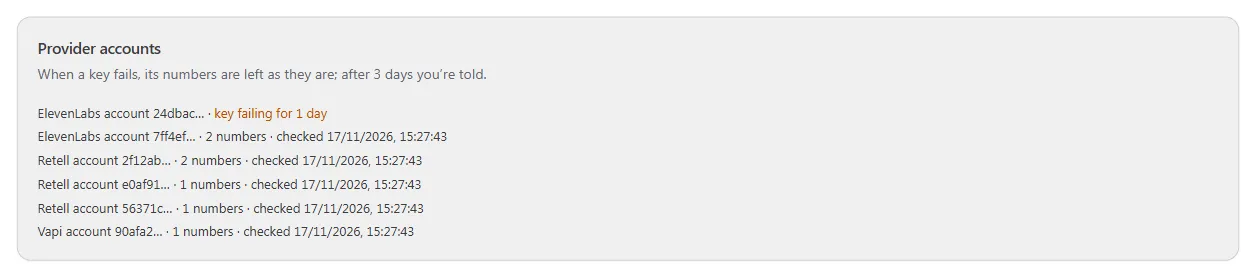
The Provider accounts card lists every account the numbers are read from and when each was last checked.
- A key that fails leaves that account’s numbers exactly as they are. After 3 days you are told under Needs attention, so you can update the key.
- A number gone from the provider for 2 daily checks is marked Missing at provider and its charge ends. You are told in case it was ported out or released by mistake.
When a client can’t pay a number fee
Section titled “When a client can’t pay a number fee”A number fee that can’t be paid follows the same steps as any other recurring charge: it may take the balance below zero up to your limit, then it is retried, then grace and suspension follow your settings. See When a client owes you.
For clients who pay by card, you can also have the fee paid straight from the card: on the Credits tab, under More options, turn on When a number fee can’t be paid from the balance, charge a bundle to the client’s saved card, choose the Bundle to charge and, if you like, At most a month. This applies only to card clients who agreed to card charges on their Billing page.
Release review
Section titled “Release review”If a client stays suspended for 30 days for an amount owed, its numbers move to Waiting for your decision, and the agency owner is emailed.
Nothing is ever released without your click. For each number, the owner chooses:
- Keep: the number stays with the client, and you carry its cost. It shows in your margin.
- Release: the client’s charge for it ends. Then release the number at the provider yourself; the next daily check marks it Released.
If the client pays first, its numbers go back to Active.
Numbers in your margin
Section titled “Numbers in your margin”On Margin, each client’s number costs are counted day by day while the number is theirs. Days a number has no client are shown as unallocated, so you can spot numbers you pay for and nobody uses.