Prepaid credits for voice AI clients | Voice AI Portal
Prepaid credits for voice AI clients: how they work, what a credit is worth and what happens when a client runs out. For agency owners.


On this page
- Why prepaid credits suit voice AI clients
- How voice AI providers charge: per minute and in prepaid credits
- How do prepaid credits work for a client?
- Four ways to bill a client, compared
- How much should one credit be worth? Start from your cost per minute
- Bundles, bonus credits and auto top-up
- What happens when a client runs out of credits?
- Moving an existing client to credits
- When a minutes plan still makes sense
- How it works in Voice AI Portal
- Prepaid credits for voice AI: get paid before the calls: questions
Short answer: For a voice AI agency owner with clients today: prepaid credits for voice AI clients make sense when usage swings or you prepay your provider, as non-enterprise Retell AI customers now do. The client buys credits first, each call or charge draws them down, and you are paid before minutes are used. Keep a minutes plan for steady clients.
Why prepaid credits suit voice AI clients
Prepaid credits suit voice AI because your costs can arrive before your income. You pay the provider for the time your AI voice agents talk, often in advance, while a flat monthly fee usually arrives after the month is done. Credits reverse that order: the client pays first, and each conversation draws down money you already hold.
Vapi already bills usage from a prepaid credit balance, according to Vapi’s pricing page, so agencies on Vapi fund their minutes up front too. Retell AI then joined the prepaid model: it moved its usage to prepaid credits on 30 September 2026, with enterprise customers staying on invoices, according to Retell AI’s pricing page.
So if you build on Retell AI outside enterprise terms, you now fund the minutes before a client’s busy month happens. If that client pays you a flat fee at month end, you carry the gap. For who should hold that bill, see who pays the voice AI provider bill.
Three problems credits fix
Your margin is the difference between what a client pays you and what its minutes and tools cost you. Credits protect it in three ways:
- Cash flow: the money arrives up front, not after the month ends.
- Busy months: a client that doubles its call volume buys more credits, so your margin holds.
- Awkward overflow invoices: the client watches its balance fall, so a top-up is expected rather than a surprise.
How voice AI providers charge: per minute and in prepaid credits
Two of the three providers in this guide draw usage from a prepaid credit balance: Retell AI and Vapi. ElevenLabs sells monthly subscription plans that each include an allowance of credits, according to ElevenLabs’ pricing page. How your provider charges decides how much client money you need up front.
| Provider | Prepaid or invoiced | Billing increment | Top-up |
|---|---|---|---|
| Retell AI | Prepaid credits since 30 September 2026; enterprise stays on invoices | Per second | $10 free credit once per email; top-up terms on its pricing page |
| Vapi | Prepaid credit balance | See Vapi’s pricing page | See Vapi’s pricing page |
| ElevenLabs | Monthly subscription with included credits | See ElevenLabs’ pricing page | See ElevenLabs’ pricing page |
The Retell AI row comes from its pricing page, checked on 8 November 2026. Provider billing changes often, so confirm the Vapi and ElevenLabs details on their own pages before you set client prices.
The rest of this guide turns to your side of the bill: how you charge your own clients in credits.
How do prepaid credits work for a client?
Prepaid credits billing works like a phone top-up or a deposit: the money sits with you before the work happens. The client buys a bundle of credits from you, its balance shows what is left, and each conversation or charge takes credits off. When the balance runs low, it buys more, by hand or through an automatic top-up it has agreed to.
A credit is simply a unit you name and price. It turns your costs, such as minutes, chats and monthly fees, into one balance the client can read.
The cycle in five steps
- You set the price of a credit and what each use costs in credits.
- The client pays you up front for its credits.
- Calls and chats use credits as they happen.
- The client sees its balance fall.
- It tops up before reaching zero, or your run-out rule applies.
Choosing the unit
The unit matters less than you might think. You can price one credit at one cent so the maths is obvious. Or you can make one credit roughly one minute so a client can read its balance as time.
Both work if the client can say what 1,000 credits buys. If it cannot, the unit is too clever.
Four ways to bill a client, compared
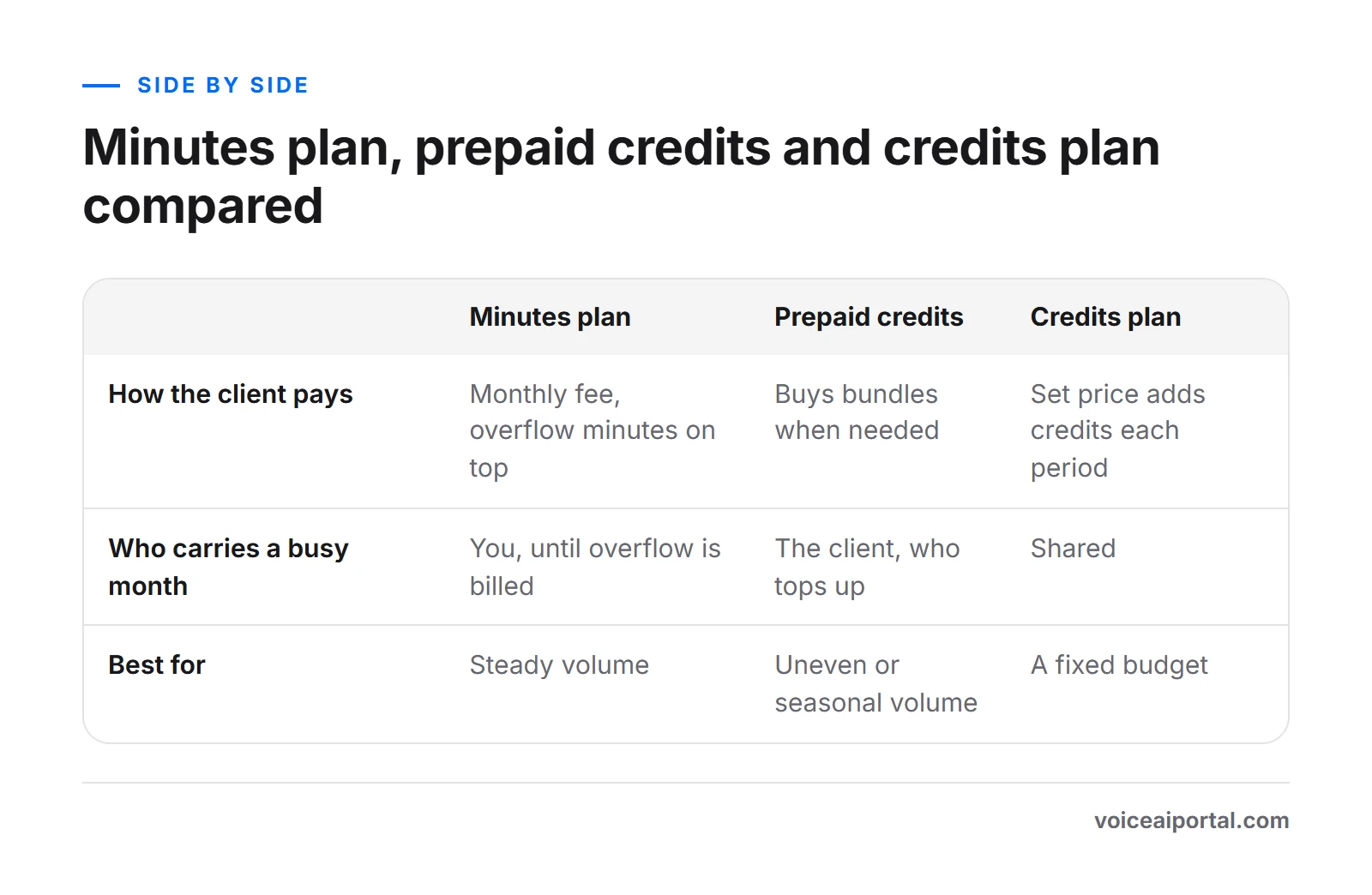
There are four ways to set up billing for a voice AI client: a minutes plan, prepaid credits bought when needed, a credits plan that adds credits every period, and a minutes plan that takes extras from credits. Each suits a different kind of client, and nothing stops you running different setups for different clients.
A minutes plan sells a monthly fee with included minutes. Overflow minutes are the minutes used beyond that allowance, charged at a set rate.
| Setup | How the client pays | Who carries a busy month | Best for |
|---|---|---|---|
| Minutes plan | Monthly fee with included minutes and chats, overflow minutes on top | You, until the overflow is billed | Steady, predictable volume |
| Prepaid credits | Buys credit bundles when needed | The client, who tops up | Uneven or seasonal volume |
| Credits plan | A monthly, 3, 6 or 12 month price that adds credits each period | Shared: credits arrive on schedule, extras are bought | Clients who want a fixed budget |
| Minutes plan with extras in credits | Monthly plan, with extras paid from credits | The client, for anything beyond the plan | Moving an existing client in stages |
What happens to unused credits
On a credits plan, decide what happens to unused credits at the end of each period. You have three choices: they expire, roll over once, or keep rolling over.
Expiring credits protect your margin but feel harsh to a quiet client. Rolling over once is a fair middle: the client keeps one period of slack, and old balances never pile up.
Decide too what happens to a remaining balance when a client cancels or leaves, because it is the first thing it will ask. Put it in your credit terms, alongside the expiry rule. In Voice AI Portal your credit terms are shown to the client before every payment, and when you refund a partly used bundle you choose whether the credits already used are forgiven or owed.
Unused prepaid credits are usually recorded as deferred revenue, or a contract liability, until they are used or expire, under IFRS 15 and ASC 606. So a bundle sold today is not yet income in full. Confirm the treatment with your accountant.
For the full minutes approach, see how to bill voice AI clients for minutes.
How much should one credit be worth? Start from your cost per minute
Set your credit price backwards from your cost. Work out what one minute really costs you, choose the margin you need, then pick a credit value that makes a minute cost a round number of credits. Round numbers matter because the client has to understand its own balance.
Your cost per minute is more than the provider rate. Add telephony, phone number fees spread over the minutes, and your share of the tools you run, including your client portal.
The cost lines in a voice AI minute
Each minute of an AI voice agent is several per-minute costs stacked together:
- Platform fee: what the voice AI platform charges to run the agent. Vapi’s pricing page lists $0.05 a minute for hosting, prepaid.
- Speech-to-text: turning the caller’s words into text.
- The language model (LLM): the model that decides what the agent says, such as an OpenAI model. It is often billed on top.
- Text to speech (TTS): the agent’s voice, for example an ElevenLabs voice.
- Telephony: the carrier’s per-minute charge for the call, through Twilio or the numbers your provider supplies.
Add the lines up from your own invoices to get your real AI voice agent cost per minute, then price the credit from that, not from a headline pricing per minute. For current provider rates, see Vapi and Retell AI pricing for agencies.
Check how your provider counts time. Retell AI bills per second (checked 8 November 2026), and its pricing page notes: “Once the call is transferred, the AI voice agent fee stops.” So a transferred call can cost you less in agent fees than its full length suggests.
Worked example (illustrative)
These figures are illustrative, not any provider’s rate. Swap in your own.
| Input | Example figure |
|---|---|
| Your all-in cost per minute | $0.12 |
| Value of one credit | $0.01 |
| Credits per minute | 25, so $0.25 a minute to the client |
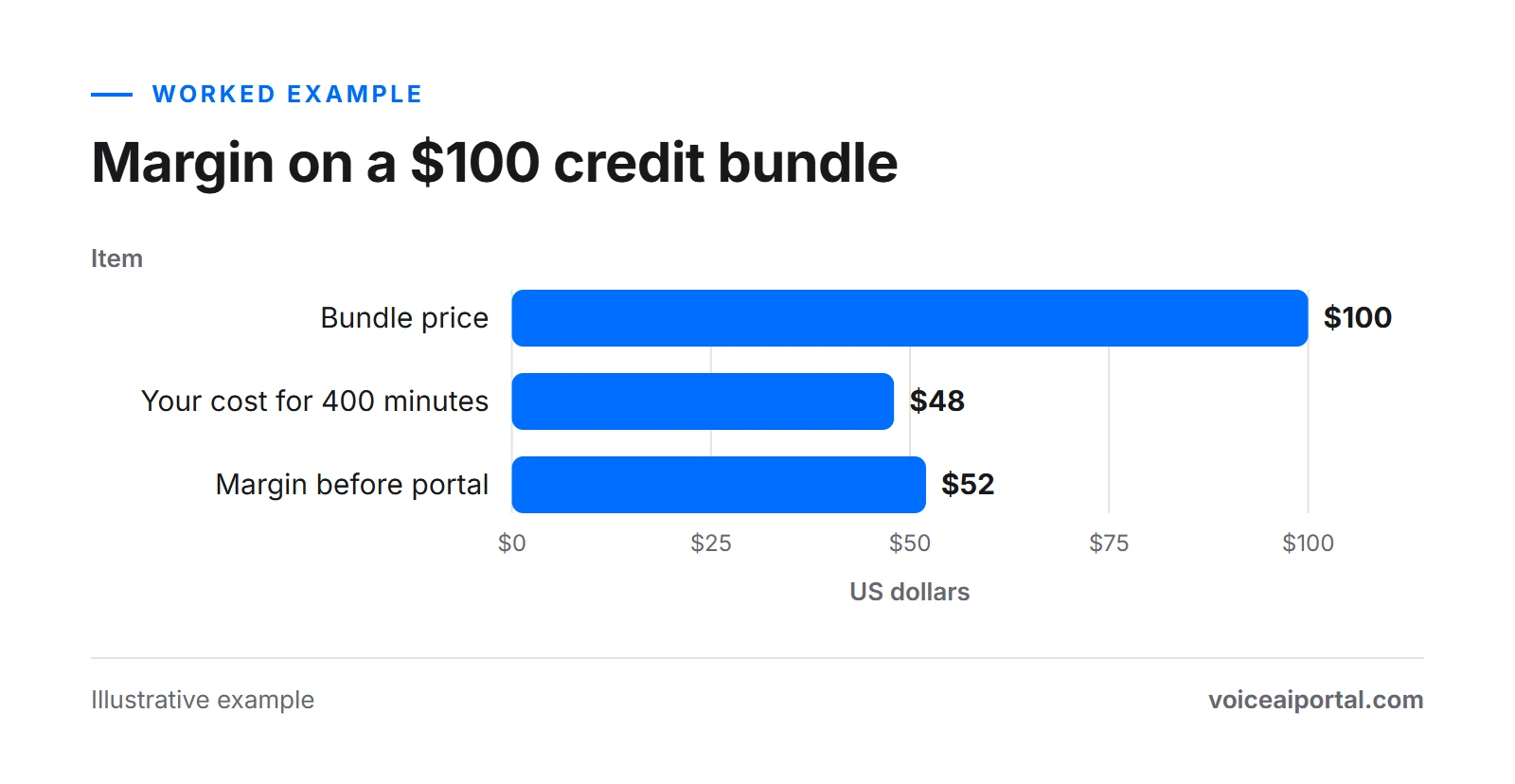
| Bundle | 10,000 credits for $100 |
| Minutes the bundle buys | 400 |
| Your cost for 400 minutes | $48 |
| Margin on the bundle, before the portal | $52 |
Now subtract your client portal cost. Take your plan from the pricing page, divide it by your number of clients, and take that from the $52. The result is your margin on that client’s bundle.
How to check the numbers
- Credits per minute times credit value: 25 × $0.01 = $0.25.
- Bundle divided by credits per minute: 10,000 ÷ 25 = 400 minutes.
- Minutes times your cost: 400 × $0.12 = $48.
For what to charge overall, including setup and monthly fees, see how much to charge for an AI voice agent.
If you want to try it on a real client as you read, you can Start free trial.
Bundles, bonus credits and auto top-up
Bundles are the fixed amounts of credits a client can buy, such as 10,000 or 25,000. Bonus credits reward a bigger purchase, and auto top-up buys a bundle when the balance runs low. Together they keep money arriving before the calls, without you chasing each payment.
Pricing a bonus
Continuing the illustrative example, say the 25,000 credit bundle costs $250 and adds a 10% bonus. The client gets 27,500 credits, which at 25 credits a minute is 1,100 minutes.
Those minutes cost you $132 at the example rate, so your margin is $118. Without the bonus, 1,000 minutes would cost $120 and leave $130.
So the bonus costs you $12 on that bundle, in return for $250 paid up front. Keep the bonus small enough that your biggest bundle still clears your margin target.
Auto top-up
Auto top-up buys a bundle on the client’s saved card when its balance falls to a level the client chooses. It is the client’s decision: in Voice AI Portal only the client can switch it on, from its own Billing page, and you decide whether it is offered and which bundles can be used for it.
It suits clients whose calls cannot stop, such as an after-hours line. A client that wants tight control of spend may prefer to top up by hand.
One balance for regular fees
Credits can pay for more than minutes. A setup fee, a monthly care plan or a phone number fee can come off the same balance, so the client tops up one thing instead of paying several invoices.
What happens when a client runs out of credits?
When a client runs out, you choose between letting calls continue and collecting later, or pausing new calls until it tops up. A short grace period with reminders is a fair place to start. Stopping a business’s phone line is a big step, so decide your rule before you need it.
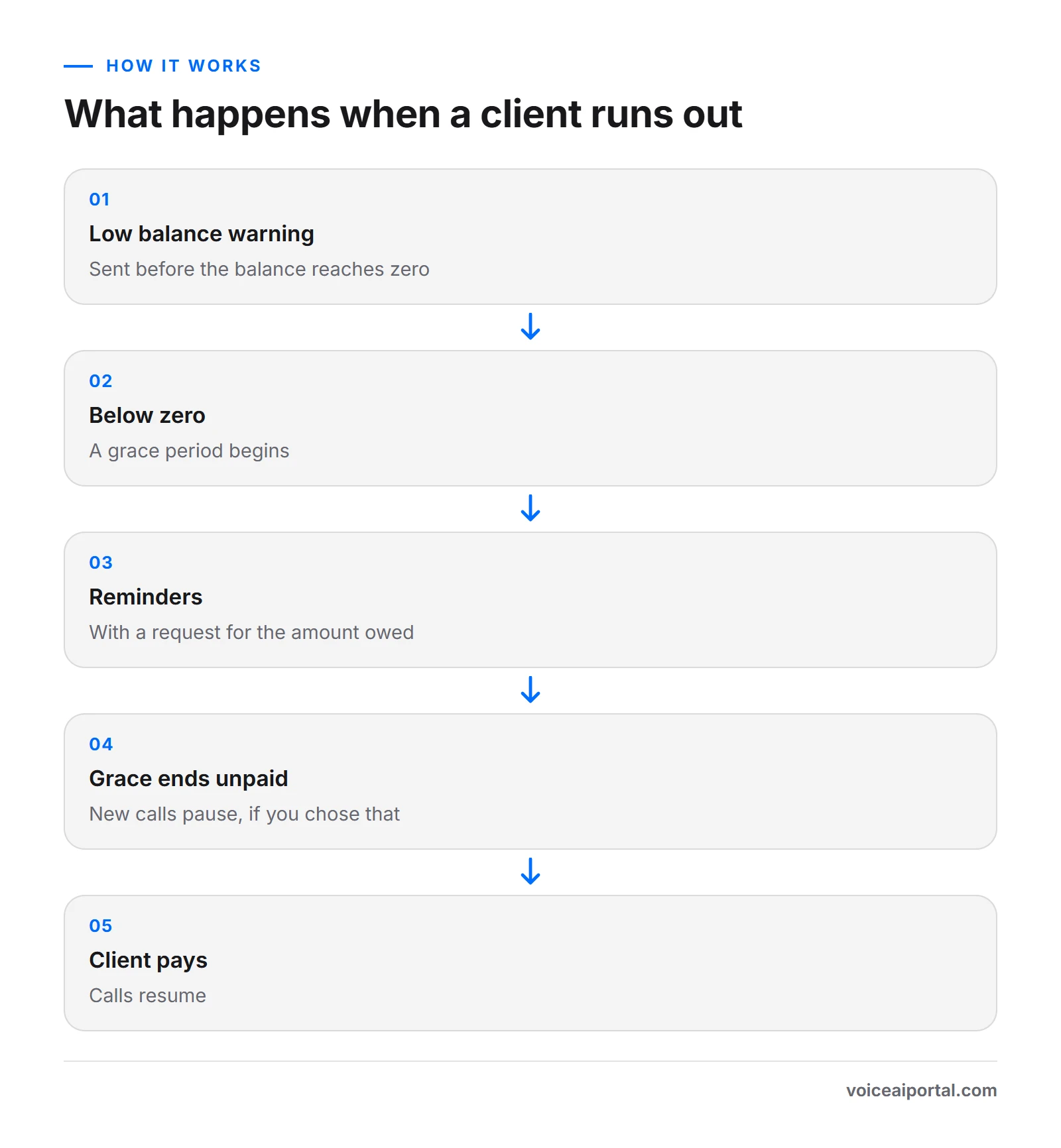
A fair order of events
- Low balance warning: sent before the balance reaches zero.
- Below zero: a grace period begins.
- Reminders: sent during grace, with a request for the amount owed.
- Grace ends unpaid: new calls pause, if you chose that for this client.
- Client pays: calls resume.
Write this into the client’s agreement. Say how long grace lasts, which calls pause and how fast service returns.
How Voice AI Portal handles it
Clients who owe you get a grace period you choose, 7 days unless you change it, plus reminders and a request for the amount owed. The request goes the way the client pays: a payment request, a Stripe invoice, or its saved card with its agreement.
Only clients on Track and enforce can be suspended, and you choose what a suspension stops: calls and chats, calls only, chats only, or nothing but reminders. On calls, a suspension stops new outbound calls and campaigns, while inbound calls keep connecting and are counted by default. Calls in progress always finish, and when the client pays, anything paused resumes within a minute. The full sequence is in When a client owes you.
Keep inbound and outbound apart
Pausing an outbound campaign costs the client little. Pausing the line its own customers ring is a far bigger step, which is why, by default, a suspension leaves inbound calls connecting.
Moving an existing client to credits
Move an existing client in stages. Keep its current plan, bill anything extra in credits for a month or two, then offer a full switch once it trusts the balance. In Voice AI Portal you change the setup per client, so one client’s move does not touch the rest.
The conversation with the client
- Explain why: you prepay the provider, so the client prepays you.
- Show the worked numbers for its own usage last quarter.
- Offer a bonus on the first bundle as a reason to switch.
- Agree the run-out rule and any auto top-up in writing.
Setting it up per client
Before you move a client, open its billing page. It shows the client’s plan, the minutes used this period, any overflow and how it pays, such as through Stripe invoices.
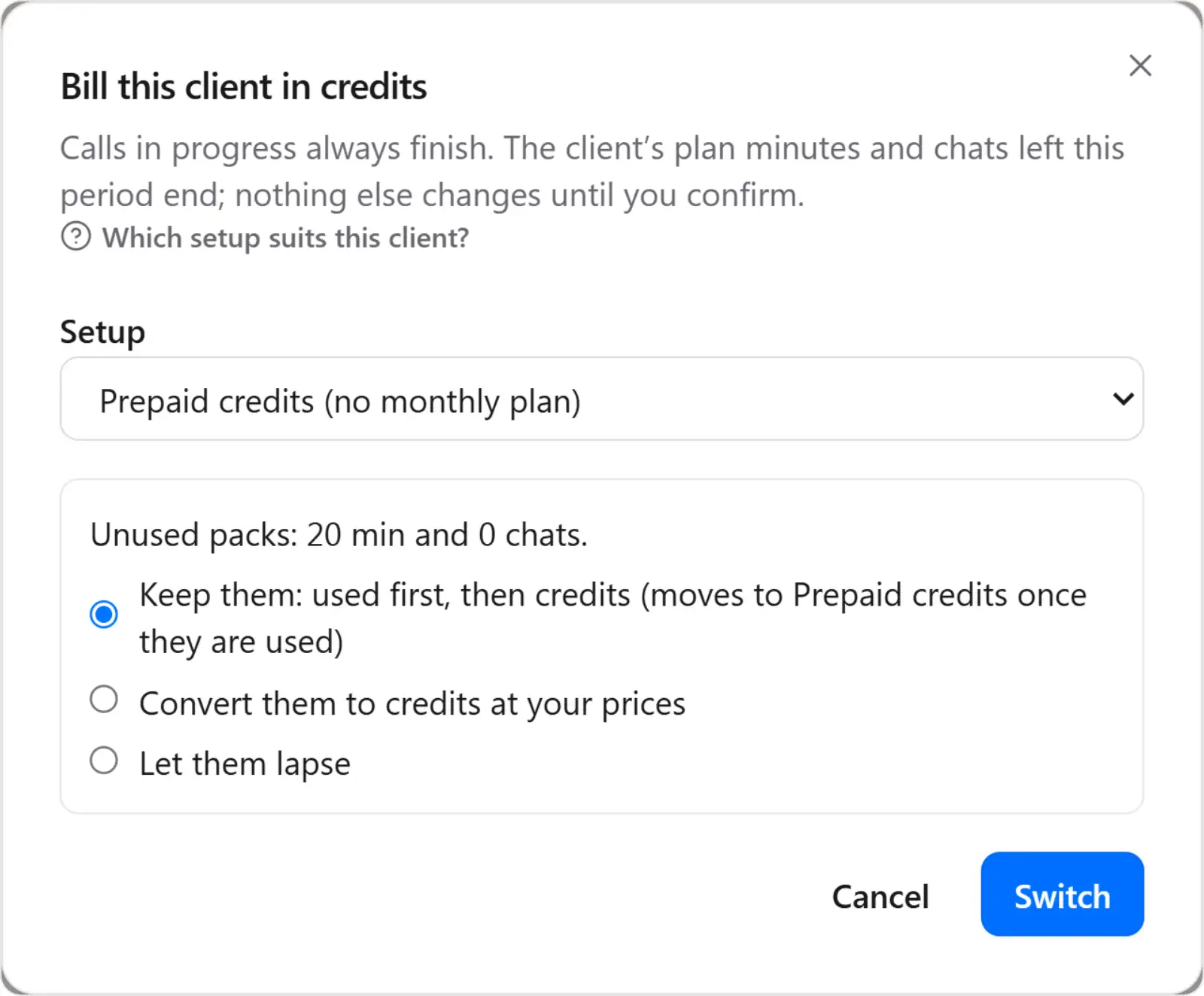
Each client takes one of four setups: a minutes plan, prepaid credits, a credits plan, or a minutes plan that draws extras from credits. When you move a client, you choose whether its unused minute packs are kept and used first, converted to credits at your prices, or left to lapse. The steps, with screenshots, are in Move a client to credits.
Each client has a billing mode: Off, Track only, or Track and enforce. Track only is a sensible first step, because you see usage against the balance without stopping anything.
When a minutes plan still makes sense
A minutes plan still makes sense when a client’s volume is steady and it wants one predictable invoice. A dental practice with the same call pattern every month rarely needs credits. The overflow rate covers the odd busy week, and the client never thinks about a balance.
Minutes plans also suit clients that cannot prepay easily, such as those whose finance team pays only on invoice. Here, keeping the plan and moving only the extras to credits is a useful halfway house.
A quick decision check
- Volume swings noticeably from month to month: lean towards credits.
- You prepay your provider: lean towards credits.
- The client wants a fixed monthly cost: a minutes plan or a credits plan.
- The client pays only on invoice: a minutes plan, with anything extra paid from credits.
How it works in Voice AI Portal
Voice AI Portal is a white-label client portal for voice AI agencies. Your clients sign in to your brand, with your subdomain, logo, login page and sender, and white label comes with every plan.
Each client connects to one provider account through its API key: Retell AI, Vapi or ElevenLabs, where you build its voice agents. Different clients can use different providers. For Retell AI clients, Voice AI Portal’s integration page says: “Retell AI clients get calls, web calls, web chats and SMS in their dashboard.”
Billing and payments
You can bill clients in prepaid credits at your own prices, and client billing is on every plan. You set what a minute and a chat cost in credits, with their own prices for WhatsApp, SMS, web chat and chosen agents, and sell bundles with a bonus on bigger ones: see Bill your clients in credits and Set up credits. For sixteen ways to combine credits, plans and add-ons, see Ways to bill your clients.
Clients pay into your own Stripe account, by card or invoice, or you record manual payments, and Voice AI Portal adds no fee to client payments. Recurring charges, such as a setup fee or care plan, can be taken from credits or billed as money.
Billing alerts for failed charges and clients in grace or suspended can go to a Slack incoming webhook, or to your own HTTPS webhook signed with HMAC-SHA256. You can also see your margin on each client, which is owner only unless you share it with admins.
Keeping an eye on prepaid clients
A client that has paid up front notices quickly when its agent stops working. Voice AI Portal’s agency dashboard page says “Every client is checked every 15 minutes”, and Health shows in the app which client’s agent needs attention, such as an invalid key.
In short
Prepaid credits put the client’s money in your account first, which matters more now that Retell AI usage is prepaid outside enterprise terms. Price a credit from your all-in cost, keep bonuses inside your margin target, agree a fair run-out rule, and move existing clients in stages. When you are ready to set it up for your own clients, Start free trial.
Prepaid credits for voice AI: get paid before the calls: questions
Should I bill voice AI clients in credits or minutes?
Bill in credits when a client’s volume swings or you prepay your provider, and keep a minutes plan when its volume is steady and it wants one fixed invoice. Credits bring the money in before the minutes are used. Keeping the plan and paying extras from credits sits between the two.
How do prepaid credits work for an agency’s clients?
The client pays up front for a block of credits, and each conversation or charge takes credits off its balance. When the balance runs low it buys more, by hand or through an auto top-up it has agreed to. You hold the money before the minutes are used.
How much should one credit be worth?
Make one credit a round amount, such as one cent, then set how many credits a minute uses so your margin holds. In the illustrative example above, 25 credits a minute at $0.01 each charges $0.25 against a $0.12 cost. Work from your own all-in cost per minute, not the provider rate alone.
What happens when a client’s credits run out?
A grace period with reminders comes first, and new calls pause only if the client stays unpaid and you chose that for it. In Voice AI Portal, grace lasts 7 days unless you change it, with reminders and a request for the amount owed. Only clients on Track and enforce can be suspended, calls in progress always finish, and calls resume within a minute of payment.
Can I keep a client’s minutes plan and bill extras in credits?
Yes. The client keeps its monthly plan, and anything beyond it comes off a credit balance. In Voice AI Portal it is one of four setups per client, and client billing is on every plan.
Sources
- Retell AI: Pricing checked 26 November 2026
- Retell AI: Pricing (billing increment and free credit) checked 26 November 2026
- Voice AI Portal: Agency dashboard checked 26 November 2026
- Voice AI Portal: Retell AI integration checked 26 November 2026
- Vapi: Pricing checked 26 November 2026
- Vapi: Pricing (hosting fee) checked 26 November 2026


