White label AI chatbot: add chat to your voice AI service
How to sell a white label AI chatbot beside voice: which chat channels Retell AI, Vapi and ElevenLabs support, how to price chat, and how to report it.


On this page
- What is a white label AI chatbot?
- Why add a chatbot to the voice service you sell?
- How do you choose a white label chatbot platform?
- Which chat channels sit beside voice on Retell AI, Vapi and ElevenLabs?
- How do you set up a chatbot for a client?
- White label chatbot pricing: how should agencies charge for chat?
- How do you show calls and chats in one report?
- How do you brand and manage white-label chatbots across clients?
- The short version
- White label AI chatbot: add chat to your voice AI service: questions
Short answer: A white label AI chatbot is a chat agent built on another company's technology and sold under your brand. For a voice AI agency owner, the usual route is to build the chat agent in the provider account you already use and sell it under your brand to clients you already serve. Add web chat or SMS (WhatsApp too on ElevenLabs), price chats inside the voice plan, and show calls and chats in one branded client portal.
What is a white label AI chatbot?
A white label AI chatbot is a chat agent built on another company’s technology and sold under your brand. The client signs in to your portal, reads your reports and pays your invoice. White labelling covers what the client sees from you, from the login page to the monthly email.
In voice AI, that technology is your provider account, where you build the agent. Your provider is the AI platform you build on: Retell AI, Vapi or ElevenLabs. The white-label layer sits on top: branded sign-in, the client’s conversations, reports and billing.
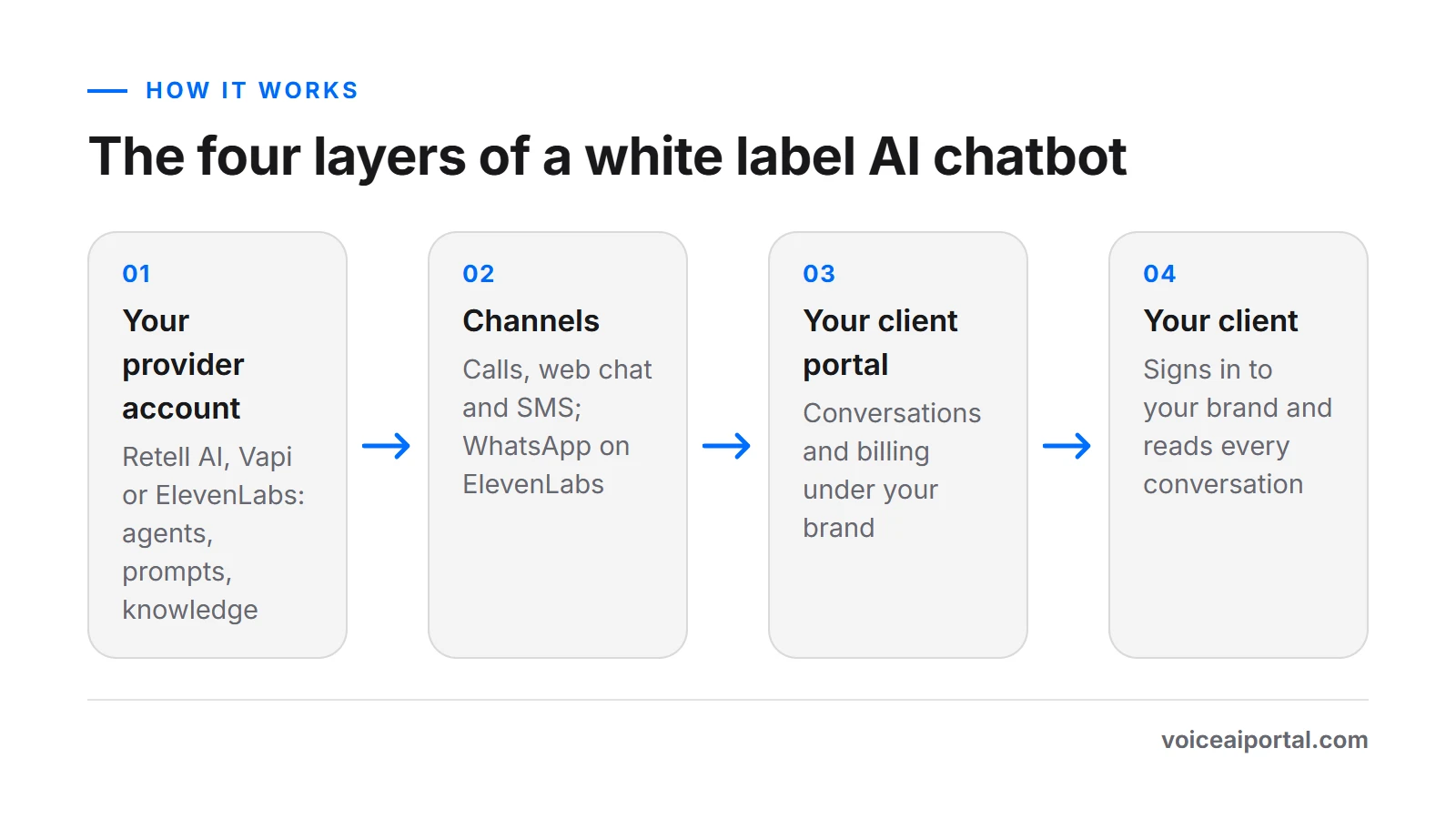
So the setup has four layers. Your provider account holds the agents, prompts and knowledge, and the agent answers on its channels. Your client portal shows the conversations under your brand and runs the billing, and your client signs in there.
The AI (artificial intelligence) part is a large language model: software of the kind behind ChatGPT, which writes replies from written instructions and the client’s own information. Older button-menu chatbots offered a fixed set of options. These answer questions in plain language.
One part sits outside your portal: the chat widget on the client’s website, which their customers use. It comes from your provider, so check in the provider’s own documentation how far you can restyle it before you promise a fully branded chatbot.
Chatbot reseller, white label programme or your own build
If you have searched for an AI chatbot white label option, you will have seen three different things sold under the same name. They differ on four points: control, channels, account and data access, and margin.
- Chatbot reseller: you sell another company’s finished bot under your name, and that company decides what it can do.
- White label programme: a software as a service (SaaS) vendor lets you put your brand on its product, on its reseller terms. This is the usual model for dedicated white-label chatbot builders sold to digital agencies: a chatbot builder with a reseller plan.
- Your own build on a provider: you build the agent in your provider account and add your own brand, pricing and reporting on top.
| Criterion | Chatbot reseller | White label programme | Your own build on a provider |
|---|---|---|---|
| Control | The vendor decides features and changes | You configure inside the vendor’s builder | You write the prompt, rules and knowledge |
| Channels | The vendor’s list | The builder’s list | Your provider’s list, per client |
| Account and data access | Held by the vendor | In the vendor’s system, under its terms | In an account you control, on the provider’s systems under its terms |
| Margin | A discount or commission the vendor sets | Your price minus the reseller fee | Your fee minus provider usage and portal cost |
| Suits | Selling chat with no build work | Web designers and marketing agencies adding a chat-only product | Agencies already running voice agents |
The first two routes trade control for speed: the builder is ready, but the vendor sets the features, the channels and your cost. The third asks for more build work and gives you control of the agent, the account and the pricing.
For a voice agency, the third route usually fits best, because chat becomes one more channel on agents you already run. You keep the provider relationship, and the client stays your client.
Why add a chatbot to the voice service you sell?
If you already sell voice agents, adding chat lets you charge more per client for work you have mostly done. The prompt, knowledge and rules behind a voice agent can usually be reused for chat. Chat also gives the client more visible activity each month, which matters at renewal.
Start with the money
Your provider bills you for usage, while most agencies sell clients a flat monthly fee. Chat runs on the same provider account, so check how your provider bills it and price it before launch, not after the first busy month.
Priced well, chat is extra margin on a client you already serve, with no new client to find. Margin here means what you keep from a client’s fee after the provider’s bill.
Then the client problem
A voice agent works out of sight. The client notices it when a caller complains, and rarely when it quietly handles a busy Monday.
Chat adds work the client can see: website visitors answered at night, texts replied to and, for clients on ElevenLabs, WhatsApp messages. Reported beside the calls, it gives the client a fuller picture of what they pay you for.
Which clients and use cases suit chat?
The best use case is a business that gets the same questions all day, in writing as well as by phone. These are the jobs chat does well:
- Out-of-hours enquiries: website visitors answered while the office is closed.
- Lead generation: answering a visitor’s questions and taking their details for the client to follow up.
- Routine questions: opening hours, prices, areas covered and how to book.
- WhatsApp replies: for ElevenLabs clients whose customers already message them there.
Good fits include local service businesses: clinics, trades, salons, property lettings and similar. For the phone-first version of this offer, see white label AI receptionist.
Starting a chatbot business from scratch
Web designers and marketing agencies often start with chat, because the client’s website is already theirs to change. The business model matches voice: a monthly fee per client, your provider’s usage underneath, and the difference as your margin.
The main investment is your time: learning one provider, building a first agent well and testing it. Start with one provider and one niche, then add voice for clients who want their phone covered too.
How do you choose a white label chatbot platform?
Choose a white label chatbot platform on four things: what your clients see, the channels they need, who controls the account and data, and what each client costs you. There is no best white-label option for every agency. A chat-only chatbot provider suits a different agency from one already running voice agents.
Most chat-only white label programmes are SaaS products: a monthly subscription for software the vendor hosts. A voice agency can often skip that layer and use the provider it already pays.
What should a white label chatbot platform support?
A good white label chatbot platform puts your brand on every screen the client sees, keeps each client separate, covers the channels clients ask for and tracks usage for billing. Use this checklist before you commit to one.
- Your brand on the login page, portal and emails, on your own subdomain.
- A chat widget you can restyle for each client’s website, checked in the vendor’s documentation.
- Separate sign-in for each client, with nothing shared between clients.
- Calls and chats in one list, each labelled by channel.
- The channels each client needs, checked against their provider. WhatsApp is the usual gap.
- Usage tracked against a plan, so you can bill included allowances and extras.
- Your margin on each client, hidden from the client.
- An early warning when a client’s agent needs attention.
- Agents kept in your own provider account, so the build stays yours.
- Clear answers on where conversations are stored and who processes them.
Compare cost and control side by side
Run each option through the same questions and write the answers down. The vendor’s own pricing and terms pages are the source for each answer, so date your notes.
| Criterion | Question to ask | Why it matters |
|---|---|---|
| Platform cost | Is it charged per client, per seat or per conversation? | It sets the lowest fee you can charge a small client |
| Usage cost | Who pays for the AI usage, and at what rate? | Busy months are where margin leaks |
| Channels | Which channels does each client get, and which need extra setup? | WhatsApp often decides the provider |
| Branding | Can the vendor’s name appear on the login, emails or widget? | Clients who see it may go direct |
| Account and data | Whose account holds the agents and conversations? | It decides what you keep if you change tools |
| Client billing | Can you bill clients from it, or do you invoice separately? | Separate invoicing takes staff time every month |
For the usage bill itself, see who pays the voice AI provider bill.
Data and privacy
Chat transcripts often hold names, phone numbers and details of a customer’s problem. Before launch, find out where your provider stores conversations, and read its data-processing terms.
Agree with the client what their privacy notice says about the chat, and who handles a customer’s request to see or delete their data. Take advice on the rules that apply where the client trades.
Which chat channels sit beside voice on Retell AI, Vapi and ElevenLabs?
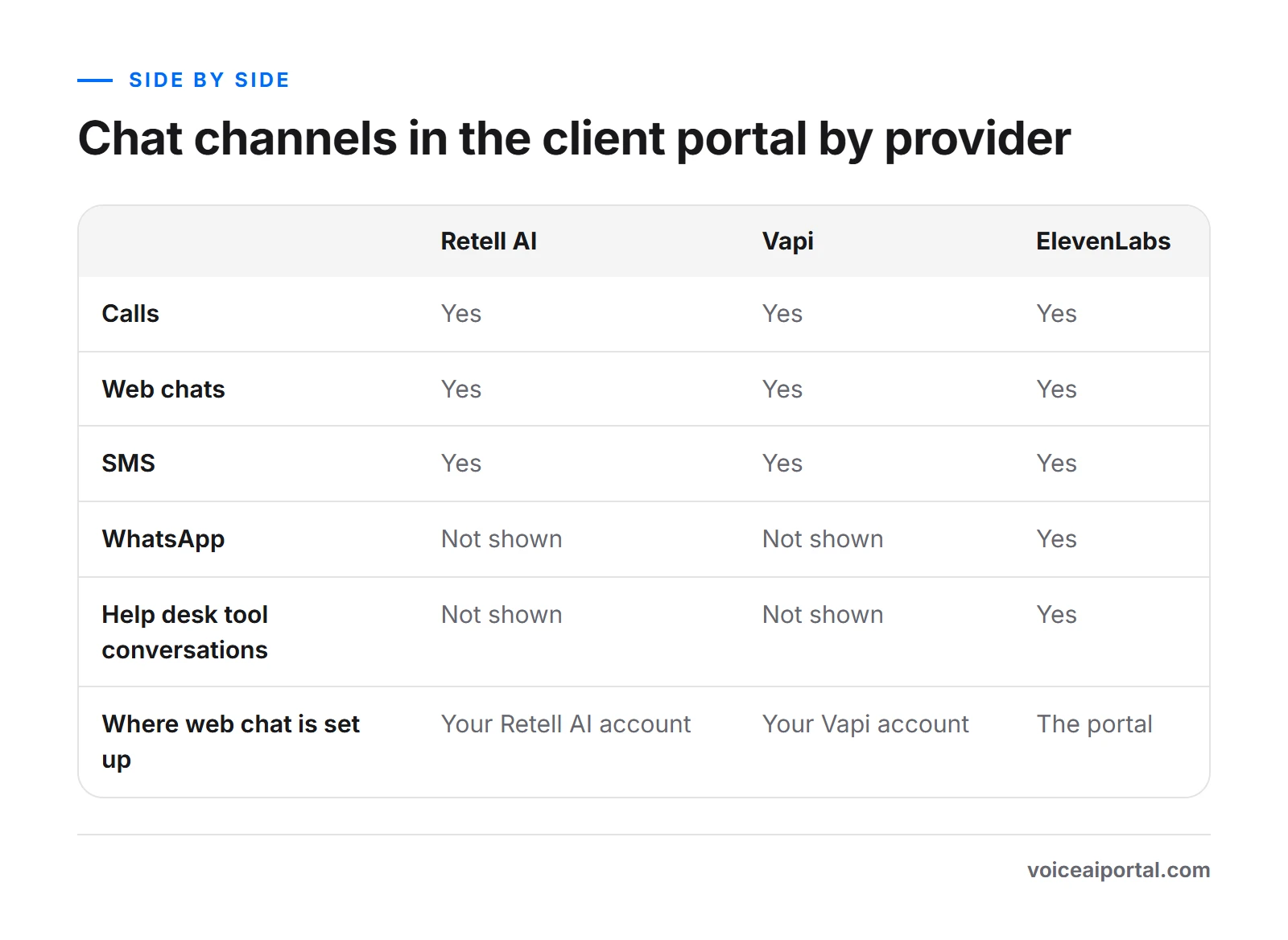
In the client portal, website chats and texts sit beside calls for clients on all three providers, and WhatsApp is the dividing line. ElevenLabs lists WhatsApp among its agent channels. Retell AI’s docs list no built-in WhatsApp, though its chat API can serve a custom channel you connect yourself. Voice AI Portal reports WhatsApp only for ElevenLabs clients.
Check the channel against the provider before you promise it to a client. Voice AI Portal’s pricing page puts the scope in one line: “Calls, web chats and SMS from every provider, plus WhatsApp for ElevenLabs.” That holds on every plan.
| In the client portal | Retell AI | Vapi | ElevenLabs |
|---|---|---|---|
| Calls | Yes | Yes | Yes |
| Web chats | Yes | Yes | Yes |
| SMS | Yes | Yes | Yes |
| Not shown | Not shown | Yes | |
| Help desk tool conversations | Not shown | Not shown | Yes |
| Where web chat is set up | Your Retell AI account | Your Vapi account | The portal |
ElevenLabs: WhatsApp beside web chat and SMS
ElevenLabs says one agent runs across “telephony, web, mobile, WhatsApp, SMS, email, and chat”. Of the three providers, it is the only one whose WhatsApp conversations show in the client portal.
For an ElevenLabs client, Voice AI Portal shows “Calls, web chats, SMS, WhatsApp and help desk tool conversations”, each labelled by channel. A help desk tool is the software a support team uses to answer customer emails and tickets.
The owner switches web chat and WhatsApp on for each client, from the portal. The chat window on the client’s website is the ElevenLabs widget, so the portal does not brand it. There is more on this in the ElevenLabs white label client portal guide.
Retell AI: website chat, SMS and the chat API
Retell AI chat agents run on its website widget, on SMS, or on your own channel through its chat API. An API (application programming interface) is the way one piece of software asks another for data or actions.
Retell AI’s docs are direct about the rest: “Retell has no built-in integrations with third-party chat platforms”. WhatsApp is therefore not built in, though the chat API can carry a custom channel if you build the connection yourself.
In the portal, a Retell AI client sees calls, web calls, SMS and web chats. A web call is a voice call made from a browser. You set chat up in your Retell AI account, and the Retell AI integration brings those conversations into the client’s portal.
Vapi: chats and texts in the portal
In the portal, a Vapi client sees calls, SMS and web chats. You set chat up in your Vapi account, and the portal reports it beside the calls. That is the portal’s scope for Vapi clients, so check any other channel, WhatsApp included, against Vapi’s own documentation before you promise it.
Clients can “Play and download each recording, and search, copy or download the transcript”, as the Vapi integration page puts it. For a chat, the transcript is the whole record.
When a client asks for WhatsApp
The provider decides the answer. Build that client’s agent on ElevenLabs, or offer website chat and texting on Retell AI or Vapi.
Each client connects to one provider account, and different clients can use different providers. So one agency can run a WhatsApp client on ElevenLabs beside voice-first clients on Retell AI or Vapi. For the voice side of that choice, read Retell AI vs Vapi for agencies.
How do you set up a chatbot for a client?
Set up a chatbot in two places. Build or adapt the chat agent in your provider account, then connect that account to the client’s portal so conversations, usage and billing sit in one branded view. On Retell AI and Vapi, chat is set up in the provider. On ElevenLabs, the owner switches web chat and WhatsApp on for each client from the portal.
This order avoids rework:
- Agree the channels. Website chat and SMS work on all three providers. WhatsApp means ElevenLabs.
- Rewrite the agent for text. Adapt the prompt, the written instructions the agent follows, for reading rather than listening.
- Load the client’s knowledge. In your provider, add the client’s site pages, FAQs and price lists to the agent’s knowledge base, the set of documents it answers from. Check it covers the awkward questions listed under testing below.
- Build it in your provider account. Agents, prompts and voices are built there, outside the portal.
- Connect the client. Add the client in your client portal with their provider and API key, then choose the agents and numbers it should show.
- Switch on channels. On Retell AI and Vapi, set chat up in the provider. On ElevenLabs, switch web chat and WhatsApp on from the portal.
- Test, then invite the client. Run test chats, set up the client’s plan and invite their client users.
Write the bot for text
Voice prompts carry habits that read badly in chat. Spoken agents spell out phone numbers, repeat details back and avoid sending links.
A chat agent can share a link, a short list or an address in one message. Cut the spoken confirmations, keep answers to a few lines, and give it the client’s contact page to share.
Read ten real chats from the test period before you call it finished. Text exposes vague answers that sounded fine out loud.
Test before the widget goes live
Test the chat agent before the widget goes on the client’s website. Try the awkward questions: prices, opening hours, complaints and anything off topic.
Agree what happens when the bot can’t help
Decide with the client where a stuck chat should go: a phone number, an email address or a contact form. Write it into the prompt, so the agent offers it instead of guessing.
Client users review those conversations in their portal afterwards. A person replying to a customer does it in the client’s own phone, email or messaging tools.
Keep it running after launch
Set a monthly routine for each client: read a sample of chats, and update the knowledge when prices, hours or services change. Small gaps in the knowledge show up in chat transcripts first.
In the client portal, health shows in the app which client’s agent needs attention, and by email too if you switch health email on. That way a broken key or agent is found before the client finds it.
Want to follow along with one client? Start free trial and connect their provider account as you read.
White label chatbot pricing: how should agencies charge for chat?
Charge for chat inside the same monthly plan as voice: included minutes and a chat allowance, a price per extra chat, and chat packs for busy months. Work out what chat costs you from your own provider invoice first. Then set a fee that keeps your margin rate at least where voice has it.
Included minutes are the minutes a plan covers. Overflow minutes are billed at a set rate once those run out, and minute packs are extra minutes a client buys on top of the plan.
In Voice AI Portal, chats have their own allowance, extras and packs, and chats never use minutes: a client whose minutes run out keeps chatting, and one whose chats run out keeps calling. Agree in writing what happens when a client’s chats run well past the allowance. A larger allowance and fee at renewal is the simplest answer.
Three ways to sell chat
| Model | How it works | Suits | Watch for |
|---|---|---|---|
| Bundled with voice | One plan includes minutes and a chat allowance | Clients who want one line on the invoice | Size the chat allowance with headroom |
| Flat chat add-on | A fixed monthly fee on top of the voice plan | Clients with steady website traffic | Busy months can cost more than the add-on earns |
| Chat-only plan | A plan with a chat allowance and no voice | Web design clients starting small | A smaller fee still carries your share of portal cost |
For most voice clients, bundling is the simpler sell: one plan and one invoice. It also makes it less likely the client prices your chat against stand-alone chatbot services, because they are buying the whole service.
For setting the voice fee underneath, see how much to charge for an AI voice agent.
Why ElevenLabs chat needs headroom
On ElevenLabs, some chats can’t be blocked at the start. ElevenLabs documents that its conversation initiation webhook “does not run for widget or SDK conversations, other messaging integrations, or resumed WhatsApp and SMS threads.” A webhook is a message one system sends another when something happens.
Voice AI Portal does not rely on that webhook. For a client on Track and enforce with provider changes switched on, it stops new WhatsApp messages on the client’s linked numbers when chats run out, and a conversation already open carries on until it closes. ElevenLabs web chat stops only when Website widget needs minutes is on and the client’s site uses the widget code from its settings, as the chat billing docs set out.
Voice AI Portal gives each client one of three billing modes: Off, Track only, or Track and enforce. For an ElevenLabs chat client, size an enforced allowance with room to spare, or start on Track only. Track only lets you see real use in the first month, then set the allowance at renewal.
Worked example: adding chat to a voice client
This example is illustrative. The figures are not any provider’s rates, so replace each one with your own invoice and your own fees.
Each provider publishes its rates on its own pricing page: Retell AI, Vapi and ElevenLabs. Check the chat and messaging rates there, then against your invoice.
For an ElevenLabs client on WhatsApp, Meta’s own charges apply under its WhatsApp Business Platform pricing. Those charges sit on top of the agent cost, so add them to the estimate.
Meta’s pricing turns on a 24-hour customer service window that opens when a customer messages the business. Read how it treats messages inside and outside that window before you set a WhatsApp allowance.
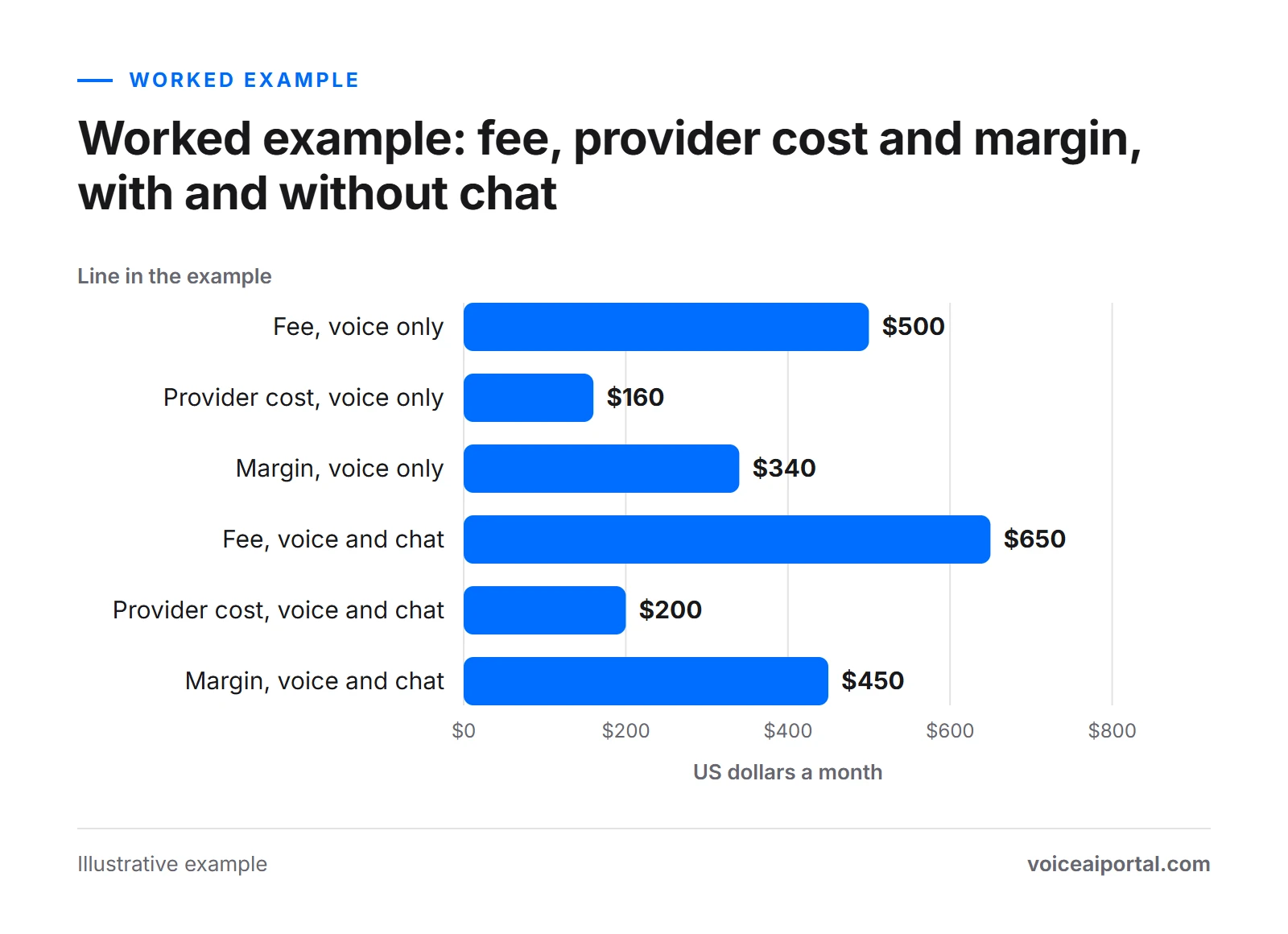
- Current voice plan: $500 a month, with 800 included minutes.
- Provider cost for this client’s calls last month: $160.
- Proposed add: website chat and texting for $150 a month more, with 500 included chats.
- Estimated provider cost for chat: $40 a month, to check after month one.
- Your Voice AI Portal cost per client: P, your plan from the pricing page divided by your number of clients.
| Illustrative | Voice only | Voice and chat |
|---|---|---|
| Monthly fee | $500 | $650 |
| Provider cost | $160 | $200 |
| Margin before portal cost | $340 | $450 |
| Margin rate before portal cost | 68% | 69% |
| Margin after portal cost | $340 minus P | $450 minus P |
Chat adds $110 a month in margin and keeps the margin rate at about the same level. Adding chat doesn’t add a client, so P stays the same in this example.
To check it, open the client’s provider invoice after month one and compare the chat cost with the $40 estimate. If chats ran well past 500, raise the allowance and the fee at renewal. For the billing mechanics, see how to bill voice AI clients for minutes.
How do you show calls and chats in one report?
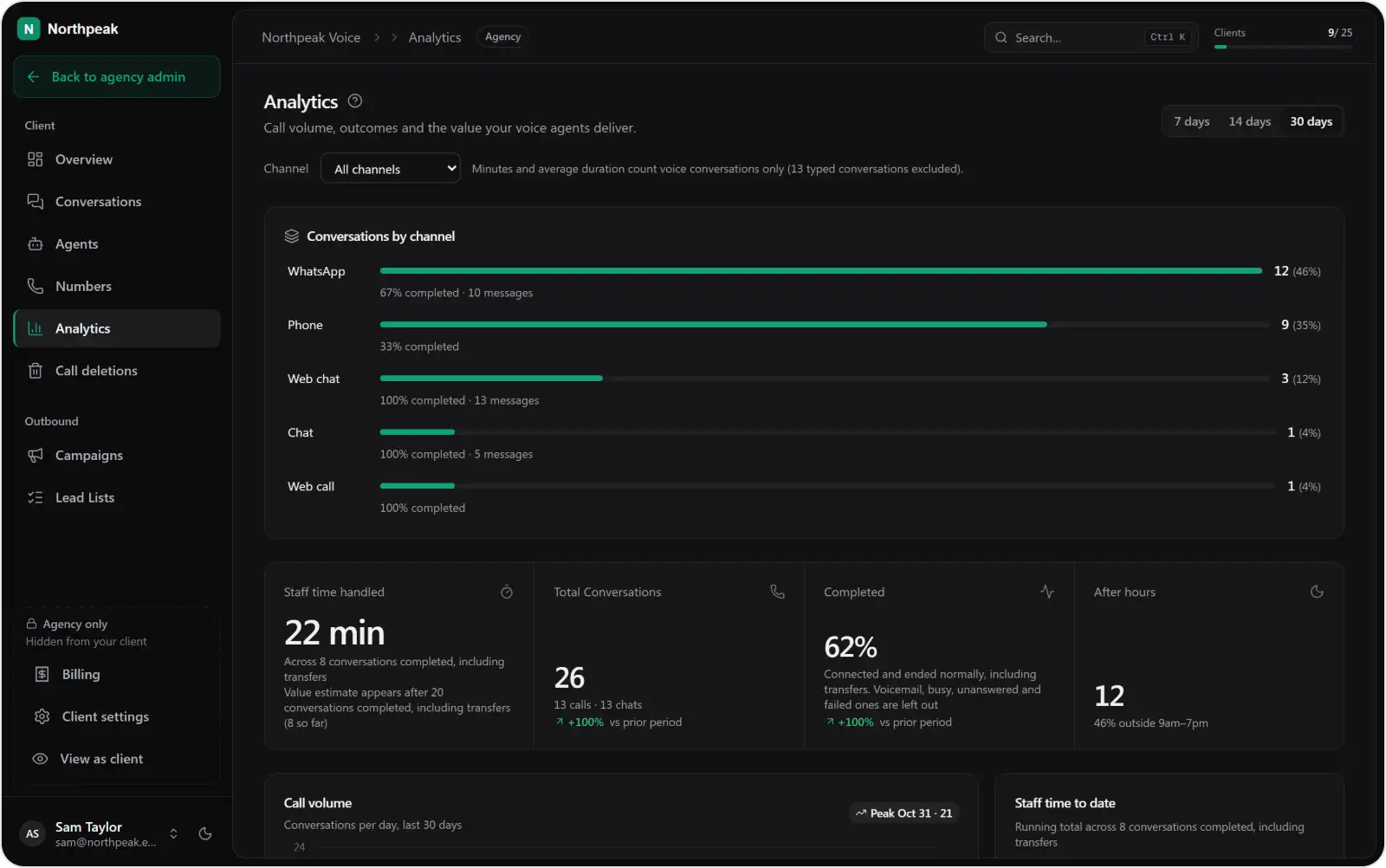
Show calls and chats in one place, labelled by channel, so the client sees one total for everything their AI agents handled. Separate reports per channel make chat look like a side project. One list, one dashboard and one monthly email keep the whole service in view when renewal comes round.
What to show the client each month
- Conversations, split by channel: phone, web chat, SMS and, for ElevenLabs clients, WhatsApp.
- How many conversations were completed.
- After-hours conversations: the ones that came in while the client was closed.
- Staff time handled, an estimate with published counting rules, with the working shown so the client can check it.
- Two or three transcripts the client will recognise, picked by you.
The transcripts do more than the totals. A client who reads their own customer’s question, answered well at 11pm, understands the service in a way a chart rarely manages.
Keep it in one place
A single branded dashboard and a monthly results email keep the work in front of the client between meetings. Both should carry your brand, not the provider’s.
For a full monthly template, see voice AI client reporting. For running several channels per client, see multichannel AI agents in one client portal.
How do you brand and manage white-label chatbots across clients?
Brand once at agency level, then run every client from one dashboard, whichever provider each one uses. Your clients sign in to your subdomain, logo and login page with a one-time code, and white label comes with every plan.
Client billing is on every plan, and clients pay into your own Stripe account by card or invoice. Voice AI Portal adds no fee to client payments. Your margin on each client is owner only unless the owner shares it with admins, and clients never see it.
For ElevenLabs clients, the chat window on the client’s website is the ElevenLabs widget, so the portal does not brand it. For the full detail on running several channels per client, see multichannel AI agents in one client portal.
The short version
A white label AI chatbot lets a voice agency earn more from each client with agents it already runs. Check the channels per provider, since WhatsApp means ElevenLabs. Price chat inside the voice plan with headroom, and keep calls and chats in one branded report.
To set it up on your first client, Start free trial.
White label AI chatbot: add chat to your voice AI service: questions
How long does it take to launch a chatbot for a client?
Set the launch date with the client once three things are done, because their content and sign-off decide the timing more than the software. The agent is rewritten for text, the client’s knowledge is loaded, and you have read ten real test chats. Connecting the client in the portal is one guided wizard.
Can Retell AI or Vapi clients use WhatsApp?
Not through the client portal, which shows WhatsApp conversations only for ElevenLabs clients. Retell AI’s chat API can carry a custom channel if you build the connection yourself, and Vapi’s own documentation is the place to check its options. A client who needs WhatsApp in their portal should have their agent built on ElevenLabs.
Are AI chatbots actually intelligent?
They answer in plain language from the instructions and information you give them, which is far more flexible than a button menu. They only know what you load, and they can still give a wrong answer with confidence. That is why test chats and a clear route to a person come before launch.
What should I check on privacy and security?
Check where your provider stores conversations, read its data-processing terms, and agree with the client what their privacy notice says about the chat. Keep API keys with your own team. In Voice AI Portal, settings, channels and keys stay with the agency, and everyone signs in with a one-time code.
Do I have to switch providers to add chat?
No. Connect the account each client already uses on any of the three providers, and the portal shows that client’s calls, texts and web chats. Providers are set per client, so you can mix them across your client list.
Can I give a client a free trial of chat?
Yes. Client billing lets you give a client a free trial of 1 to 90 days on their plan. Use the trial to measure real chat volume before you fix the included allowance.
Sources
- ElevenLabs: Agents checked 20 November 2026
- Retell AI docs: Create a chat agent checked 20 November 2026
- ElevenLabs docs: Personalization checked 20 November 2026
- Voice AI Portal: ElevenLabs integration checked 20 November 2026
- Voice AI Portal: Pricing checked 20 November 2026
- Voice AI Portal: Vapi integration checked 20 November 2026


