How to choose a white label voice AI platform: a checklist
A scored checklist for choosing a voice AI platform to resell: client billing, branding, Retell AI, Vapi and ElevenLabs keys, reporting and data.


On this page
- What should a reseller platform do for your agency?
- How deep should the branding go: domain, logo, emails and login?
- How should client access and permissions work?
- How should client billing and minutes work?
- Which providers should it support, and who holds the API keys?
- What reporting will your clients actually read?
- What data does it store, and what does it read live?
- A scored checklist for any white label AI voice agent platform
- How Voice AI Portal answers each criterion
- Questions agencies ask before choosing a platform
Short answer: If you run a voice AI agency, or are adding voice AI to web design or marketing, judge any platform you plan to resell on six things: minute billing into your Stripe, your own Retell AI, Vapi or ElevenLabs keys, your brand and domain, separate client users, reporting clients read, and a list of stored data.
What should a reseller platform do for your agency?
A white label voice AI platform should let you sell voice agents as your own service. White label means the client sees your brand, never the vendor’s. What the client touches is a client portal: a branded place where each client sees what their agent did, and where you bill them for it.
The same checks apply if you are a web designer or a marketing agency adding voice AI as a service. Voice agents are conversational AI: software that answers or makes calls and chats in natural language.
Two models: all-in-one platform or portal layer
White label voice AI comes in two models. The one you pick decides how much you build, and what you keep if you leave.
All-in-one platforms build and host the agents for you, often with telephony bundled, so numbers and minutes come from the platform. Setup is lighter: one account, one bill, and agents built in the platform’s own editor. The trade-off is lock-in, because the platform usually holds the agents, the numbers and the cost line.
Portal layers sit on provider accounts you hold, such as Retell AI, Vapi or ElevenLabs. Setup takes more work: you build each agent in the provider, then connect it to the portal with a key. In return the agents, the numbers and the provider bill stay with you, so changing portal does not mean rebuilding clients.
| All-in-one platform | Portal layer | |
|---|---|---|
| Setup effort | Lower: build, host and get numbers in one place | Higher: build in the provider, then connect a key per client |
| Who holds the numbers and cost line | Usually the platform | You, in your provider account |
| Where agents and numbers live | Usually in the platform’s account | In your own provider and carrier accounts |
The checks below apply to both models. We frame them around the portal layer, because that is the model we built.
The provider builds the agent, the portal runs the business
Voice quality, latency and the language model are provider choices, so compare those in Retell AI, Vapi or ElevenLabs directly. Our Retell AI vs Vapi comparison covers that side. The platform you are choosing here is the layer on top: brand, client users, billing, reporting and data.
That layer matters because of how the money works. You pay the provider by the minute, but many agencies sell clients a flat monthly fee, so a busy month eats the margin.
It matters for keeping clients too. The agent works out of sight, so a client only notices it when something goes wrong, unless you show them what it did.
Provider dashboards are built for building agents. Give one to a client and they see the vendor’s brand and build tools, and you end up sharing a sign-in to your provider account. A client portal gives each client their own sign-in on your brand instead.
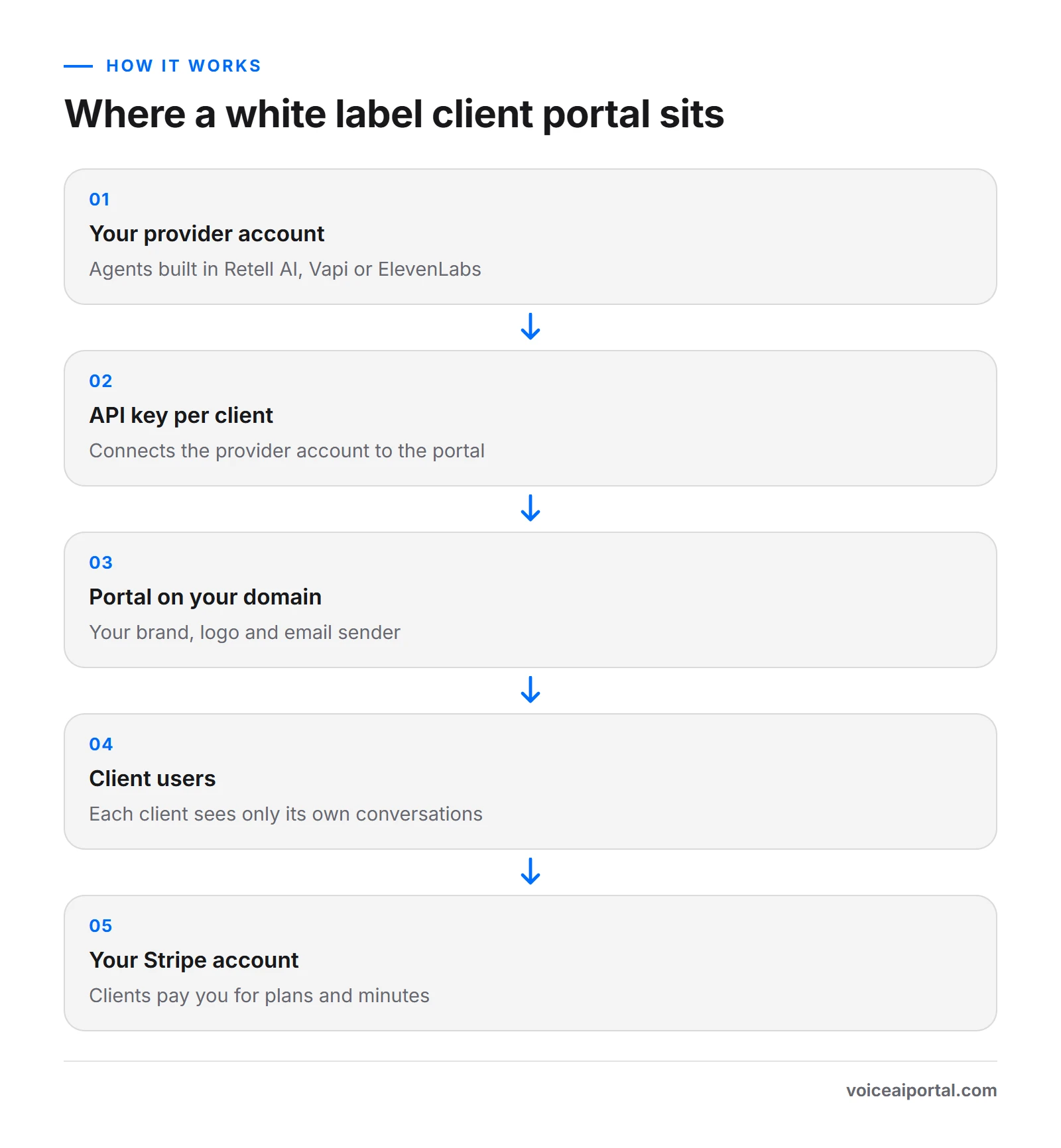
The five links in the chain
- Agents stay in your provider account.
- An API key per client connects that account to the portal.
- The portal runs on your domain and brand.
- Each client’s own users sign in to it.
- Client payments land in your own Stripe account.
The sections below take each link in turn, with what to check in a trial.
Want to test each point on a working client portal as you read? Start free trial.
How deep should the branding go: domain, logo, emails and login?
Branding should cover everything a client touches: the web address, the login page, the logo, the colours, the browser tab and every email. If any one of these shows the vendor’s name, the client can find the vendor and the vendor’s own pricing. Check what the client actually sees on each surface.
Custom domain and SSL
A custom domain puts the portal at an address you own, such as portal.youragency.com. It is usually set up with a CNAME record, a DNS entry that points your subdomain at the vendor’s servers. The vendor then issues an SSL certificate, the padlock that lets the address load securely.
Ask who sets up SSL and who renews it. An expired certificate shows your client a browser warning with your name on it.
Logo, colours, tab and login page
Look for a light and a dark logo, your own colours and your own favicon, the small icon in the browser tab. Then check the tab title. If it carries the vendor’s name, every client who opens the portal sees it.
The login page is the screen a client sees every time. It should carry your logo, your colours and your own page title and description, which can also show in search results and link previews.
Emails from your own domain
Sign-in codes, invoices and results emails all come from somewhere. If they come from the vendor’s domain, the vendor’s name sits in your client’s inbox. Look for sending from your own domain through your own sender.
What conversation pages give away
Check what each conversation page shows. If it names the provider or shows what the call cost you, a client can work out your margin in a minute. Hiding both protects your pricing.
Check in a trial: open the client view in a private browser window and read every screen, tab title and email as your client would.
How should client access and permissions work?
Each client should have their own users, seeing only their own conversations, while your team holds the settings. Count three things: how many client users each plan allows, how many team seats you get, and which roles can change the brand, the domain and billing. A shared sign-in fails on all three.
Client users
A client user is one person at your client who can sign in. A dental practice might want the manager and two receptionists, while a sole trader plumber might want one. Plan limits on client users shape your margin on larger clients, so check them before you sign several multi-site clients.
Check how people sign in, too. A one-time code means there is no shared secret to reset or leak when your client’s staff change.
Team roles
Your own team needs roles as well. A contractor who builds agents should not be able to change your custom domain or brand colours. Ask which roles exist and what each one can change.
Keeping clients apart
Separation is the whole point. In a trial, set up two test clients, sign in as a user of one, and confirm nothing from the other appears anywhere, including search results and emails.
How should client billing and minutes work?
Client billing should let you sell each client a monthly plan with included minutes, charge for minutes beyond it and collect payment into your own Stripe account. Without it you invoice by hand from provider exports, and margin leaks every busy month. This is the criterion that pays for the rest.
The terms to know
- Included minutes: the minutes a client’s plan covers each month.
- Overflow minutes: minutes used beyond that, charged at a rate you set.
- Minute packs: extra minutes a client buys in advance, often with an expiry date.
If your agents also answer web chat or SMS, check whether plans can include chats as well as minutes. For setting the plans themselves, see how to bill clients for minutes.
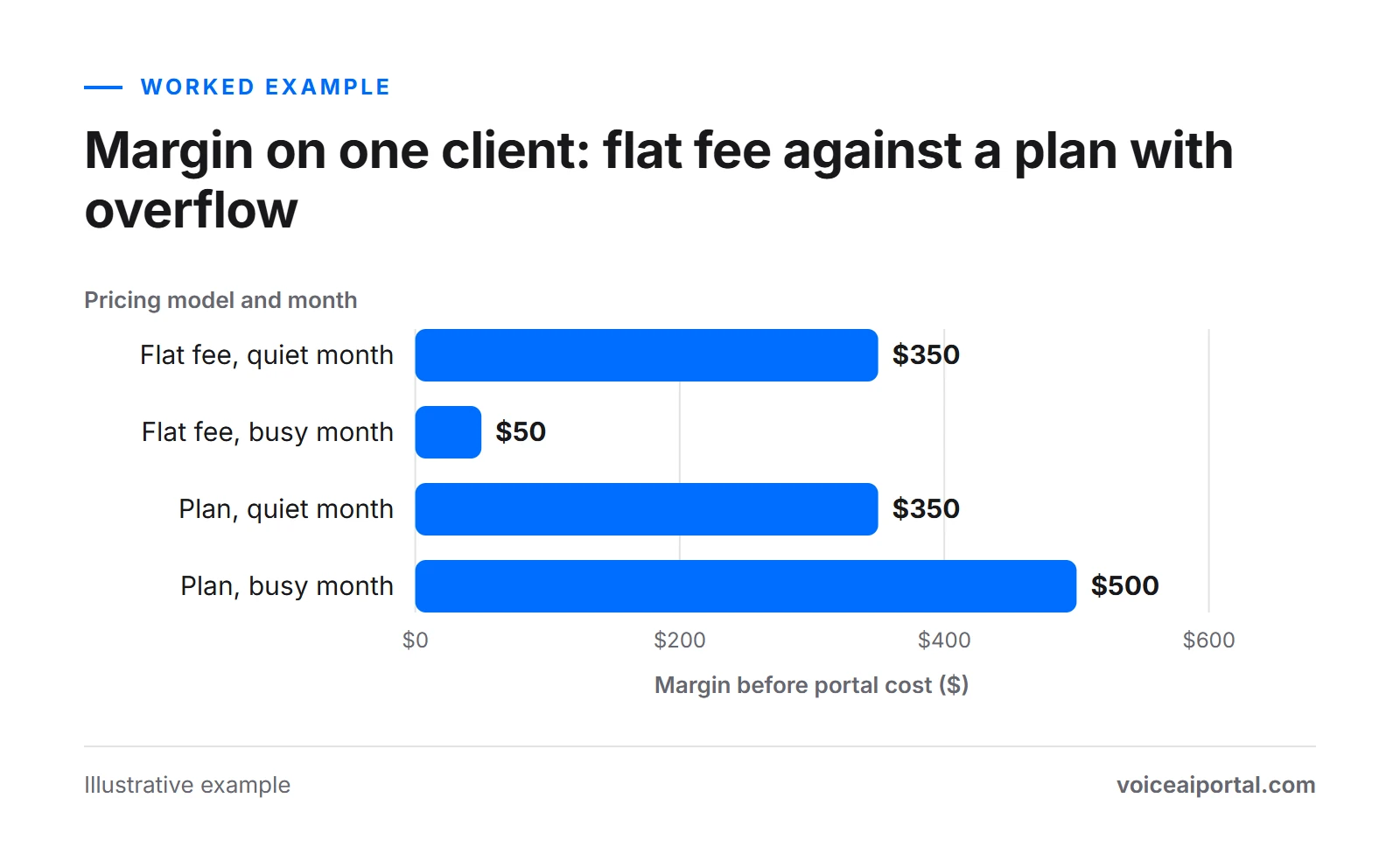
Worked example: flat fee against a plan with overflow
This is an illustrative example. The cost per minute is an assumption for the sums, not any provider’s published rate. Use the all-in figure from your own provider invoice; our Retell AI and Vapi pricing guide shows how to work it out.
Inputs (illustrative):
- Client fee: $500 a month.
- Your all-in provider cost: $0.15 a minute.
- Plan option: 1,500 included minutes, then $0.30 per overflow minute.
- A quiet month of 1,000 minutes and a busy month of 3,000 minutes.
- Your portal cost for this client: fill in from your own plan.
| Month | Provider cost | Flat fee margin | Plan revenue | Plan margin |
|---|---|---|---|---|
| Quiet: 1,000 minutes | $150 | $350 | $500 | $350 |
| Busy: 3,000 minutes | $450 | $50 | $950 | $500 |
On the flat fee, the busy month’s margin falls from $350 to $50, before your portal cost. On the plan, the same month adds 1,500 overflow minutes at $0.30, which is $450, so revenue is $950 and margin is $500.
To check your own version, rerun the sums with your busiest month from the last quarter. If the flat-fee margin on that month would not cover your portal cost and your own time on the client, that client needs a plan with included minutes.
Where the money lands
Ask where client payments go. If they go into your own Stripe account, the customer record and the cash stay with you, even if you later change tools. Ask too whether the vendor adds a fee to client payments, and whether you can record bank transfers.
What happens at the limit
Ask what happens when a client runs out of minutes. A platform might do nothing, track use, or stop new calls. Find out exactly which calls stop and which carry on, then decide per client which you want.
If you are still deciding whether you or the client should hold the provider bill, who pays the voice AI provider bill sets out both models.
Which providers should it support, and who holds the API keys?
Pick a platform that works on top of provider accounts you hold, connects each client with its own API key, and supports the providers you use: Retell AI, Vapi, ElevenLabs or a mix. If the platform holds the provider account, it usually holds the numbers and the cost line too, so check what the contract lets you take with you.
An API key is a secret code that lets one piece of software act on your provider account. Whoever holds it can see and change what that key can reach.
One provider per client, or several
You may not stay on one provider. You might run a receptionist agent on Retell AI for one client and a WhatsApp agent on ElevenLabs for another. Check that different clients can sit on different providers under one agency sign-in.
Check channels as well as calls. Web chat, SMS and WhatsApp work differently on each provider, and a client who chats with your agent will expect those chats next to their calls.
Treat keys like a bank login
Unless the provider lets you restrict it, a provider API key can often reach much of the account it came from. ElevenLabs is one provider that lets you limit a key: its authentication docs describe restricting a key to chosen API endpoints and setting a credit quota on it.
Ask four questions about keys. Is there one key per client? How is it encrypted at rest? Who on the vendor’s team can read it, and how quickly can you swap it if it leaks?
A good answer names the encryption method, such as AES-256-GCM. That is AES with a 256-bit key, the cipher NIST specifies in FIPS 197, run in Galois/Counter Mode (GCM), the mode NIST sets out in Special Publication 800-38D. A vague answer about ‘bank-grade security’ tells you nothing.
Then test it. Create a new key in the provider, paste it into the platform, and check the next conversation comes through. If changing a key means rebuilding the client, every client you add carries that risk.
Outbound campaigns
If you run outbound sales calls or reminders for clients, check outbound on its own. Look for calling windows, pacing, opt-outs and a consent step, and check which channels each provider can send on. Check the calling rules for each country you call into before the first campaign. In the US, the FCC’s 2024 ruling says calls that use an AI-generated voice need the called party’s prior express consent (FCC 24-17).
What reporting will your clients actually read?
Reporting should show a client, at a glance, what their agent did: how many conversations, how many were completed, what came in after hours, and what was said. Expect clients to sign in when something feels wrong and to read the emails you send. Build your checks around those two moments.
The conversation record
For each conversation, look for the recording, the transcript and a summary, with search and filters. Check that a client can play or download a recording, and that calls and chats sit in one list, labelled by channel.
A value figure with the working shown
A single headline figure with no working invites the client to argue with it. Look for a staff time figure that shows how it was worked out: the conversations handled, and the time a human agent at your client would have spent on them.
Treat booking or revenue figures with care. Ask where each number comes from, and whether the platform reads it from your client’s own systems.
The results email
A results email puts the numbers in front of a client without a sign-in. Check that it comes from your own domain, carries your logo, and that you can see which clients receive it. Our guide to voice AI client reporting covers what to put in it.
Reporting for you: health
An agent fails out of sight. A key expires or a number stops connecting, and your client hears about it from a customer. Look for a health view that names the client, what went wrong and what to check.
What data does it store, and what does it read live?
A platform can keep its own copy of your clients’ conversation data, read it live from the provider each time a page opens, or do some of each. Ask which data sits on which side, where stored data is held, how long it is kept, and what happens to it if you leave.
Stored or read live
Reading live means the platform asks the provider’s API for the data each time someone opens a page. Storing means it keeps its own copy. Either can be right, and each changes what you tell clients.
| Stored by the platform | Read live from the provider | |
|---|---|---|
| Speed | Quick to load and chart over months | Depends on the provider’s API each time |
| History | Kept for as long as the platform keeps it | Limited to what the provider keeps |
| Your client terms | A second copy to list | One copy, in your provider account |
| Provider outage | Past data still shows | Pages may not load |
Questions to ask before you resell
- Which items are stored: recordings, transcripts, contact lists, call statistics, keys?
- In which region is stored data held?
- How long is it kept, and can you delete one client’s data?
- How are provider keys encrypted, and who can read them?
- Who on the vendor’s team can see client conversations?
- Do they offer data processing terms you can pass on to clients?
- What happens to stored data if you cancel?
Your clients will put these questions to you. Keep the written answers on file and reflect them in your own client contract.
A scored checklist for any white label AI voice agent platform
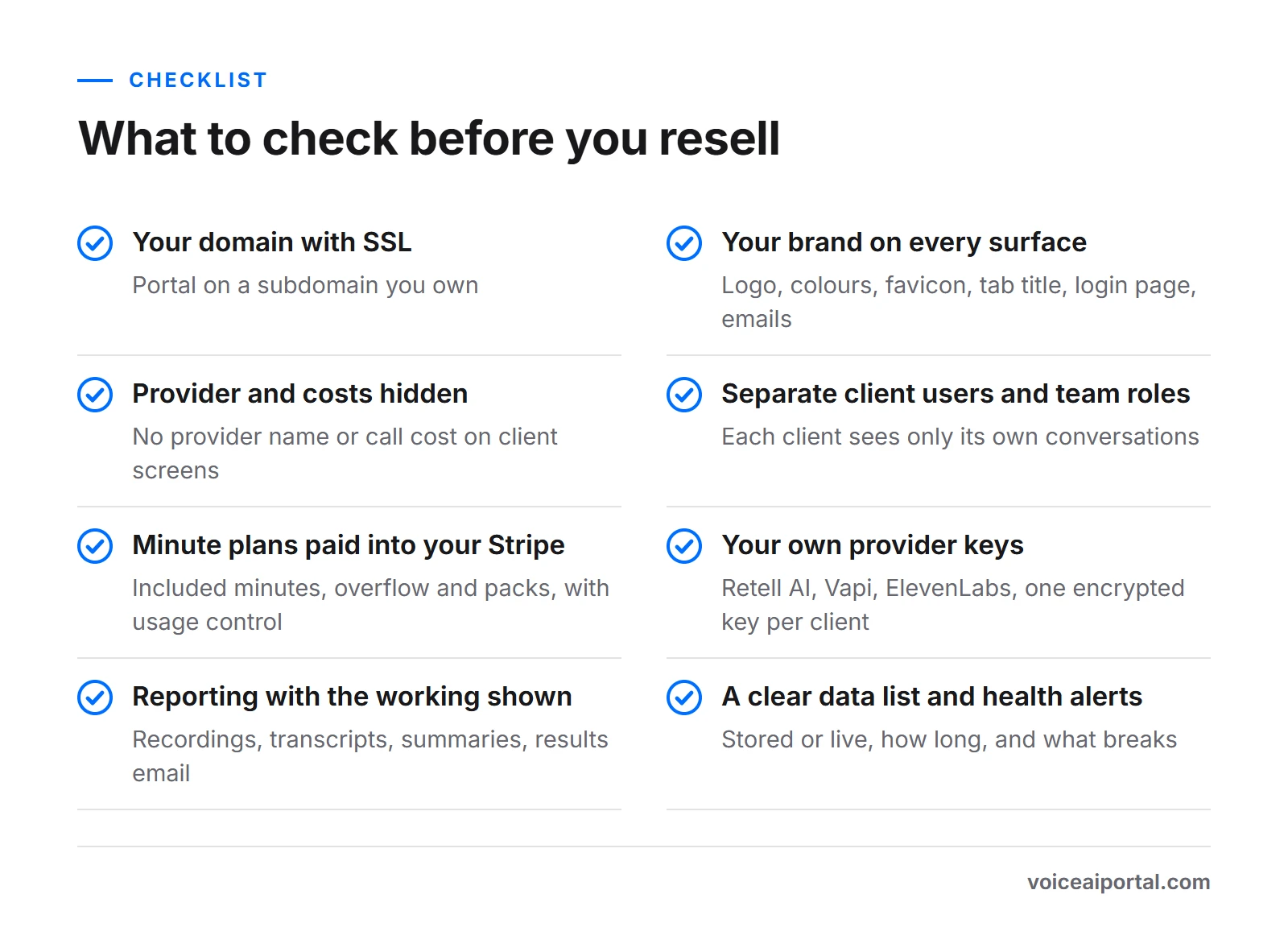
Score each criterion 0, 1 or 2 on any white label AI voice agent platform: 0 if it is missing, 1 if it is partly there or needs a workaround, and 2 if you have seen it work in a trial or demo. Ten criteria give a total out of 20, and two of them can end the decision alone.
| # | Criterion | Scores 2 when |
|---|---|---|
| 1 | Custom domain | The portal runs on your subdomain, with SSL set up for you |
| 2 | Branding depth | Logo, colours, favicon, tab title and login page are all yours |
| 3 | Your email sender | Codes, invoices and reports come from your own domain |
| 4 | Provider hidden | Client screens never show the provider or your call costs |
| 5 | Client users and roles | Each client has separate users, and team roles limit who changes brand and domain |
| 6 | Client billing | Plans with included minutes, overflow and packs, paid into your own Stripe |
| 7 | Usage control | You choose per client whether to track or enforce minute limits |
| 8 | Providers and keys | It supports every provider you use, on accounts you hold, with one encrypted key per client |
| 9 | Reporting | Recordings, transcripts, summaries, channels, a value figure with its working, and a branded results email |
| 10 | Data and health | A clear stored or live list, and an alert when a client’s agent needs attention |
Reading the score
- 17 to 20: shortlist it.
- 12 to 16: workable, if the gaps are ones you can cover by hand.
- 11 or less: keep looking.
- Any 0 on row 6 or row 8: stop, whatever the total. Those two rows decide your margin and who owns your clients.
Illustrative example: a platform that runs on your domain (2), sends email from its own domain (0), bills clients only through the vendor’s Stripe (1) and supports one of the two providers you use, on keys you hold (1), scores 4 out of 8 on those rows. It is not ruled out, but the email gap and vendor-held payments cost you something on every client.
Run the sheet on each option you trial, with the same test client, so the scores compare like for like.
How Voice AI Portal answers each criterion
Voice AI Portal is a white label client portal for voice AI agencies. It works on top of the Retell AI, Vapi or ElevenLabs accounts you already have, with each client connected to one provider account and different clients on different providers. Here is how it answers each row of the checklist above.
We built it on the three providers’ APIs, so it connects to each client’s provider account through that client’s own key. On the client side, the white label feature page puts the key point plainly: “Conversation pages never show the provider or what each call cost you.”
Criterion by criterion
| Criterion | What Voice AI Portal does |
|---|---|
| 1. Custom domain | Runs on your own subdomain, such as portal.youragency.com, with one CNAME record, and SSL is set up once the domain is verified. |
| 2. Branding depth | Light and dark logos, primary and secondary colours, a favicon and four login page designs (Clean, Professional, Modern, Premium). White label is included on every plan. The browser tab shows your agency name and favicon, and the login page uses your own meta title and description. |
| 3. Your email sender | Emails go from your own domain through your own sender, including the results email with your logo. |
| 4. Provider hidden | Conversation pages never show the provider or what each call cost you. |
| 5. Client users and roles | Each client gets its own client users on your brand, and agencies and their clients sign in with a one-time code. Only the agency owner can change the custom domain, brand colours and advanced settings, while owners and admins can upload logos and the favicon and change the login page theme. |
| 6. Client billing | Sell clients monthly plans with included minutes and chats, overflow minutes and minute packs, with client billing on every plan. Clients pay into your own Stripe account by card or invoice, or you record manual payments with a payment page and reminders, and Voice AI Portal adds no fee to client payments. You can give a client a free trial of 1 to 90 days. |
| 7. Usage control | Three modes per client: Off, Track only, and Track and enforce. On Track and enforce, new outbound calls and campaigns stop when the client runs out of minutes. Calls in progress always finish, and inbound calls stop only for clients with provider changes on. |
| 8. Providers and keys | Works with Retell AI, Vapi and ElevenLabs, with each client connected to one provider account through its own API key and different clients on different providers. Provider keys are encrypted with AES-256-GCM. |
| 9. Reporting | Conversations with recording, transcript and summary, with search, filters, play and download. Inbound content is read live from the provider when the page opens, and not stored. Analytics include completed and after-hours conversations, plus staff time handled with its working shown, which is an estimate with published counting rules. |
| 10. Data and health | Health shows in the app which client’s agent needs attention, such as an invalid key or calls failing to connect, and what to check, and it reads stored call statistics. Contact lists and numbers dialled are stored to run outbound campaigns. |
What shows for each provider
| Retell AI | Vapi | ElevenLabs | |
|---|---|---|---|
| Conversations in the portal | Calls, web calls, web chats, SMS | Calls, web chats, SMS | Calls, web chats, SMS, WhatsApp, help desk tool conversations |
| Outbound from the portal | Call and SMS campaigns | Call campaigns | Call and WhatsApp campaigns |
For ElevenLabs clients, each conversation is labelled by channel, and web chat and WhatsApp are set up from the portal. Outbound campaigns run from a contact list with playbooks, calling windows, pacing, opt-outs and a consent confirmation.
Agents, prompts, voices and phone numbers stay in your provider account. You build and edit them in Retell AI, Vapi or ElevenLabs, and the portal shows your clients what they did and bills for it. The Retell AI, Vapi and ElevenLabs integration pages give the detail.
Adding a client
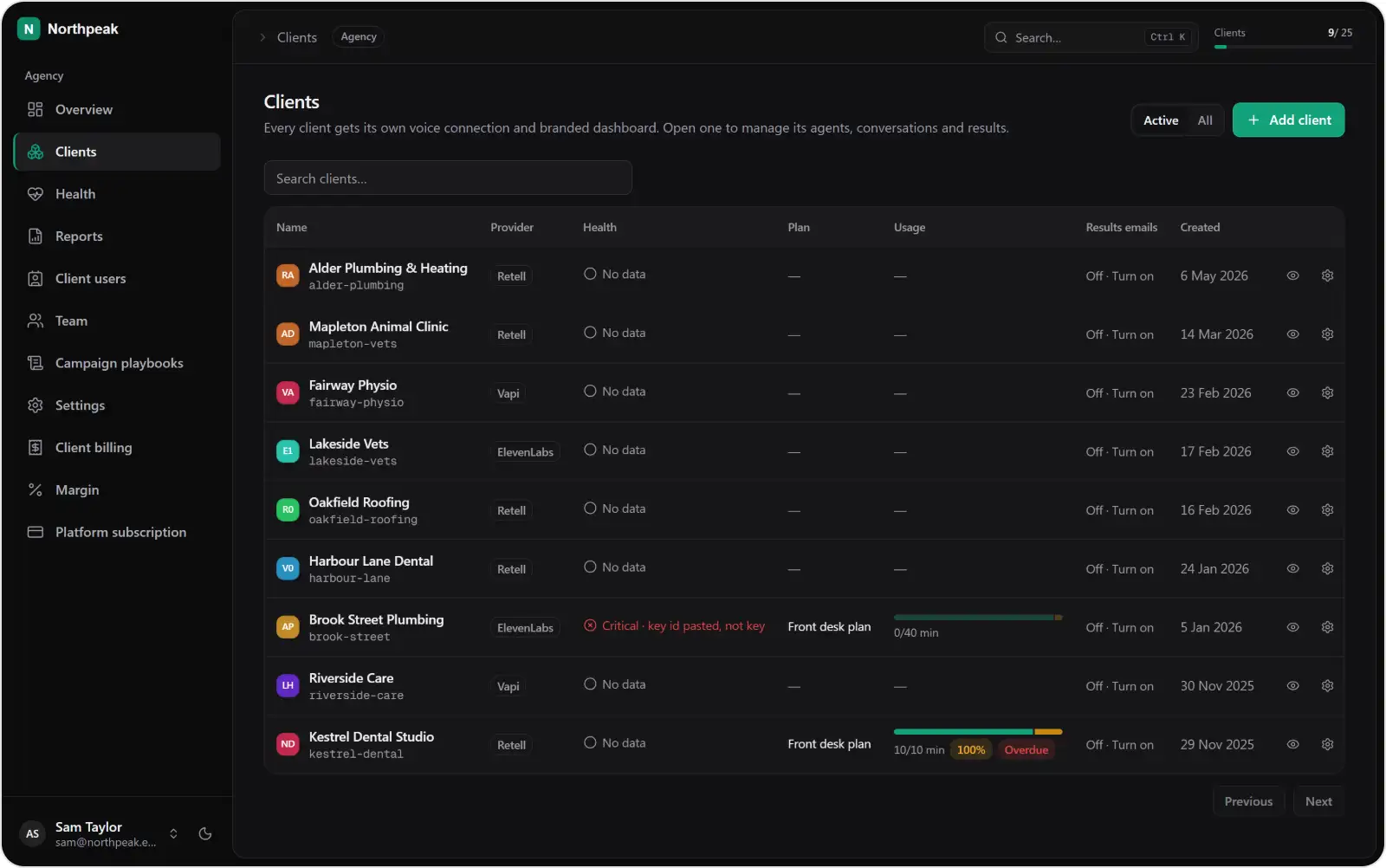
The agency dashboard gives you one sign-in for every client and every provider. Adding a client is one guided wizard: connect the provider key, choose the agents and numbers, set the region and staff costs, and set up outbound if you want it.
Every client then sits in one list, with its provider, health, plan, minutes used and results email status side by side.
Run the checklist yourself
Client, team seat and client user limits differ by plan, so See pricing before you count your clients.
In short, score billing and key ownership first, because they decide your margin and who owns each client. Then check that your brand holds on every screen and email, and that each client can see their agent working.
The most direct way to score Voice AI Portal is on a test client of your own: Start free trial.
Questions agencies ask before choosing a platform
What should I look for in a white label voice AI platform?
Look for minute billing paid into your own Stripe, your brand and domain on every screen and email, and separate users for each client. Check that it supports the Retell AI, Vapi or ElevenLabs accounts you already hold. Then check that clients will read the reporting and that you get a clear list of what data is stored. Score each with the checklist above, and treat billing and key ownership as deal-breakers.
What reseller features matter most for client accounts and rebilling?
Separate client users and per-client billing matter most. Each client needs its own users who see only their own conversations, and its own plan with included minutes, overflow minutes and minute packs. Payments should land in your own Stripe account, so the customer relationship stays with you.
Should I choose a no-code or a developer-focused platform?
Choose a client portal that needs no code, and make the no-code or developer choice at the provider. Retell AI, Vapi and ElevenLabs each have a dashboard for building agents and an API for developers, so agent complexity lives there. The portal on top should need only an API key and a few settings per client. Our Retell AI vs Vapi comparison covers the build side.
How do I check a platform’s privacy and security before I resell it?
Ask for a written list of what it stores, where and for how long, and how it encrypts provider keys. Check who on the vendor’s team can see client conversations, how clients sign in, and what happens to stored data if you cancel. Keep the answers on file, because your clients will ask you.
Can I keep my own provider accounts on a white label platform?
Yes, if the platform connects to your provider accounts with an API key rather than running agents in an account it owns. Keeping the accounts means you keep your agents, your phone numbers and your provider cost. Ask whether different clients can sit on different providers, and how you replace a key.
Does a white label platform affect voice quality?
Voice quality comes from the provider: its voices, speech models and settings, which you choose in Retell AI, Vapi or ElevenLabs. A white label client portal shows and bills what the agent does. Compare voice quality in the providers’ own dashboards before you commit a client to one.
Sources
- Voice AI Portal: White label checked 13 November 2026
- Voice AI Portal: White label, custom domain checked 13 November 2026
- Voice AI Portal: White label, brand and login page checked 13 November 2026
- ElevenLabs: API authentication checked 13 November 2026
- NIST: FIPS 197, Advanced Encryption Standard (AES) checked 13 November 2026
- NIST: SP 800-38D, Recommendation for Block Cipher Modes of Operation: Galois/Counter Mode (GCM) and GMAC checked 13 November 2026


