Can I build a voice AI dashboard? The build or buy guide
Can I build a voice AI dashboard? What it takes on the Retell AI, Vapi and ElevenLabs APIs, the upkeep, and a build or buy table with hour ranges.


On this page
- Can I build a voice AI dashboard for my clients?
- What should a voice AI dashboard include?
- What does building it take on the Retell AI, Vapi and ElevenLabs APIs?
- How do I connect a dashboard to call data and webhooks?
- What do access, branding and billing take?
- What maintenance does nobody budget for?
- Build or buy: how do I decide?
- Can I build a voice AI dashboard? The build or buy guide: questions
Short answer: If you run a voice AI agency, yes: you can build your own voice AI dashboard on the Retell AI, Vapi and ElevenLabs APIs. The work is call sync, webhooks, transcripts, recordings, per-client sign-in, branding and Stripe billing, then upkeep as each API changes. Build if the dashboard is your product. Buy a white-label client portal if the agents are.
Can I build a voice AI dashboard for my clients?
Yes. Retell AI, Vapi and ElevenLabs each have an API (application programming interface, the route your code uses to ask a provider for data), so a developer can pull your clients’ conversations into a dashboard you own. The code that lists calls is the small part. Sign-in, branding, billing and upkeep take most of the hours, and those hours come out of your margin.
The question usually starts with a client. An AI voice agent works out of sight, so the client only notices it when something goes wrong. If you send them into your provider login, they see your costs, your tools and another company’s brand.
Retell AI and Vapi both expect you to build that client layer. Retell AI’s guide for agencies says “The Retell dashboard itself is not rebranded”, and Retell AI has no API to create client workspaces.
Vapi’s FAQ describes Vapi as API-first and says “The integration model of multi-tenancy is similar to Stripe”. Multi-tenancy means many separate clients on one system, each seeing only their own data. With Vapi, that layer is yours to build.
Tutorials that build a voice agent in 10 minutes stop at the agent. The client layer (sign-in, branding, billing) is not part of them, and it is the part your clients see every day.
The size of the job depends on who will look at it. An internal, read-only dashboard for your own team on one provider needs only the integration, sync and conversation views from the table further down. A client-facing one on several providers needs everything in this guide.
So the real decision is whether to build or buy. We built Voice AI Portal on these same APIs. This guide sets out the work in the order you meet it, with hour ranges your developer can check.
What should a voice AI dashboard include?
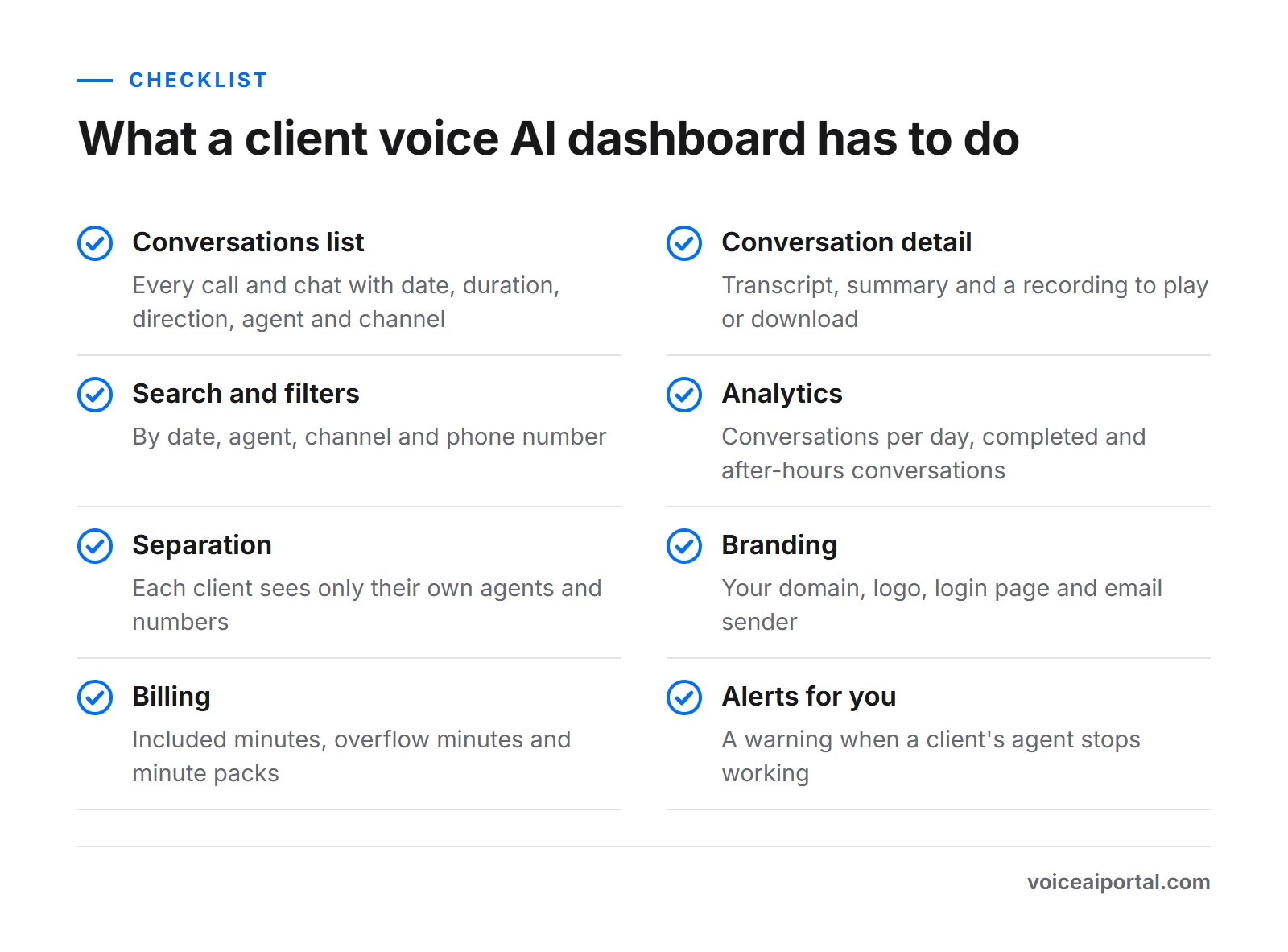
A voice AI dashboard should show each client what their AI agents did, in your brand, without exposing your provider account. That means a conversation list, a transcript, recording and summary for each conversation, simple analytics, separate sign-in for each client user, and billing if you sell minutes.
A transcript is the written record of what the caller and the agent said. The summary is the provider’s short AI write-up, produced after the conversation ends.
This is the feature list we would hand a developer:
- Conversations list: every call and chat, with date, duration, direction (inbound or outbound), agent and channel.
- Conversation detail: transcript, summary and a recording the client can play or download.
- Search and filters: by date, agent, channel and phone number.
- Analytics: conversations per day, completed conversations and after-hours conversations, meaning those outside the client’s opening hours.
- Separation: each client sees only their own agents and numbers.
- Branding: your domain, logo, login page and email sender.
- Billing: included minutes, overflow minutes and minute packs, if you sell minutes.
- Alerts for you: a warning when a client’s agent stops working.
It also has to work on a phone. That is where a busy client owner often opens it, sometimes straight after a complaint.
What the dashboard leaves out matters as much. Clients should never see your API key, the provider’s cost per call, the prompt or the tools behind the agent. If a client sees a cost figure, expect a conversation about your margin that you did not plan to have.
Tracking how each voice AI agent performs
Call performance comes from the call records your sync has saved. Count conversations per day, completed conversations, average duration and after-hours conversations, then split them by agent and by channel.
Keep analytics to what the records support. Each provider returns post-call analysis alongside duration and end reason. Retell AI’s call analysis has call summary, user sentiment and call successful, and Vapi’s analysis object has summary, structured data and success evaluation. ElevenLabs returns evaluation criteria results and data collection.
Each provider names and fills these fields its own way. None of them shows what the caller did next. A client dashboard still has to put them into one format and leave out any figure the records cannot back.
What the provider handles: speech-to-text and text-to-speech
Some of the work never touches the dashboard. The voice pipeline runs in the provider: speech-to-text (STT, turning the caller’s voice into text), a large language model (LLM) that picks each reply, and text-to-speech (TTS, turning the LLM’s reply into a voice).
The agent’s settings in Retell AI, Vapi or ElevenLabs decide which parts it uses, the TTS voice included. Those choices shape latency, the pause before the agent replies, and turn detection, how the agent knows the caller has finished. Your dashboard only reads the result.
Transcript accuracy depends on the speech-to-text the agent uses. It is usually measured as word error rate: the share of words a transcriber gets wrong, compared with a checked human transcript.
Your dashboard shows each transcript as the provider produced it. When a client queries one, play the recording and read the two side by side.
To check this list against a working client portal as you read: Start free trial.
What does building it take on the Retell AI, Vapi and ElevenLabs APIs?
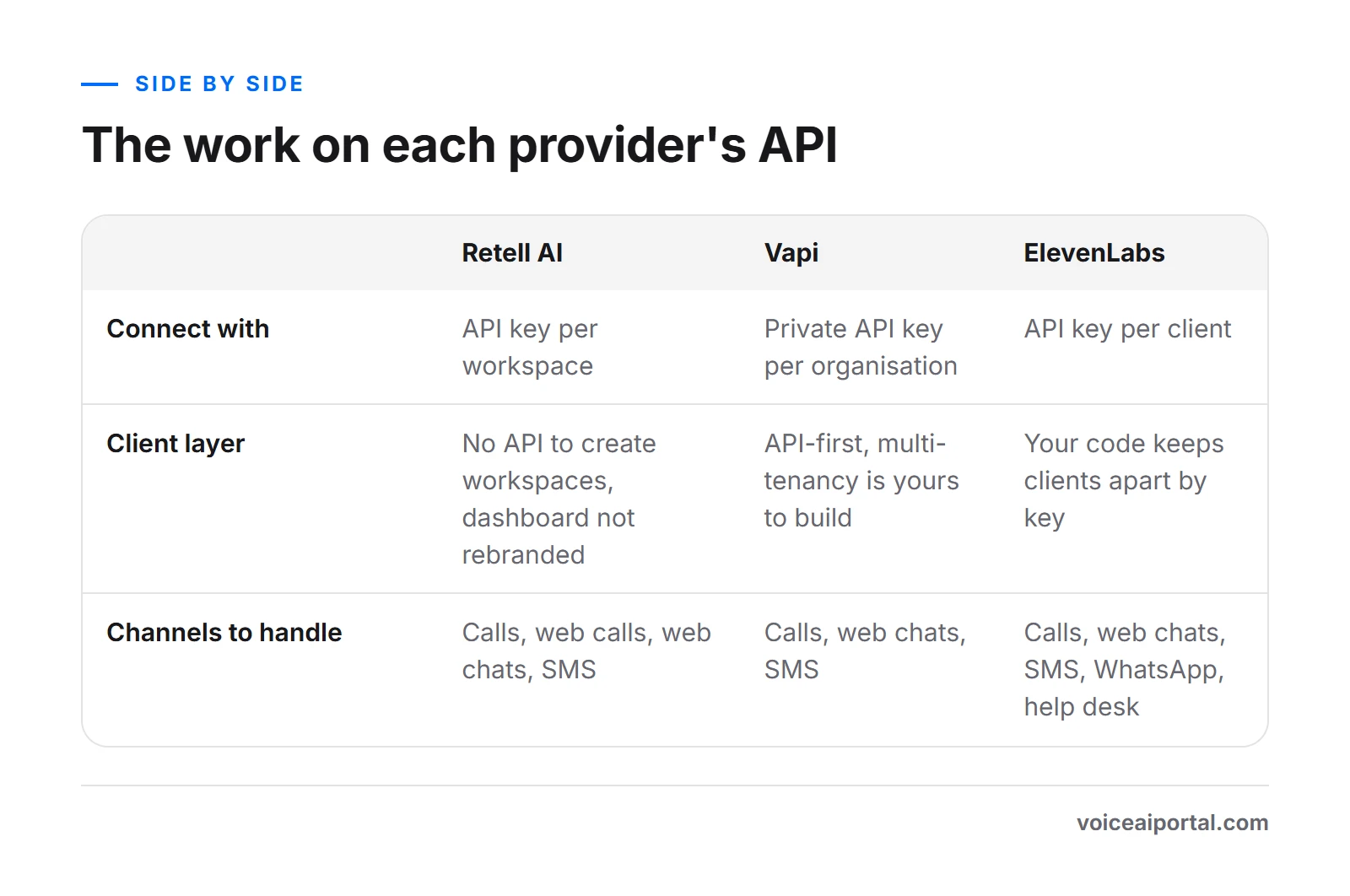
Building it takes three separate integrations. Each provider has its own API key, its own endpoint (the address in an API that returns one kind of data) for listing conversations, its own call record and its own webhook format. You also keep a mapping of client to key that must never leak, and you test each provider on its own.
Here is what each provider asks of you, from building on all three.
Retell AI
Retell AI connects with an API key, and each client is best kept in their own Retell AI workspace with their agents and numbers. Retell AI has no API to create those workspaces. Each one is set up by hand in Retell AI before you paste its key into your system.
Our own integration lists calls through Retell AI’s /v3/list-calls endpoint, then reads each call’s transcript, summary and recording. Summaries are written after the call ends, so plan for a call to appear before its summary does.
In our integration, Retell AI conversations come in as phone calls, web calls, SMS and web chats. Each type needs its own place in your conversation list.
Vapi
Vapi connects with a private API key for each client’s Vapi organisation. Our Vapi integration notes say it plainly: “Use a private key, not a public one.” A public key will not validate.
Calls are listed through Vapi’s API, and Vapi can send events to an address you own when a call ends. Check the current event names and payload in Vapi’s API reference before you build the parser.
In our integration, Vapi conversations come in as calls, SMS and web chats. Each client is kept separate by their own organisation, their own key and the rules your code enforces. Our Vapi dashboard guide covers the client side in more detail.
ElevenLabs
ElevenLabs connects with an API key per client. Budget for listing conversations, then fetching each one’s detail and audio. Check ElevenLabs’ API reference for the current routes and its post-call webhook format.
In our integration, ElevenLabs carries the most channels: calls, web chats, SMS, WhatsApp and help desk tool conversations, each labelled by channel. Your list needs a channel label from day one.
Rate limits and concurrency
Expect each provider to limit how often you can call its API and how many calls run at once (concurrency). Before you design syncing, check each provider’s current figures and whether they change with your plan.
A dashboard that asks every client’s API for new calls every minute is the design most likely to hit those limits.
What you would build it with
A typical stack has six layers. These are common options, not the only ones:
- Front end: a web framework such as Next.js on React.
- Database: Postgres, or Supabase for hosted Postgres with sign-in included.
- Sign-in: your framework’s auth library, or Supabase Auth.
- Charts: a charting library for the analytics views.
- Billing: Stripe Billing for plans, invoices and card payments.
- Hosting: a Docker container on any host that serves HTTPS, so provider webhooks can reach it.
For a view only your team uses, a low-code internal-tool builder such as Retool can sit on the same database. It suits your own staff better than branded sign-in for client users.
Step by step: the order to build in
If you do build, this order puts a working view in front of you early and leaves billing until the numbers under it are reliable:
- One provider first: list one client’s conversations and show their transcripts.
- Sync: add webhooks and the scheduled backfill described in the next section.
- One conversation format: a single shape for every conversation, so your views never care which provider it came from.
- The other providers: map each one into that format.
- Access: roles and client assignment, tested with two clients.
- Branding: subdomain, login page and email sender.
- Billing and margin last: once minute counts match each provider’s own figures.
How do I connect a dashboard to call data and webhooks?
There are two ways to connect a dashboard to call data. A webhook is a message the provider sends to a web address you own when a conversation ends. Polling is your code asking the API for anything new. Most builds need both, because a webhook can be missed and polling alone is slow.
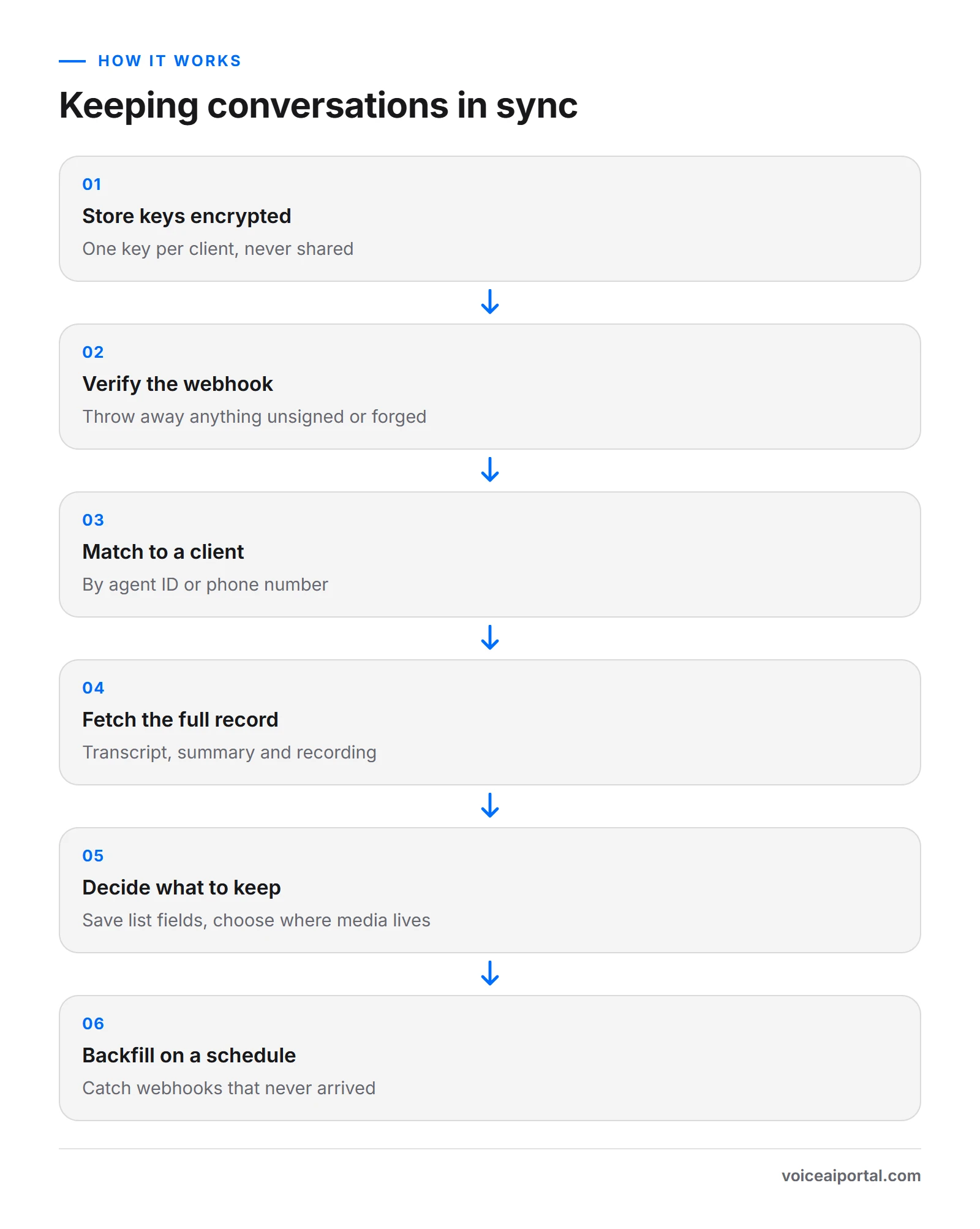
A sync that holds up runs in six steps:
- Store each client’s key encrypted, tied to that client and never shared.
- Verify the webhook’s signature and throw away anything unsigned or forged.
- Match the event to a client by agent ID or phone number. If nothing matches, log it and stop.
- Fetch the full record from the API: transcript, summary and recording.
- Decide what to keep. Save the fields your lists need and choose where media lives.
- Backfill on a schedule, listing each client’s conversations since the last sync to catch webhooks that never arrived.
In outline, the job looks like this:
In outline, the sync works like this:
- On each webhook event: verify the signature and reject the event if it fails. Match the client by the agent ID or phone number, and log and stop if there is no match. Then fetch the conversation from the provider’s API with that client’s key, and save the fields your list needs.
- Every hour: for each client, list the conversations since that client’s last sync, and fetch any the webhook missed.
Step 3 is where builds go wrong. If one webhook address serves many clients, every event must be matched before it is saved. One bad match shows a client another client’s conversations, so test it with two clients on the same provider before anyone real signs in.
Recordings need their own plan. Where the provider serves audio through its API, your server fetches it with the key and passes it on, because the key must never reach a browser.
Storing copies has a cost too. Every transcript and recording you keep is client data you are responsible for securing, backing up and deleting, so keep only what your lists need.
A live view needs more work. Post-call webhooks arrive after a call, so showing calls in progress needs a call-start event from the provider, where it sends one, and a way to push it to an open page.
What do access, branding and billing take?
Access, branding and billing turn a call list into something you can put in front of a client. Each client needs sign-in for several client users, your logo and domain, and email from your sender. If you sell minutes, you also need plans and payments that match what the provider charges you.
Access
You need at least three roles: you, your team and each client’s users. Each role needs invites, sign-in, a way back in when someone loses access, and removal when they leave.
Every page and every API route must check which clients that person is assigned to. One missed check is a data leak, so review this code harder than any other part of the build.
Branding
White label means the client sees only your brand. That covers a custom subdomain with its security certificate, your logo and colours, and a branded login page.
Email takes the most care. Sign-in and report emails should come from your own sender, and that needs DNS records (the settings that prove you own a domain) before inboxes will trust them.
Billing
Billing decides your margin. You pay the provider by the minute and usually sell a flat monthly fee, so the client’s busiest month can be your thinnest.
A billing build means plans with included minutes, overflow minutes (minutes beyond the plan, at a set rate) and minute packs (extra blocks a client buys ahead). On top of that you need minute counts per client from each provider, rounding, trials, Stripe invoices, failed payments and reminders.
Then decide what happens when a client runs out of minutes, and make it a deliberate setting rather than a side effect. Our guide on how to bill voice AI clients for minutes covers the pricing side.
Last, track margin per client. That means what you billed against what the provider charged, by month, visible to you and never to the client.
What maintenance does nobody budget for?
Budget for upkeep every month, because the dashboard depends on three APIs you do not control. Providers can add fields and channels, change webhook payloads and release new API versions. Any of those changes can blank a client’s view without warning.
This is the recurring work, with our planning range for three providers:
- API changes (2 to 6 hours a month): read each changelog and retest the sync.
- Keys and failed syncs (1 to 4 hours a month): a client rotates a key and their conversations stop quietly, or a backfill times out.
- Security updates (1 to 3 hours a month): patches for the libraries the dashboard runs on.
- Client support (2 to 3 hours a month): “why is this call missing?” questions.
That adds up to 6 to 16 hours a month for about 10 clients. It is our estimate from the list above, not a measurement, so ask your developer to check it.
New channels add more. When a provider adds one, such as WhatsApp conversations on ElevenLabs, you need new parsing, labels and filters before clients see them.
The failure that costs you clients is the silent one. If a key goes invalid or calls stop connecting, you want to know before the client does. Build a per-client health check that says what broke and what to check.
Testing and deploying before clients sign in
Test the dashboard with test agents before any client signs in. Set up two test clients on the same provider, place real calls to each agent, and check every call lands under the right client with its transcript, summary and recording.
Then break things on purpose. Rotate a key, send a forged webhook and switch the webhook address off for an hour, then check the backfill fills the gap.
Deploy the same container you tested, behind HTTPS. Invite one friendly client first and watch their first week of conversations before you invite the rest.
Testing the AI agents themselves is separate work, and it stays in the provider. ElevenLabs documents agent testing and says “The framework includes three complementary test types”: full simulated conversations, next-reply checks and tool-call checks.
Those tests run from the ElevenLabs dashboard, its CLI (command-line tool) or its API, and a test can repeat 2 to 20 times for a pass rate. A dashboard shows what happened on real calls, so budget for testing as well.
Build or buy: how do I decide?
Build if the dashboard itself is what you sell. Buy if you sell the agents and the service around them, because every hour on dashboard code is an hour not spent on clients. Either way, put hours against the decision before you make it.
Hour ranges for a first version
These ranges assume one experienced developer and all three providers. They are our estimate, built up from this guide, not a measurement. Ask your developer to check each line.
| Part | What it covers | Hours |
|---|---|---|
| Provider integrations | Keys, listing, detail and channels for Retell AI, Vapi and ElevenLabs | 40 to 80 |
| Webhooks and sync | Signature checks, client matching, backfill | 20 to 40 |
| Client views | Conversation list, detail, player, search, analytics | 40 to 80 |
| Access | Roles, invites, sign-in, client assignment | 20 to 40 |
| Branding | Subdomains, login page, email sender | 15 to 30 |
| Billing | Stripe plans, overflow, packs, invoices, minute counts | 40 to 80 |
| Margin and health | Per-client margin, broken-agent alerts | 15 to 30 |
| First version | 190 to 380 | |
| Upkeep | From the maintenance list above | 6 to 16 a month |
Worked example (illustrative)
Take an agency with 10 clients across all three providers, paying a contractor $60 an hour. Every input is illustrative, so swap in your own.
- Build: 190 to 380 hours at $60 is $11,400 to $22,800.
- Upkeep: the monthly range above at $60 is $360 to $960 a month, or $4,320 to $11,520 a year.
- First year, built: $15,720 to $34,320.
- Per client, first year: $1,572 to $3,432 across 10 clients.
- First year, bought: your monthly plan from the pricing page, times 12 = ______.
Check it two ways. Compare line 3 with line 5, then compare line 4 with what one client pays you in a month. More clients spread the build cost, but upkeep grows with them, because each client adds keys, syncs and questions.
Decision table
| Question | Points to build | Points to buy |
|---|---|---|
| What do you sell? | The dashboard is the product | The agents and the service |
| Who will look at it? | Only your own team | Your clients, on your brand |
| Who writes the code? | An in-house developer with spare time | Nobody, or a developer busy on client work |
| Which providers? | One provider | A mix of Retell AI, Vapi and ElevenLabs |
| Do you bill minutes? | No, flat fees only | Yes, with plans, overflow and packs |
| Where must call data live? | On your own servers, for a client’s requirement | With the provider, read when a page opens |
| When do clients need it? | You can wait for a first version | A client is asking now |
What buying looks like in Voice AI Portal
Voice AI Portal is the bought option: a white-label client portal for voice AI agencies, built on top of the provider accounts you already have. Here is how it maps onto the build lines above.
| Build line | In Voice AI Portal |
|---|---|
| Provider integrations | Works with Retell AI, Vapi and ElevenLabs; each client connects to one provider account, and different clients can use different providers |
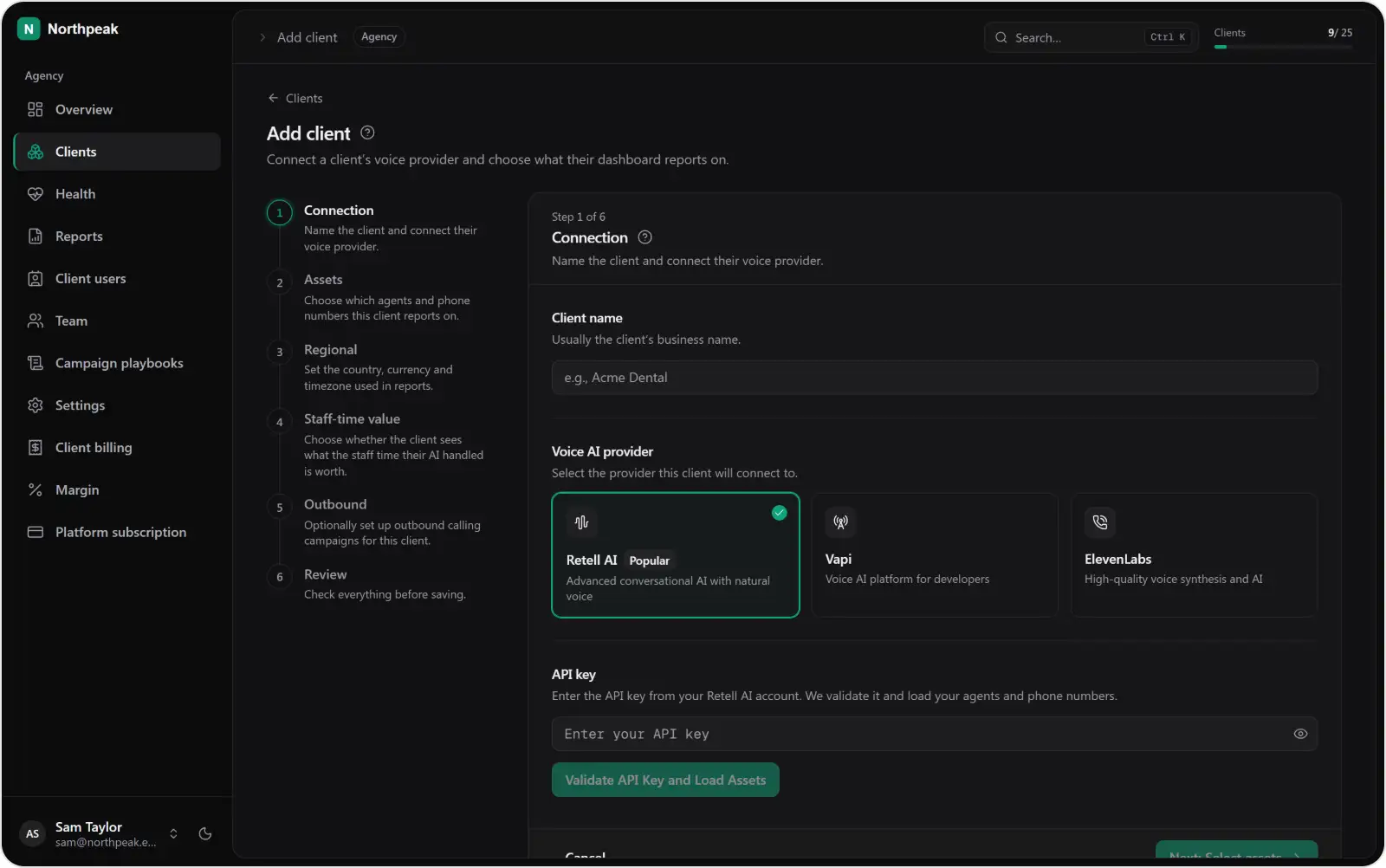
| Keys | Pasted once per client in a six-step guided wizard; only you and your admins can add or change a key, and clients never see it |
| Client views | Every conversation in one place, with the recording, transcript and summary; inbound content is read live from the provider when the page opens, and is not stored |
| Access | Agencies and their clients sign in with a one-time code, so they have no passwords |
| Branding | Your clients sign in to your brand: your subdomain, logo, login page and sender; white label comes with every plan |
| Billing | Sell clients minute and chat plans, with packs and overflow; client billing is on every plan |
| Payments | Clients pay into your own Stripe account, by card or invoice, or you record manual payments; Voice AI Portal adds no fee to client payments |
| Margin | What you earn on each client by month; owner only unless the owner shares it with admins, and clients never see it |
| Health | Shows which client’s agent needs attention, such as an invalid key or calls failing to connect; shown in the app, and by email only if health email is switched on |
On key handling, our white label page says “provider API keys are encrypted with AES-256-GCM before they are stored”.
As the pricing page puts it, every plan shows “Calls, web chats and SMS from every provider, plus WhatsApp for ElevenLabs.”
Your agents stay in your provider account: you build and edit them in Retell AI, Vapi or ElevenLabs, and the client portal shows what they did. For provider detail, read the Retell AI white-label dashboard and ElevenLabs white-label client portal guides.
In short
You can build a voice AI dashboard. On three providers, by our estimate, that means 190 to 380 hours for a first version plus monthly upkeep. If the dashboard is not your product, spend those hours on clients and give them a branded client portal instead. Start free trial and connect your first client.
Can I build a voice AI dashboard? The build or buy guide: questions
Can I build a voice AI dashboard without coding, and what will it cost?
You can build a basic one. A no-code automation tool such as Make can catch provider webhooks and write each conversation to Airtable or Google Sheets, with Softr or Glide as a simple front end, which is enough for one client. The cost is those tools’ subscriptions plus your time, and separate sign-in for each client, white-label branding and minute billing through Stripe still need real code or a bought client portal.
Can I just give clients the provider’s dashboard?
You can, but provider dashboards are built for building agents. Your client would see the vendor’s brand and tools, you would be sharing a login, and Retell AI says its own dashboard is not rebranded. A client portal gives each client their own sign-in on your brand.
How long does it take to build a voice AI dashboard?
Our planning range is 190 to 380 developer hours for a first version on all three providers, plus monthly upkeep. Those figures are estimates built up from the parts in this guide, not a measurement. Starting with one provider and no billing removes two of the biggest lines in the table.
Do I have to move clients to a new provider to use a bought client portal?
No. With Voice AI Portal you connect the Retell AI, Vapi or ElevenLabs account each client already uses, with its API key. Clients on different providers sit side by side in one agency dashboard.
Can I host a voice AI dashboard on my own servers?
Yes, if you build it. You can run it in a Docker container on your own servers or with a host in the region a client asks for. The calls themselves still run in Retell AI, Vapi or ElevenLabs, so check where each provider holds recordings and transcripts as well.
Should my dashboard store call recordings?
Only if you need to. Every stored recording and transcript is client data you are responsible for securing, backing up and deleting. Reading media live from the provider when someone opens the page keeps less on your servers and leaves the provider as the record of each call.
Sources
- Retell AI: White label voice AI platforms for agencies checked 14 November 2026
- Retell AI API reference: Get call checked 14 November 2026
- Vapi docs: FAQ checked 14 November 2026
- ElevenLabs docs: Agent testing checked 14 November 2026
- Voice AI Portal: Vapi integration checked 14 November 2026
- Voice AI Portal: White label checked 14 November 2026
- Voice AI Portal: Pricing checked 14 November 2026


